
Environment mapping
In the previous chapter we have learned what cube images are and how to use them by drawing a skydome.
In this chapter we will implement an indirect illumination technique called environment mapping using cube images. We will add the contribution of radiance coming from the sky to the radiance reflected from a surface. To do that we will learn about Monte Carlo integration and its application in environment mapping.
This tutorial is math and physics heavy and assumes you already have some intuition for calculus. The recommendations from the previous tutorials for consuming math still apply: you can understand math in many ways, depending on your way of thinking and background:
- Read and understand the math first, then the code
- Understand the code first, and then interpret the math
Read whichever way is better for you. Be prepared that multiple rereads may be necessary.
This tutorial is in open beta. There may be bugs in the code and misinformation and inaccuracies in the text. If you find any, feel free to open a ticket on the repo of the code samples.
Theory
In the diffuse lighting chapter we explicitly ignored indirect illumination, and this resulted in ugly metallic objects in the specular lighting chapter. Now it's time to revisit the rendering equation and put some indirect lighting back to our simplified model using light probes.
Let's remember that the rendering equation looks like this:
This is a generic integral with an infinite recursion inside it. Our computers cannot handle integrals and infinite recursions, so we specialized this model to render our scene in real time.
We removed shadow casting, introduced point lights, inserted a specific BRDF into the rendering equation, and most importantly, removed indirect illumination, cutting off the infinite recursion. The result was the following:
Now we need to reintroduce some kind of an indirect illumination to make sure metallic objects won't be black. Reflected radiance from additional light sources simply add up, so let's model indirect illumination as an added term given by integrating reflected radiance coming from the environment like this.
Basically we appended this extra radiance coming from indirect illumination:
We need to find some way to calculate a value for this term. Let's remember the requirements we had in the diffuse lighting chapter! We wanted to avoid solving a generic integral and wanted to avoid interdependencies between scene elements. This removed lots of cases that we would have needed to account for and increased our performance.
It turns out that we must evaluate an integral somehow, and there is a field of study called numerical analysis that provides algorithms for approximate soultions for integrals. Here we will simplify the above indirect illumination integral, calculate some of its partial results and store them in textures.
Some of those results correspond to directions, and this is where cube images from the previous chapter come in. They stored data in six images and made it addressable with a 3D direction vector.
Light probes
Light probes store the indirect illumination calculated from a specific point of the scene in a cube image. During rendering indirect illumination is read from the light probes that affect our surface element.
This solution does not create interdependencies between models during rendering. You can load light probes from file or calculate them during runtime by for instance rendering the scene or certain scene elements onto a cubemap.
The indirect illumination will be different for rough and smooth surfaces.
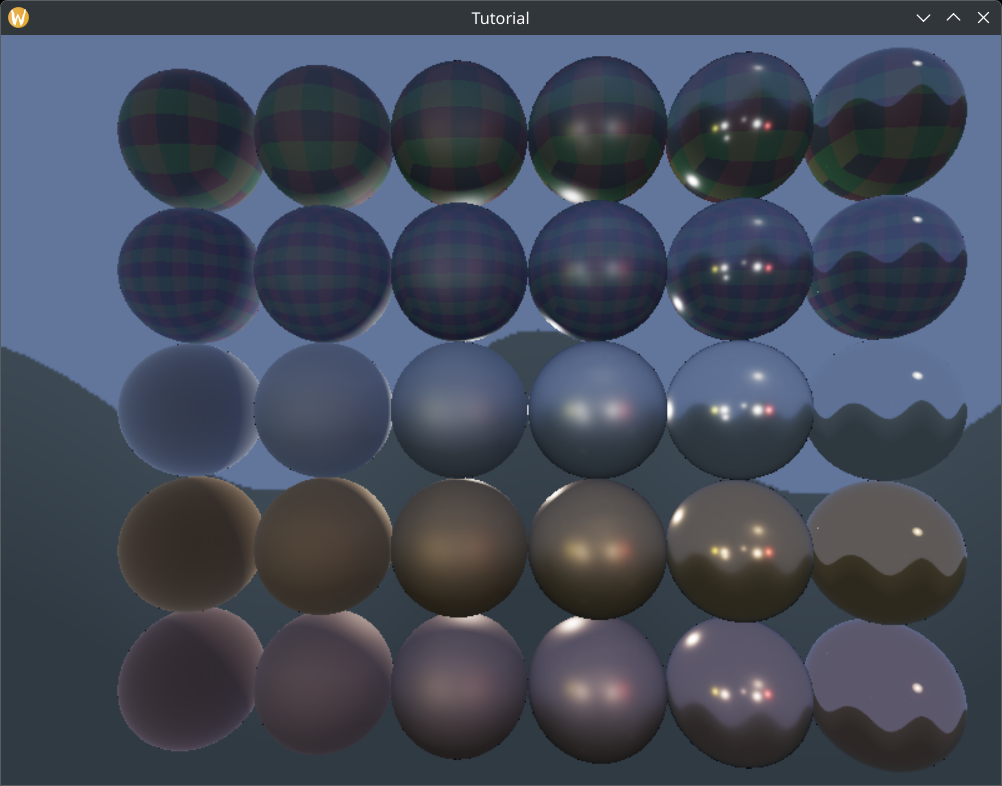
As we can see, rough surfaces become blurry, because they reflect light from many different directions. More blurry reflections can be stored in lower resolution images, because they do not have high frequency changes that require more dense sampling.
We can take advantage of mipmapping, a feature that allows storing the progressively downscaled versions of an image, and smoothly transitioning between them during sampling. During image creation we can specify the number of mip levels that we want, and later fill it with lower resolution data.
The indirect illumination data for higher roughness values can be stored in lower mip levels, and Vulkan allows us to linearly blend them for roughness values in-between.
In the following sections we are going to simplify the newly added indirect illumination integral until it can be performed on a computer and its partial results can be stored in 2D images and cube images. In this tutorial we will have a single light probe, but much of the theory works for many light probes so it is phrased as if there were multiple light probes.
Monte Carlo integration
Solving an integral analytically is not something computers are capable of, at least not with the kind of function that is inside the rendering equation, so numerical analysis comes to the rescue. We can approximate the integral of the indirect illumination using Monte Carlo integration.
Integrating a function over a domain can be approximated with the following formula:
Where is a probability density
function, is an integer number and for every integer
This formula works best when the probability density function gives high probability to the parts of the function where there is high frequency change and the sample points also cluster around these parts. This way parts with high frequency changes can be sampled and averaged accurately, and parts with lower frequency changes can be undersampled.
Let's get a feel for the reasoning behind Monte Carlo integration! Now I'm going to throw around terminology from probability theory. Feel free to learn about it and digest it if things get fuzzy! Let be the function we want to integrate! The integral would look like this:
Let's multiply and divide it with a function! Let's call this function ! This does not alter the integral's value as long as the function does not do exotic things.
If this function is a probability density function, then this formula can be interpreted as the expectance value of the function.
Applying an approximation from mathematical statistics, if we take samples according to the density function p, the expectance value can be approximated with the average of the function evaluated at the sample points.
The resulting formula is our numerical method. It's a simple sum, we can choose and will be whatever that is inside the indirect illumination integral. A simple sum with two function that we can evaluate can be implemented on today's computers. When applying this method to the indirect illumination integral, we get the formulae present in the Unreal Engine 4 doc and the Frostbite doc.
We aren't quite there yet, because is still unspecified. The Frostbite doc chooses this to be a function of the NDF function:
Now the integral sign is gone and what remains is a simple sum that is computable.
Now let's work on it a bit so we can evaluate it and store it in images! Images can be 2D images, cube images, 3D images, image arrays, etc. and the thing they have in common is that they cannot be addressed by a vector of arbitrary dimensions, only 2D vectors, 3D vectors, etc., so they can only store sample points of 2D, 3D, etc. functions. What we have in the integral is way more than that, so we either have to approximate to get rid of variables, or try to split it into partial results and store those in images. Let's see what steps can be taken!
Removing view dependency
In general reflections depend on two parameters: a view direction and a normal vector. Calculating a direction of reflection is a function of both parameters.
The Frostbite doc in section 4.9.1.2 removes view dependency as an approximation. Let's assume that the camera direction points towards the normal vector. This leads to a huge flaw in our integration especially when the angle between the view direction and the normal vector is large.
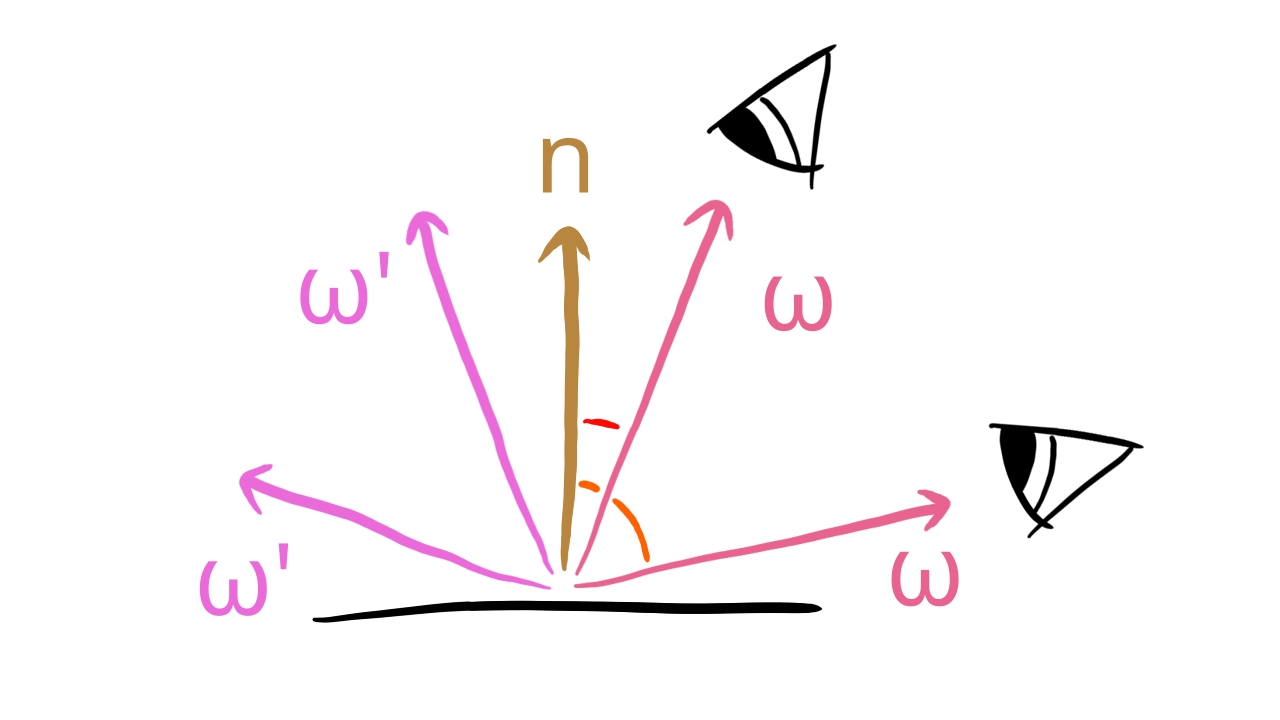
The benefit is the removal of view dependence, reducing the amount of variables inside the integral.
Now let's see what we can do about the remaining variables!
Split sum approximation
We still have problems with storing the results in textures. The integral depends on the x, y and z coordinates of the normal vector, and the value of the BRDF depends on the roughness and the nomal vector. Cube images can map data to a direction and a mip level, and 2D images can map data to a 2D vector and a direction. We still need to work on the formula to store results in images.
Let's find the next opportunity for simplification by plugging the Cook-Torrance BRDF into the formula!
Since we assume that the normal vectors, the half vectors and the direction vectors are unit length, the dot product in the divisor will be equal to the cosine in the divident, and they will cancel out.
Then let's plug the probability function derived from the NDF into the equation!
The constant and the NDF will cancel out.
Now we have the BRDF and the incoming light multiplied together inside the sum. Here comes the approximation: let's integrate the incoming light from different directions and the BRDF value from different directions, and let's multiply them together!
This changes the previous Monte Carlo integral into two integrals: one for the light dependent LD term and one for the material data, normal and view direction dependent DFG term. The individual partial results can finally be stored in textures. The individual terms' formula is below.
The LD term is the preintegrated light contribution in a given point for every direction, and it can be stored in a cubemap. For increasing roughness the cubemap contents become more blurry, so they can be stored in a mipmapped cubemap's lower resoultion mip levels. Notice that the new LD term is weighed by the dot product between the sample direction and the normal vector. If you are curious, find the relevant chapters in the Frostbite doc and the Unreal Engine 4 doc for details.
The DFG term depends on the , the roughness and the dot product of the normal vector and the view vector. Both the Frostbite doc and the Unreal Engine 4 doc works on this formula a bit, and the can be factored out of the integral, leaving only the roughness and the dot product of the normal vector and the view vector. The steps are the following:
Let's substitute the Schlick approximation into the equation!
Let's relabel two subexpression in the above equation!
With these variables the above equation looks like this:
Now let's rearrange the equation a bit:
Simply reordering the last part will be the following:
Now the term falls into two sums and only the first one contains . The last step is the following:
Now the two sums only depend on the roughness and the dot product between the normal and the view vector. These are two scalar values, and the result of these two sums can be stored in two components of a 2D texture.
Only the LD term is dependent on the lighting condition, so that's the only thing we need to calculate and store in a cube image for every light probe. (These are also called pre filtered environment cubemaps.) The DFG term can be computed once and reused for every light probe.
Conceptually the technique is about creating cubemaps for selected points in space, integrate the LD term, the preintegrated incoming radiance arriving at this point, and use it as indirect illumination data in the vicinity of the selected point. In this tutorial we will have a single cubemap for a single point, the incoming radiance is the radiance coming from the skydome, and this data will be used to calculate indirect illumination everywhere on the scene.
Now that we rearranged and approximated our formula until the results can be stored in images, we need to do one final thing that is necessary for a Monte Carlo integration: we need to generate sample directions.
Generating sample directions
Monte Carlo integration requires sample points, so it's time to discuss how to generate pseudorandom directions to use as light directions and calculate their half vectors. These directions need to be more spread out for more rough materials. The basic idea is to generate a set of random 2 dimensional float vectors, then use these as parameters to generate vectors within a cone, and use the roughness parameter to widen this cone. Then transform these directions into the coordinate system of the surface element!
Hammersley sets
First let's generate a set of 2 dimensional float vectors! This is where Low Discrepancy Sequences come in handy. The Unreal Engine 4 doc used the Hammersley set, so this is what we are going with.
Let the number of samples be ! The th sample point will be generated the following way:
- The coordinate will be .
- The coordinate will be the Van der Corput inverse of .
The basic idea of the Van der Corput inverse is:
- Let's write down our number in base !
- Let's mirror this number to the decimal dot!
We can express this with a formula. Let be a positive integer number that is written down in base like this:
It's Van der Corput inverse is given by this formula:
Our choice for base will be , so we take the binary number, and mirror it to the decimal dot, getting a number less than one.
Generating sample directions
Now that we have a random 2D point set, we want to turn these into directions around a normal vector that can be more spread out based on the roughness of the material. This can be achieved using a following formula from the Unreal Engine 4 doc. The basic idea is to generate half vectors in a cone around the normal vector. The larger the roughness is, the wider the cone gets. For the Hammersley set element corresponding to the given sample point the sample half vector is given by the following formula.
This formula gives us half vectors in the local coordinate system of the surface element. We need to transform it to the coordinate system of the surface element!
As we have already discussed in the 3D chapter, transforming a coordinate vector can be done by transforming the base vectors and taking their linear combination with the coordinate vector's coordinates. Let's define the local coordinate system's vectors to be the orthonormal unit vectors! We want the vector to be transformed to the normal vector, and we want to transform the other two into an orthogonal pair of unit vectors in the plane perpendicular to the normal vector. We can do that by defining an UP vector as , or if this is parallel to the normal, then , and get two orthogonal vectors in the said plane by taking some cross products. These will be the surface tangents for a surface element with the given normal. We can define these as the transformed and vectors. The transformed vectors will be the following:
- The transformed vector will be the tangent vector given by the cross product of the normal vector and the up vector.
- The transformed vector will be the tangent vector given by the cross product of the normal vector and the tangent x vector.
- The transformed vector will be the normal vector.
We can use this coordinate system to transform our half vectors into the cone surrounding the normal vector.
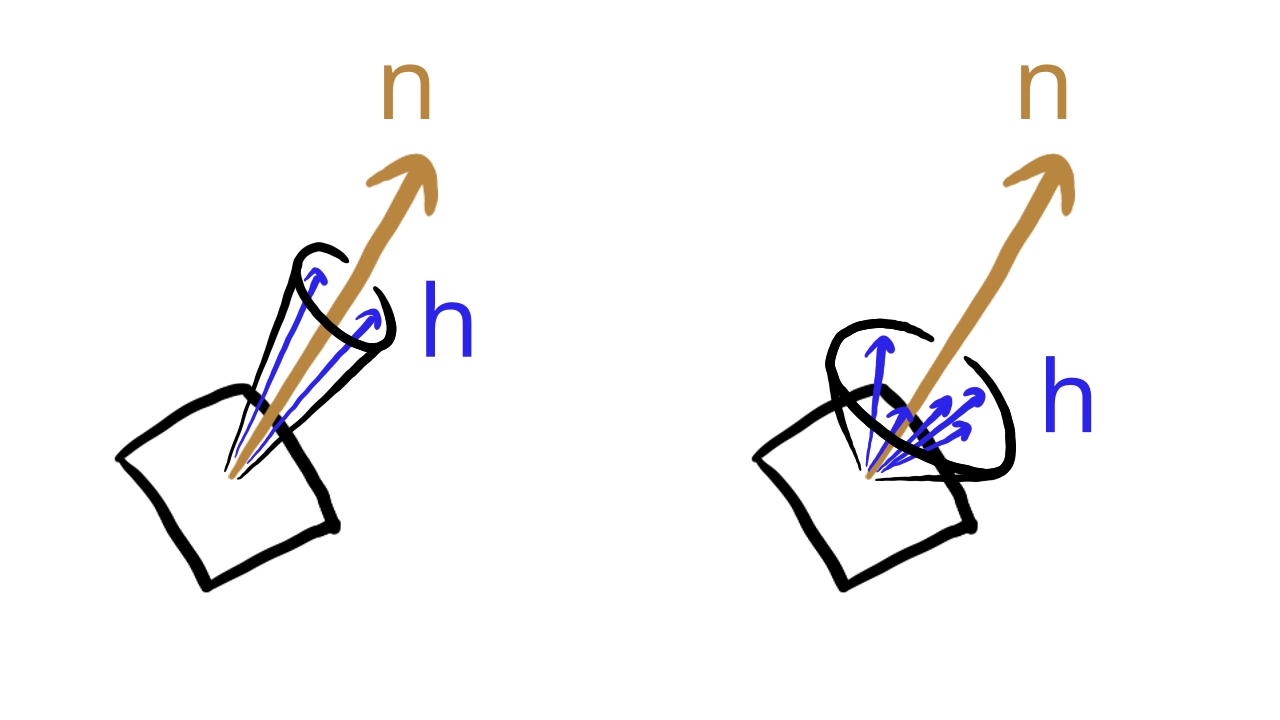
Now we have sample directions around the normal vector in the right coordinate system. We can plug these both into the LD and the DFG generation integrals.
Putting it all together
Now that we have covered everything piece by piece, let's assemble the pieces into an indirect illumination technique!
At the beginnig of the chapter we put a rendering equation for indirect illumination back into the integral. The problem is that computers cannot solve it, so we tried to find some numerical solution. This lead us to Monte Carlo integration.
We wrote down the equation to numerically solve the new integral using Monte Carlo integration. We acquired a sum instead of the integral, which can at least be implemented on a computer. Then we took our BRDF and a probability function based on our NDF and plugged it into the equation. This gave us opportunities to rearrange the Monte Carlo integral and perform some approximations to find partial results that can be precomputed and stored in images. We had the term for preintegrating material specific data and storing it in a 2D image, and an term for preintegrating lighting specific data and storing it in a cube image.
Then we found the last missing puzzle piece for a Monte Carlo integral: pseudorandom directions. We generalted low discrepancy sequences to generate 2D vectors, and calculated 3D direction vectors around a cone. Then we transformed the new direction vectors into the normal vector's frame of reference, and we can use these as half vectors within a microfacet. For every half vector there will be an exact matching light direction in the mirror direction, so now we have sample directions for the Monte Carlo integral.
We already have a cubemap that contains incoming radiance from every direction: the skydome. In this tutorial the single LD cubemap will contain the preintegrated radiance coming from the sky, and we will calculate indirect illumination for every point in space based on this LD cubemap.
The whole process requires the following steps:
-
We will preintegrate the term and store it in a 2D image.
- We generate random half vectors with Hammersley sets and the cone formula.
- We plug these half vectors into the sum of the term and calculate the integral for many view angles and roughness values.
- This can be represented as the sample points of a 2D function of the view angle and roughness value, and can be stored in a 2D image.
- With a sampler configured for linear interpolation, we can read a value for any roughness and view angle.
-
We will preintegrate the term for many roughness values and store the result in a mipmapped cube image.
- We generate random half vectors with Hammersley sets and the cone formula.
- We plug these half vectors into the sum of the term and calculate the integral for many view directions and roughness values. We remove view dependence and assume that the view direction and the normal point the same way, so this can be interpreted as a function of a direction vector and a roughness value.
- We integrate the radiance coming from the skydome.
- This can be stored in a mipmapped cube image. For the same roughness value the integral for every direction can be stored in the same mipmap level. For increasing roughness the integral will be more blurry and can be stored in lower resolution mip levels.
- With a sampler configured for linear interpolation, we can read a value for any roughness and view direction. intermediate roughness values will be interpolated between mip levels.
- During rendering we will read the and term for a given view direction, roughness and normal vector, and calculate the indirect illumination based on these partial results.
Now we can start coding.
General purpose GPU computing
In our triangle tutorial we familiarized ourselves with the graphics pipeline that contains a series of fixed function and programmable steps to process geometry and get it onto the screen. Since this process requires running programs for massive amounts of data, it is backed by hardware which contains hundreds or thousands of programmable processing units and task specific fixed function hardware. People started to take advantage of this hardware for non "vertex processing - rasterization - fragment processing" types of work, such as machine learning and numerical analysis and it proved suitable, giving rise to GPGPU. All of this is good news, because so far we have formulated a kind of work that involves numerical analysis and we may have hope that we can run it on the GPU.
In the old days such work was done using the graphics pipeline by for instance, drawing a full screen quad and performing general purpose computation in the fragment shader and storing the results in a render target for later readback.
Nowadays graphics hardware and graphics APIs offer specialized functions for GPGPU called Compute shaders.
In this talk (with timestamp) Lou Kramer compares using the graphics pipeline for image downscaling and using compute shaders.
Compute shaders
In Vulkan compute shaders are shaders that follow a different model than the "vertex processing - rasterization - fragment processing" model of the graphics pipeline. It does not have attributes, vertex output parameters, etc. Instead when a compute shader is launched, every shader invocation gets an id, and can read and write buffers and textures bound using descriptor sets. Based on the invocation id, every invocation can read and write a specific subset of the bound buffers and images.
An adjusted version of an example compute shader stolen from learnopengl.com can be seen below.
#version 460 core

layout (local_size_x = 1, local_size_y = 1, local_size_z = 1) in;

layout (rgba32f, set = 0, binding = 0) uniform image2D imgOutput;

void main() {
    vec4 value = vec4(0.0, 0.0, 0.0, 1.0);
    ivec2 texelCoord = ivec2(gl_GlobalInvocationID.xy);

    value.x = float(texelCoord.x)/(gl_NumWorkGroups.x);
    value.y = float(texelCoord.y)/(gl_NumWorkGroups.y);

    imageStore(imgOutput, texelCoord, value);
}
As you can see, there are no attribute variables, no interpolated values, no color attachments, only uniform variables
backed by descriptors. Some types of resources bound by a descriptor set can be written by a shader, and in the given
example, the invocation id stored in the gl_GlobalInvocationID can be used to address parts of the resource
you want to write to.
The programmable processing units of a GPU are arranged in larger units containing registers, ALU, cache, and other hardware. On AMD GCN these unit are called Compute Units, on NVidia hardware they are called Streaming Multiprocessors. These units are capable of executing multiple shader invocations in parallel. Groups of invocations scheduled to the same unit have opportunity to communicate efficiently, and the programming model of Compute Shaders expresses this with workgroups.
Workgroups are groups of invocations within a compute shader dispatch that are scheduled onto the same compute unit/streaming multiprocessor. They can share data in shared memory and in other advanced ways.
A well written compute shader will run many threads within a work group. In the example shader above, which is not a well
written compute shader, this can be seen at the line
layout (local_size_x = 1, local_size_y = 1, local_size_z = 1) in;. The size of a work group is defined by
the variables local_size_x, local_size_y and local_size_z, which are kind of the
3D dimensions of the workgroup thread count. If you multiply them together, you get the amount of threads within a work
group, which in this case will be 1. Running one thread per threadgroup is terrible for hardware utilization, and we will
not do this, but it seems it can still serve as a shader example.
The compute shader defines how many threads will be in a work group, and our application will record compute dispatch
commandy in a command buffer that will specify how many work groups to launch, and this is also specified with three
integers serving as kind of 3D parameters for the workgroup count analogously to the workgroup thread count. Then based
on the workgroup count and the workgroup's thread count there will be vector identifiers available from the shader like
gl_GlobalInvocationID, which can be used to identify every running thread in a compute dispatch and can be
used to identify parts of the resources the shader reads or writes. These identifiers are vectors, and their values are
dependent on the local size dimensions and the compute dispatch dimensions. You'll see examples as you write more
complicated shaders in this tutorial.
This summary of high level concepts of compute shaders are enough. Let's deepen our knowledge by implementing the LD and DFG preintegration using compute shaders.
Writing compute shaders
Now that we wrapped our head around the necessary concepts, it's time to write compute shaders. Let's create a directory
for it called compute_shaders in our shader_src directory!
┣━ Cargo.toml
┣━ build_tools
┣━ shader_src
┃  ┣━ compute_shaders
┃  ┣━ vertex_shaders
┃  ┗━ fragment_shaders
┣━ vk_bindings
┃  ┣━ Cargo.toml
┃  ┣━ build.rs
┃  ┗━ src
┃     ┗━ lib.rs
┗━ vk_tutorial
   ┣━ Cargo.toml
   ┗━ src
      ┗━ main.rs
We are going to write two compute shaders: one for the LD preintegration and one for the DFG preintegration.
Both shaders will use the Van der Corput inverse GLSL implementation stolen from
learnopengl. (There the function name is
RadicalInverse_VdC)
float van_der_corput_inverse(uint bits)
{
    bits = (bits << 16u) | (bits >> 16u);
    bits = ((bits & 0x55555555u) << 1u) | ((bits & 0xAAAAAAAAu) >> 1u);
    bits = ((bits & 0x33333333u) << 2u) | ((bits & 0xCCCCCCCCu) >> 2u);
    bits = ((bits & 0x0F0F0F0Fu) << 4u) | ((bits & 0xF0F0F0F0u) >> 4u);
    bits = ((bits & 0x00FF00FFu) << 8u) | ((bits & 0xFF00FF00u) >> 8u);
    return float(bits) * 2.3283064365386963e-10; // / 0x100000000
}
Writing the LD preintegration shader
Let's start writing the LD preintegration shader! For every pixel of a given mip level we want to determine the corresponding view direction and roughness. Then for the given radiance cubemap (in this case the skydome) we want to plug this view direction, roughness and radiance cubemap into the LD preintegration formula, execute it and store the result in the corresponding pixel within the mip level.
#version 460

layout(local_size_x = 8, local_size_y = 8) in;

const uint ENV_MAP_MAX_MIP_LVL_COUNT = 8;

layout(set = 0, binding = 0) uniform samplerCube input_image;
layout(set = 0, binding = 1, rgba32f) writeonly uniform imageCube output_image[ENV_MAP_MAX_MIP_LVL_COUNT];

layout(push_constant) uniform MipLevel {
    uint mip_level;
    float roughness;
} push_const_data;

vec3 pos_x_pos_y_pos_z = vec3(1.0, 1.0, 1.0);
vec3 pos_x_pos_y_neg_z = vec3(1.0, 1.0, -1.0);
vec3 pos_x_neg_y_pos_z = vec3(1.0, -1.0, 1.0);
vec3 pos_x_neg_y_neg_z = vec3(1.0, -1.0, -1.0);

vec3 neg_x_pos_y_pos_z = vec3(-1.0, 1.0, 1.0);
vec3 neg_x_pos_y_neg_z = vec3(-1.0, 1.0, -1.0);
vec3 neg_x_neg_y_pos_z = vec3(-1.0, -1.0, 1.0);
vec3 neg_x_neg_y_neg_z = vec3(-1.0, -1.0, -1.0);

vec3 cube_vecs[6][4] = {
    // Pos X
    {
        pos_x_pos_y_pos_z,
        pos_x_pos_y_neg_z,
        pos_x_neg_y_pos_z,
        pos_x_neg_y_neg_z
    },
    // Neg X
    {
        neg_x_pos_y_neg_z,
        neg_x_pos_y_pos_z,
        neg_x_neg_y_neg_z,
        neg_x_neg_y_pos_z
    },
    // Pos Y
    {
        neg_x_pos_y_neg_z,
        pos_x_pos_y_neg_z,
        neg_x_pos_y_pos_z,
        pos_x_pos_y_pos_z
    },
    // Neg Y
    {
        neg_x_neg_y_pos_z,
        pos_x_neg_y_pos_z,
        neg_x_neg_y_neg_z,
        pos_x_neg_y_neg_z
    },
    // Pos Z
    {
        neg_x_pos_y_pos_z,
        pos_x_pos_y_pos_z,
        neg_x_neg_y_pos_z,
        pos_x_neg_y_pos_z
    },
    // Neg Z
    {
        pos_x_pos_y_neg_z,
        neg_x_pos_y_neg_z,
        pos_x_neg_y_neg_z,
        neg_x_neg_y_neg_z
    }
};

vec3 lerp_cube_face(vec3 positions[4], ivec2 texcoord, ivec2 image_size)
{
    float x = float(texcoord.x)/float(image_size.x - 1);
    float y = float(texcoord.y)/float(image_size.y - 1);

    vec3 positions1 = mix(positions[0], positions[1], x);
    vec3 positions2 = mix(positions[2], positions[3], x);

    return mix(positions1, positions2, y);
}

// Common

float PI = 3.14159265;

float van_der_corput_inverse(uint bits)
{
    bits = (bits << 16u) | (bits >> 16u);
    bits = ((bits & 0x55555555u) << 1u) | ((bits & 0xAAAAAAAAu) >> 1u);
    bits = ((bits & 0x33333333u) << 2u) | ((bits & 0xCCCCCCCCu) >> 2u);
    bits = ((bits & 0x0F0F0F0Fu) << 4u) | ((bits & 0xF0F0F0F0u) >> 4u);
    bits = ((bits & 0x00FF00FFu) << 8u) | ((bits & 0xFF00FF00u) >> 8u);
    return float(bits) * 2.3283064365386963e-10; // / 0x100000000
}

vec2 hammersley(uint i, uint N)
{
    return vec2(float(i)/float(N), van_der_corput_inverse(i));
}

vec3 importance_sample_ggx(vec2 sample_vec, float roughness, vec3 normal)
{
    float a = roughness * roughness;

    float phi = 2.0 * PI * sample_vec.x;
    float cos_theta = sqrt((1.0 - sample_vec.y) / (1.0 + (a*a - 1.0) * sample_vec.y));
    float sin_theta = sqrt(1.0 - cos_theta * cos_theta);

    vec3 half_vec_local = vec3(
        sin_theta * cos(phi),
        sin_theta * sin(phi),
        cos_theta
    );

    vec3 up = abs(normal.z) < 0.999 ? vec3(0.0, 0.0, 1.0) : vec3(1.0, 0.0, 0.0);
    vec3 tangent_x = normalize(cross(up, normal));
    vec3 tangent_y = cross(normal, tangent_x);

    return half_vec_local.x * tangent_x + half_vec_local.y * tangent_y + half_vec_local.z * normal;
}

void main()
{
    // Texture params

    ivec2 texcoord = ivec2(gl_GlobalInvocationID.xy);
    ivec2 image_size = ivec2(imageSize(output_image[push_const_data.mip_level]).xy);

    ivec3 texcoord_cube = ivec3(texcoord, gl_GlobalInvocationID.z);

    vec3 normal = lerp_cube_face(cube_vecs[gl_GlobalInvocationID.z], texcoord, image_size);
    vec3 view_vector = normal;

    // Environment map preinteg

    const uint SAMPLE_COUNT = 1024;

    vec3 acc_env = vec3(0.0, 0.0, 0.0);
    float acc_env_weight = 0.0;
    for(int i=0;i < SAMPLE_COUNT; i++)
    {
        vec2 sample_vec = hammersley(i, SAMPLE_COUNT);
        vec3 half_vector = importance_sample_ggx(sample_vec, push_const_data.roughness, normal);
        vec3 light_dir = reflect(-view_vector, half_vector);

        float normal_dot_light = min(1.0, dot(normal, light_dir));

        if(normal_dot_light > 0.0)
        {
            acc_env += texture(input_image, light_dir).rgb * normal_dot_light;
            acc_env_weight += normal_dot_light;
        }
    }

    vec3 final_env = acc_env / acc_env_weight;

    vec4 result = vec4(final_env, 1.0);
    imageStore(output_image[push_const_data.mip_level], texcoord_cube, result);
}
Let's start with the first important line of the compute shader,
layout(local_size_x = 8, local_size_y = 8) in;, which defines the size of the compute shader work group.
Using threads will fill even a GCN Wavefront,
which can contain 64 threads. For this shader I see no point in increasing it any further. This will be ineffective
for the mip levels that are lower resolution than 8x8 but the results will be correct and I will go with simplicity.
You can write a specialized solution for those cases as a homework.
Then let's talk about the bound resources. The varibale input_image is a simple sampled cube image,
the same one that we used in the skydome shader. The important one will be the output_image, which is
not a sampled image. It is a storage image array that performs no interpolation, and its data is identified by integers.
Beyond being a storage image it is also a cube image, and the corresponding type is imageCube.
Notice how we need to specify its format in the layout qualifier as rgba32f and specify that it is write
only using writeonly.
A storage image like this can only refer to a single mip level, and we have more than one, so we turn it into an array,
which will be backed by a descriptor array just like our textures were. Every array element will refer to a mip level.
Finally we create push constant to specify the mip level written by the current shader dispatch and the corresponding
roughness parameter. For this we have the fields mip_level and roughness.
Let's jump to the main function and let's discover the rest of the code from there.
We have a gl_GlobalInvocationID variable giving the current invocation a multidimensional identifier. We
turn this into an identifier thad determines a pixel in the cubemap. The first two component will be used as the pixel
coordinate within a slice, and we store it in the variable texcoord. The third component will be the slice
id determining what face of the cubemap will we write to. We create the variable texcoord_cube as a
convenience that stores all of these parameters. We also store the size of a cubemap slice in the variable
image_size.
Then we determine the normal (and view and reflection vector) corresponding to the cubemap pixel we are currently
processing. We store the vertices of every cubemap image plane in the array cube_vecs. We select the one
that belongs to the current cubemap layer based on the third component of the gl_GlobalInvocationID. Then
we interpolate these vertices based on the texcoord variable in the function lerp_cube_face.
Inside that function we normalize the value of texcoord based on the image dimensions, and use it to lerp
between the four corners of the cube face, using the x component in one direction, and then the y component the other
direction. This will serve as the normal vector, and also due to the removed view dependency as the view vector and the
reflection vector pointing towards the mirror direction.
Then we begin performing the Monte Carlo integration. We iterate over every sample point in a for loop.
For every index we generate the corresponding element of the Hammersley set using the hammersley function.
The first component will be the index divided by the sample count, and the other one will be the Van der Corput inverse
of the index.
Then using the importance_sample_ggx we will generate 3D sample directions inside a cone, and make it more
spread out based on the roughness. Then we transform it into the normal vector's local coordinate system. The exact
formula was already introduced at the beginning.
Finally we use this sample direction as half vector. We use the GLSL function reflect to calculate the
corresponding mirror direction and use it as the light direction. Then we sample the cubemap with this light direction,
and accumulate it in a variable outside the loop, using the dot product of the normal vector and the light direction as
weight. We also accumulate this weight as well.
After the for loop we divide the accumulated incoming radiance with the accumulated weights and store it inside the
cubemap pixel identified by the variable texcoord_cube.
I saved this file as 00_env_preinteg.comp in the newly created compute_shaders directory.
We can compile it.
./build_tools/bin/glslangValidator -V -o ./shaders/00_env_preinteg.comp.spv ./shader_src/compute_shaders/00_env_preinteg.comp
Now it's time for our DFG preintegration!
Writing the DFG integral
The DFG preintegration will use much of the same code as the LD preintegration. The compute shader is the following.
#version 460

layout(local_size_x = 8, local_size_y = 8) in;

layout(set = 0, binding = 0, rg8) writeonly uniform image2D output_image;

float smith_lambda(float roughness, float cos_angle)
{
    float cos_sqr = cos_angle * cos_angle;
    float tan_sqr = (1.0 - cos_sqr)/cos_sqr;

    return (-1.0 + sqrt(1 + roughness * roughness * tan_sqr)) / 2.0;
}

// Common

float PI = 3.14159265;

float van_der_corput_inverse(uint bits)
{
    bits = (bits << 16u) | (bits >> 16u);
    bits = ((bits & 0x55555555u) << 1u) | ((bits & 0xAAAAAAAAu) >> 1u);
    bits = ((bits & 0x33333333u) << 2u) | ((bits & 0xCCCCCCCCu) >> 2u);
    bits = ((bits & 0x0F0F0F0Fu) << 4u) | ((bits & 0xF0F0F0F0u) >> 4u);
    bits = ((bits & 0x00FF00FFu) << 8u) | ((bits & 0xFF00FF00u) >> 8u);
    return float(bits) * 2.3283064365386963e-10; // / 0x100000000
}

vec2 hammersley(uint i, uint N)
{
    return vec2(float(i)/float(N), van_der_corput_inverse(i));
}

vec3 importance_sample_ggx(vec2 sample_vec, float roughness, vec3 normal)
{
    float a = roughness * roughness;

    float phi = 2.0 * PI * sample_vec.x;
    float cos_theta = sqrt((1.0 - sample_vec.y) / (1.0 + (a*a - 1.0) * sample_vec.y));
    float sin_theta = sqrt(1.0 - cos_theta * cos_theta);

    vec3 half_vec_local = vec3(
        sin_theta * cos(phi),
        sin_theta * sin(phi),
        cos_theta
    );

    vec3 up = abs(normal.z) < 0.999 ? vec3(0.0, 0.0, 1.0) : vec3(1.0, 0.0, 0.0);
    vec3 tangent_x = normalize(cross(up, normal));
    vec3 tangent_y = cross(normal, tangent_x);

    return half_vec_local.x * tangent_x + half_vec_local.y * tangent_y + half_vec_local.z * normal;
}

void main()
{
    ivec2 texcoord = ivec2(gl_GlobalInvocationID.xy);
    ivec2 image_size = imageSize(output_image);

    // Create parameters
    float roughness = max(1e-1, float(texcoord.x) / float(image_size.x - 1));
    float camera_dot_normal = max(1e-2, float(texcoord.y) / float(image_size.y - 1));

    vec3 normal = vec3(0.0, 0.0, 1.0);
    vec3 view_vector = vec3(sqrt(1.0 - camera_dot_normal * camera_dot_normal), 0.0, camera_dot_normal);

    // Dfg preinteg
    const uint SAMPLE_COUNT = 1024;

    vec2 acc = vec2(0.0, 0.0);
    for(int i=0;i < SAMPLE_COUNT; i++)
    {
        vec2 sample_vec = hammersley(i, SAMPLE_COUNT);
        vec3 half_vector = importance_sample_ggx(sample_vec, roughness, normal);
        vec3 light_dir = reflect(-view_vector, half_vector);

        float light_dot_normal = max(0.0, min(1.0, dot(light_dir, normal)));
        float light_dot_half = max(0.0, min(1.0, light_dir.z));
        float normal_dot_half = max(0.0, min(1.0, half_vector.z));
        float view_dot_half = max(0.0, min(1.0, dot(view_vector, half_vector)));

        if(light_dot_half > 0.0)
        {
            float G = step(0.0, view_dot_half) * step(0.0, light_dot_half) / (1.0 + smith_lambda(roughness, camera_dot_normal) + smith_lambda(roughness, light_dot_normal));

            float G_vis = view_dot_half * G / (normal_dot_half * camera_dot_normal);
            float Fc = pow(max(0.0, 1.0 - view_dot_half), 5);

            acc.x += (1.0 - Fc) * G_vis;
            acc.y += Fc * G_vis;
        }
    }

    acc = acc / float(SAMPLE_COUNT);

    vec4 result = vec4(acc, 0.0, 1.0);

    imageStore(output_image, texcoord, result);
}
Looking at the layout(local_size_x = 8, local_size_y = 8) in; at the beginning we can see that this shader
also consists of workgroups of 64 threads, just like the LD preintegration. The first difference can be seen on the
resources being used. The DFG term can be represented as a 2D function, so the storage image output_image
is an image2D.
Let's jump to the main function! We derive the destination pixel's coordinates from the gl_GlobalInvocationID
again store it in the variable texcoord, and query the image dimensions. Then if we represent the DFG term as
a 2D function with the roughness and the dot product of the view vector and the normal vector as parameters, we also need
the roughness and the dot product belonging to the current pixel. Since both values fall within the range of
, normalizing the pixel coordinates with the image
dimensions will theoretically suffice. In practice the lower bound for roughness had to be 1e-1 and the
lower bound of the dot product had to be 1e-2, because it lead to GPU dependent artifacts.
Now that we have the input parameters we can start the integration. First we choose the normal vector to point in the direction of the Z axis. Then we choose a view vector in the XZ plane based on the cosine between the normal vector and the view vector. The Z component can be the cosine and the X component will be the sine, which we get using the Pythagorean theorem.
Now we can start the Monte Carlo integral, calculating the DFG term for every sample point and aggregating them.
Calculating the half vector and the light direction is done the same way as we did with the LD term. Then we calculate
all of the dot products the DFG term depends on and calculate the DFG term. The DFG term had two partial results, the
G_vis involving the geometric attenuation, for which we used the Smith visibility function, and the
Fc involving the Fresnel equation. For the Smith visibility function we pull in the Smith lambda and the
visibility function itself. We evaluate it and multiply and divide it with the right dot products, see the formula
at the introduction. Then we evaluate the partial result of the Fresnel equation as well, see the formula at the
introduction. Then we evaluate the formulae inside the two sums and add them to the accumulator variables.
After the loop we divide the accumulator with the sample count and store the result in the output_image
at the pixel location texcoord.
I saved this file as 01_dfg_preinteg.comp.
./build_tools/bin/glslangValidator -V -o ./shaders/01_dfg_preinteg.comp.spv ./shader_src/compute_shaders/01_dfg_preinteg.comp
Now it's time to start writing our application.
Checking max workgroup invocations
The local size of both the LD and DFG preintegration shader is 8x8 = 64. Our application can only run on GPUs that support at least this many invocations per workgroup. Actually GPUs supporting at least 128 invocations per workgroup is guaranteed, but for shaders with larger workgroup local sizes, you want to check support like this:
    //
    // Checking physical device capabilities
    //

    // Getting physical device properties
    let mut phys_device_properties = VkPhysicalDeviceProperties::default();

    // ...

    // Checking physical device limits
    // This one is actually unnecessary, because the minimum will always be at least 128,
    // but for larger workgroups you may want to check this.
    if phys_device_properties.limits.maxComputeWorkGroupInvocations < 64
    {
        panic!("maxComputeWorkGroupInvocations must be at least 64. Actual value: {:?}", phys_device_properties.limits.maxComputeWorkGroupInvocations);
    }
Among the device limits the field maxComputeWorkGroupInvocations holds the upper bound to invocation count
in a workgroup. Now that we know our GPU is capable of running the preintegration shaders, let's load them into shader
modules!
Loading compute shaders
We have two compiled shaders, one for the LD and one for the DFG preintegration. Let's load them!
Loading LD preintegration shader
Let's load the LD preintegration shader like any other shader!
    //
    // Shader modules
    //

    // ...

    // Environment preinteg shader

    let mut file = std::fs::File::open(
        "./shaders/00_env_preinteg.comp.spv"
    ).expect("Could not open shader source");

    let mut bytecode = Vec::new();
    file.read_to_end(&mut bytecode).expect("Failed to read shader source");

    let shader_module_create_info = VkShaderModuleCreateInfo {
        sType: VK_STRUCTURE_TYPE_SHADER_MODULE_CREATE_INFO,
        pNext: std::ptr::null(),
        flags: 0x0,
        codeSize: bytecode.len(),
        pCode: bytecode.as_ptr() as *const u32
    };

    println!("Creating env preinteg shader module.");
    let mut env_preinteg_shader_module = std::ptr::null_mut();
    let result = unsafe
    {
        vkCreateShaderModule(
            device,
            &shader_module_create_info,
            std::ptr::null_mut(),
            &mut env_preinteg_shader_module
        )
    };

    if result != VK_SUCCESS
    {
        panic!("Failed to create env preinteg shader. Error: {}.", result);
    }
Also let's not forget to clean up!
    //
    // Cleanup
    //

    let result = unsafe
    {
        vkDeviceWaitIdle(device)
    };

    // ...

    println!("Deleting env preinteg shader module");
    unsafe
    {
        vkDestroyShaderModule(
            device,
            env_preinteg_shader_module,
            std::ptr::null_mut()
        );
    }
Loading DFG preintegration shader
Now we load the DFG preintegration shader.
    //
    // Shader modules
    //

    // ...

    // Dfg preinteg shader

    let mut file = std::fs::File::open(
        "./shaders/01_dfg_preinteg.comp.spv"
    ).expect("Could not open shader source");

    let mut bytecode = Vec::new();
    file.read_to_end(&mut bytecode).expect("Failed to read shader source");

    let shader_module_create_info = VkShaderModuleCreateInfo {
        sType: VK_STRUCTURE_TYPE_SHADER_MODULE_CREATE_INFO,
        pNext: std::ptr::null(),
        flags: 0x0,
        codeSize: bytecode.len(),
        pCode: bytecode.as_ptr() as *const u32
    };

    println!("Creating dfg preinteg shader module.");
    let mut dfg_preinteg_shader_module = std::ptr::null_mut();
    let result = unsafe
    {
        vkCreateShaderModule(
            device,
            &shader_module_create_info,
            std::ptr::null_mut(),
            &mut dfg_preinteg_shader_module
        )
    };

    if result != VK_SUCCESS
    {
        panic!("Failed to create dfg preinteg shader. Error: {}.", result);
    }
We also clean it up.
    //
    // Cleanup
    //

    let result = unsafe
    {
        vkDeviceWaitIdle(device)
    };

    // ...

    println!("Deleting dfg preinteg shader module");
    unsafe
    {
        vkDestroyShaderModule(
            device,
            dfg_preinteg_shader_module,
            std::ptr::null_mut()
        );
    }
Descriptor set layout
Compute shaders can read and write buffers and images. The LD preintegration shader reads from a sampled cube image and writes to cube image mip layers, and the DFG preintegration shader writes to a 2D image. These must be bound by a descriptor set, just like when we use a graphics pipeline.
LD preintegration descriptor set layout
We need to sample the skydome cube image and we need to write to cube image mip layers. We already know how to bind a sampled cube image from the previous chapter. As for the destination image, these are represented by a different descriptor type, and in the compute shader we used a uniform array to hold every mip level, and these are backed by a descriptor array.
    //
    // Descriptor set layout
    //

    // ...

    // Environment map preintegration

    const MAX_ENV_MIP_LVL_COUNT: usize = 8;

    let compute_layout_bindings = [
        VkDescriptorSetLayoutBinding {
            binding: 0,
            descriptorType: VK_DESCRIPTOR_TYPE_COMBINED_IMAGE_SAMPLER,
            descriptorCount: 1,
            stageFlags: VK_SHADER_STAGE_COMPUTE_BIT as VkShaderStageFlags,
            pImmutableSamplers: std::ptr::null()
        },
        VkDescriptorSetLayoutBinding {
            binding: 1,
            descriptorType: VK_DESCRIPTOR_TYPE_STORAGE_IMAGE,
            descriptorCount: MAX_ENV_MIP_LVL_COUNT as u32,
            stageFlags: VK_SHADER_STAGE_COMPUTE_BIT as VkShaderStageFlags,
            pImmutableSamplers: std::ptr::null()
        }
    ];

    let descriptor_set_layout_create_info = VkDescriptorSetLayoutCreateInfo {
        sType: VK_STRUCTURE_TYPE_DESCRIPTOR_SET_LAYOUT_CREATE_INFO,
        pNext: std::ptr::null(),
        flags: 0x0,
        bindingCount: compute_layout_bindings.len() as u32,
        pBindings: compute_layout_bindings.as_ptr()
    };

    println!("Creating env preinteg descriptor set layout.");
    let mut env_preinteg_descriptor_set_layout = std::ptr::null_mut();
    let result = unsafe
    {
        vkCreateDescriptorSetLayout(
            device,
            &descriptor_set_layout_create_info,
            std::ptr::null_mut(),
            &mut env_preinteg_descriptor_set_layout
        )
    };

    if result != VK_SUCCESS
    {
        panic!("Failed to create env preinteg descriptor set layout. Error: {}.", result);
    }
The skydome image will be referred to by a single VK_DESCRIPTOR_TYPE_COMBINED_IMAGE_SAMPLER at binding
0. The storage images on the other hand will be represented by a new descriptor type,
VK_DESCRIPTOR_TYPE_STORAGE_IMAGE. We will create environment cube images with
MAX_ENV_MIP_LVL_COUNT mip levels, which will be 8, so we will need at least this many
descriptors in the descriptor array.
We pass this to the create function and we have the descriptor set layout.
At the end we clean up the new descriptor set layout.
    //
    // Cleanup
    //

    let result = unsafe
    {
        vkDeviceWaitIdle(device)
    };

    // ...

    println!("Deleting env preinteg descriptor set layout");
    unsafe
    {
        vkDestroyDescriptorSetLayout(
            device,
            env_preinteg_descriptor_set_layout,
            core::ptr::null_mut()
        );
    }
DFG preintegration descriptor set layout
The DFG preintegration will write to a single 2D image. Here are the bindings for it:
    //
    // Descriptor set layout
    //

    // ...

    // Dfg preintegration

    let compute_layout_bindings = [
        VkDescriptorSetLayoutBinding {
            binding: 0,
            descriptorType: VK_DESCRIPTOR_TYPE_STORAGE_IMAGE,
            descriptorCount: 1,
            stageFlags: VK_SHADER_STAGE_COMPUTE_BIT as VkShaderStageFlags,
            pImmutableSamplers: std::ptr::null()
        }
    ];

    let descriptor_set_layout_create_info = VkDescriptorSetLayoutCreateInfo {
        sType: VK_STRUCTURE_TYPE_DESCRIPTOR_SET_LAYOUT_CREATE_INFO,
        pNext: std::ptr::null(),
        flags: 0x0,
        bindingCount: compute_layout_bindings.len() as u32,
        pBindings: compute_layout_bindings.as_ptr()
    };

    println!("Creating dfg preinteg descriptor set layout.");
    let mut dfg_preinteg_descriptor_set_layout = std::ptr::null_mut();
    let result = unsafe
    {
        vkCreateDescriptorSetLayout(
            device,
            &descriptor_set_layout_create_info,
            std::ptr::null_mut(),
            &mut dfg_preinteg_descriptor_set_layout
        )
    };

    if result != VK_SUCCESS
    {
        panic!("Failed to create dfg preinteg descriptor set layout. Error: {}.", result);
    }
This one can be represented by a single VK_DESCRIPTOR_TYPE_STORAGE_IMAGE descriptor at binding
0.
At the end we clean this one up as well.
    //
    // Cleanup
    //

    let result = unsafe
    {
        vkDeviceWaitIdle(device)
    };

    // ...

    println!("Deleting dfg preinteg descriptor set layout");
    unsafe
    {
        vkDestroyDescriptorSetLayout(
            device,
            dfg_preinteg_descriptor_set_layout,
            core::ptr::null_mut()
        );
    }
Pipeline layout
Like vertex and fragment shaders, compute shaders can access buffers and images bound by descriptor sets and they have push constant data as well. Like graphics pipelnies, compute pipelines specify their descriptor sets and push constants with pipeline layouts. Here we create pipeline layouts for our LD and DFG preintegration pipeline layouts.
LD preintegration pipeline layout
First we create the LD preinteg pipeline layout. The shader expects a descriptor set layout for the source cube image and the destination cube mip levels, and a push constant region backing the currently written mip level and the corresponding roughness value.
    //
    // Pipeline layout
    //

    // ...

    // Environment preintegration

    let descriptor_set_layouts = [
        env_preinteg_descriptor_set_layout
    ];

    // Mip level + roughness
    let env_compute_push_constant_size = (std::mem::size_of::<u32>() + std::mem::size_of::<f32>()) as u32;

    let push_constant_ranges = [
        VkPushConstantRange {
            stageFlags: VK_SHADER_STAGE_COMPUTE_BIT as VkShaderStageFlags,
            offset: 0,
            size: env_compute_push_constant_size
        }
    ];

    let compute_pipeline_layout_create_info = VkPipelineLayoutCreateInfo {
        sType: VK_STRUCTURE_TYPE_PIPELINE_LAYOUT_CREATE_INFO,
        pNext: std::ptr::null(),
        flags: 0x0,
        setLayoutCount: descriptor_set_layouts.len() as u32,
        pSetLayouts: descriptor_set_layouts.as_ptr(),
        pushConstantRangeCount: push_constant_ranges.len() as u32,
        pPushConstantRanges: push_constant_ranges.as_ptr()
    };

    println!("Creating env preinteg pipeline layout.");
    let mut env_compute_pipeline_layout = std::ptr::null_mut();
    let result = unsafe
    {
        vkCreatePipelineLayout(
            device,
            &compute_pipeline_layout_create_info,
            std::ptr::null_mut(),
            &mut env_compute_pipeline_layout
        )
    };

    if result != VK_SUCCESS
    {
        panic!("Failed to create env preinteg pipeline layout. Error: {}.", result);
    }
The descriptor_set_layouts array contains a single descriptor set layout, the
env_preinteg_descriptor_set_layout. The push constant range for the compute shader will have the
stageFlags set to VK_SHADER_STAGE_COMPUTE_BIT, the offset will be 0
and the size will be std::mem::size_of::<u32>() + std::mem::size_of::<f32>(), making room for
a 32 bit mip level index and a 32 bit float roughness value.
At the end of the program we clean it up.
    //
    // Cleanup
    //

    let result = unsafe
    {
        vkDeviceWaitIdle(device)
    };

    // ...

    println!("Deleting env preinteg pipeline layout");
    unsafe
    {
        vkDestroyPipelineLayout(
            device,
            env_compute_pipeline_layout,
            core::ptr::null_mut()
        );
    }
Now we can create the DFG pipeline layout.
DFG preintegration pipeline layout
The DFG pipeline layout will be a bit simpler, because it only takes an output image descriptor bound by a descriptor set.
    //
    // Pipeline layout
    //

    // ...

    // Dfg preintegration

    let descriptor_set_layouts = [
        dfg_preinteg_descriptor_set_layout
    ];

    let compute_pipeline_layout_create_info = VkPipelineLayoutCreateInfo {
        sType: VK_STRUCTURE_TYPE_PIPELINE_LAYOUT_CREATE_INFO,
        pNext: std::ptr::null(),
        flags: 0x0,
        setLayoutCount: descriptor_set_layouts.len() as u32,
        pSetLayouts: descriptor_set_layouts.as_ptr(),
        pushConstantRangeCount: 0,
        pPushConstantRanges: std::ptr::null_mut()
    };

    println!("Creating dfg preinteg pipeline layout.");
    let mut dfg_compute_pipeline_layout = std::ptr::null_mut();
    let result = unsafe
    {
        vkCreatePipelineLayout(
            device,
            &compute_pipeline_layout_create_info,
            std::ptr::null_mut(),
            &mut dfg_compute_pipeline_layout
        )
    };

    if result != VK_SUCCESS
    {
        panic!("Failed to create dfg preinteg pipeline layout. Error: {}.", result);
    }
The descriptor_set_layouts array contains the dfg_preinteg_descriptor_set_layout and nothing
else is needed, creation is simple.
At the end of the program we clean this up as well.
    //
    // Cleanup
    //

    let result = unsafe
    {
        vkDeviceWaitIdle(device)
    };

    // ...

    println!("Deleting dfg preinteg pipeline layout");
    unsafe
    {
        vkDestroyPipelineLayout(
            device,
            dfg_compute_pipeline_layout,
            core::ptr::null_mut()
        );
    }
Compute pipelines
Compute shaders are bound using a Vulkan pipeline. In the hardcoded triangle chapter we defined pipelines generally, mentioning that there are special kinds of pipelines such as graphics pipelines.
Compute pipelines - like graphics pipelines - are special pipelines as well, but this one does not have fixed function pipeline steps, only a shader, the compute shader, and a pipeline layout, so it is much simpler and easier to create. Below we create both the LD and the DFG preintegration pipelines.
    //
    // Pipeline state
    //

    // ...

    // Compute pipelines

    let compute_pipeline_create_infos = [
        VkComputePipelineCreateInfo {
            sType: VK_STRUCTURE_TYPE_COMPUTE_PIPELINE_CREATE_INFO,
            pNext: std::ptr::null(),
            flags: 0x0,
            stage: VkPipelineShaderStageCreateInfo {
                sType: VK_STRUCTURE_TYPE_PIPELINE_SHADER_STAGE_CREATE_INFO,
                pNext: std::ptr::null(),
                flags: 0x0,
                pSpecializationInfo: std::ptr::null(),
                stage: VK_SHADER_STAGE_COMPUTE_BIT,
                module: env_preinteg_shader_module,
                pName: b"main\0".as_ptr() as *const i8
            },
            layout: env_compute_pipeline_layout,
            basePipelineHandle: std::ptr::null_mut(),
            basePipelineIndex: -1
        },
        VkComputePipelineCreateInfo {
            sType: VK_STRUCTURE_TYPE_COMPUTE_PIPELINE_CREATE_INFO,
            pNext: std::ptr::null(),
            flags: 0x0,
            stage: VkPipelineShaderStageCreateInfo {
                sType: VK_STRUCTURE_TYPE_PIPELINE_SHADER_STAGE_CREATE_INFO,
                pNext: std::ptr::null(),
                flags: 0x0,
                pSpecializationInfo: std::ptr::null(),
                stage: VK_SHADER_STAGE_COMPUTE_BIT,
                module: dfg_preinteg_shader_module,
                pName: b"main\0".as_ptr() as *const i8
            },
            layout: dfg_compute_pipeline_layout,
            basePipelineHandle: std::ptr::null_mut(),
            basePipelineIndex: -1
        }
    ];

    println!("Creating compute pipelines.");
    let mut compute_pipelines = [std::ptr::null_mut(); 2];
    let result = unsafe
    {
        vkCreateComputePipelines(
            device,
            std::ptr::null_mut(),
            compute_pipeline_create_infos.len() as u32,
            compute_pipeline_create_infos.as_ptr(),
            std::ptr::null_mut(),
            compute_pipelines.as_mut_ptr()
        )
    };

    if result != VK_SUCCESS
    {
        panic!("Failed to create compute pipelines. Error: {}.", result);
    }

    let env_compute_pipeline = compute_pipelines[0];
    let dfg_compute_pipeline = compute_pipelines[1];
A compute pipeline's parameters are specified by a VkComputePipelineCreateInfo struct. The important fields
that we fill with useful data are the stage and layout.
The stage field is a VkPipelineShaderStageCreateInfo struct, which is filled the same way as it
was for the graphics pipelines, just the stage field is set to VK_SHADER_STAGE_COMPUTE_BIT.
The layout field is a pointer to the pipeline layout for the compute pipeline.
Just like graphics pipelines, compute pipelines can be bulk created. They are created with a call to
vkCreateComputePipelines, which can take an array of VkComputePipelineCreateInfo and write the
new pipelines to a VkPipeline array. The first element of the pipeline create info array is the LD
preintegration pipeline, having its shader module set to env_preinteg_shader_module and its pipeline layout
set to env_compute_pipeline_layout. The second element is for the DFG preintegration pipeline, analogously
its shader module set to dfg_preinteg_shader_module and its pipeline layout set to
dfg_compute_pipeline_layout. The created pipelines are written to compute_pipelines, and then
its elements are assigned to env_compute_pipeline and dfg_compute_pipeline.
These pipelines need to be cleaned up at the end of the program.
    //
    // Cleanup
    //

    let result = unsafe
    {
        vkDeviceWaitIdle(device)
    };

    // ...

    println!("Deleting dfg preinteg pipeline");
    unsafe
    {
        vkDestroyPipeline(
            device,
            dfg_compute_pipeline,
            core::ptr::null_mut()
        );
    }

    println!("Deleting env preinteg pipeline");
    unsafe
    {
        vkDestroyPipeline(
            device,
            env_compute_pipeline,
            core::ptr::null_mut()
        );
    }
Since the newly created compute pipelines are different kinds of pipelines than the already existing graphics pipelines, we should add just one comment for code organization purposes to separate them.
    //
    // Pipeline state
    //

    // Graphics pipelines

    // ...
There. Before graphics pipeline creation we prepended a comment.
Also since our compute pipelines are differentiated in name, let's rename our graphics pipeline array as well just for clarity. It won't affect behavior.
    //
    // Pipeline state
    //

    // ...

    println!("Creating graphics pipelines.");
    let mut graphics_pipelines = [std::ptr::null_mut(); 2];
    let result = unsafe
    {
        vkCreateGraphicsPipelines(
            device,
            core::ptr::null_mut(),
            pipeline_create_infos.len() as u32,
            pipeline_create_infos.as_ptr(),
            core::ptr::null_mut(),
            graphics_pipelines.as_mut_ptr()
        )
    };

    if result != VK_SUCCESS
    {
        panic!("Failed to create graphics pipelines. Error: {}", result);
    }

    let model_pipeline = graphics_pipelines[0];
    let skydome_pipeline = graphics_pipelines[1];
Now we need to create the DFG and LD images.
Image creation
Now it's time to create our DFG image and our LD preintegrated environment map.
Let's start with preparing our metadata! We need a width, a height and a format. Since for previous images we have that
in the Image data and Cube data parts in the code, we add them there.
First let's add the DFG image metadata!
    //
    // Image data
    //

    // ...

    let dfg_img_width = 128;
    let dfg_img_height = 128;
    let dfg_image_format = VK_FORMAT_R8G8_UNORM;
I chose the DFG image resolution to be 128x128.
The part that is out of the ordinary is the format VK_FORMAT_R8G8_UNORM. It only has two color component.
Since for every pixel we store only two partial result, there is no point in a format that has more color channels.
Then let's add the environment map metadata!
    //
    // Cube data
    //

    let env_img_width = 128;
    let env_img_height = 128;
I chose the environment image resolution to be 128x128 as well. For the format we'll just reuse our
cube_image_format variable, because it would be just float RGBA anyway, unlike the DFG, which is only two
component. This format served us for the skydome for storing radiance, so we'll go with it.
DFG image
Now we start creating the DFG image. The creation is the same as any other 2D image.
    //
    // DFG image
    //

    let mut format_properties = VkFormatProperties::default();
    unsafe
    {
        vkGetPhysicalDeviceFormatProperties(
            chosen_phys_device,
            dfg_image_format,
            &mut format_properties
        );
    }

    if format_properties.optimalTilingFeatures & VK_FORMAT_FEATURE_SAMPLED_IMAGE_BIT as VkFormatFeatureFlags == 0
    {
        panic!("Image format VK_FORMAT_R8G8_UNORM with VK_IMAGE_TILING_OPTIMAL does not support usage flags VK_FORMAT_FEATURE_SAMPLED_IMAGE_BIT.");
    }

    if format_properties.optimalTilingFeatures & VK_FORMAT_FEATURE_STORAGE_IMAGE_BIT as VkFormatFeatureFlags == 0
    {
        panic!("Image format VK_FORMAT_R8G8_UNORM with VK_IMAGE_TILING_OPTIMAL does not support usage flags VK_FORMAT_FEATURE_STORAGE_IMAGE_BIT.");
    }

    let image_create_info = VkImageCreateInfo {
        sType: VK_STRUCTURE_TYPE_IMAGE_CREATE_INFO,
        pNext: std::ptr::null(),
        flags: 0x0,
        imageType: VK_IMAGE_TYPE_2D,
        format: dfg_image_format,
        extent: VkExtent3D {
            width: dfg_img_width as u32,
            height: dfg_img_height as u32,
            depth: 1
        },
        mipLevels: 1,
        arrayLayers: 1,
        samples: VK_SAMPLE_COUNT_1_BIT,
        tiling: VK_IMAGE_TILING_OPTIMAL,
        usage: (VK_IMAGE_USAGE_SAMPLED_BIT |
                VK_IMAGE_USAGE_STORAGE_BIT) as VkImageUsageFlags,
        sharingMode: VK_SHARING_MODE_EXCLUSIVE,
        queueFamilyIndexCount: 0,
        pQueueFamilyIndices: std::ptr::null(),
        initialLayout: VK_IMAGE_LAYOUT_UNDEFINED
    };

    println!("Creating dfg image.");
    let mut dfg_image = std::ptr::null_mut();
    let result = unsafe
    {
        vkCreateImage(
            device,
            &image_create_info,
            std::ptr::null_mut(),
            &mut dfg_image
        )
    };

    if result != VK_SUCCESS
    {
        panic!("Failed to create dfg image. Error: {}", result);
    }

    let mut mem_requirements = VkMemoryRequirements::default();
    unsafe
    {
        vkGetImageMemoryRequirements(
            device,
            dfg_image,
            &mut mem_requirements
        );
    }

    let type_filter = mem_requirements.memoryTypeBits;

    let mut chosen_memory_type = phys_device_mem_properties.memoryTypeCount;
    for i in 0..phys_device_mem_properties.memoryTypeCount
    {
        if type_filter & (1 << i) != 0 &&
            (phys_device_mem_properties.memoryTypes[i as usize].propertyFlags & image_mem_props) == image_mem_props
        {
            chosen_memory_type = i;
            break;
        }
    }

    if chosen_memory_type == phys_device_mem_properties.memoryTypeCount
    {
        panic!("Could not find memory type.");
    }

    let image_alloc_info = VkMemoryAllocateInfo {
        sType: VK_STRUCTURE_TYPE_MEMORY_ALLOCATE_INFO,
        pNext: std::ptr::null(),
        allocationSize: mem_requirements.size,
        memoryTypeIndex: chosen_memory_type
    };

    println!("Dfg image size: {}", mem_requirements.size);
    println!("Dfg image align: {}", mem_requirements.alignment);

    println!("Allocating dfg image memory");
    let mut dfg_image_memory = std::ptr::null_mut();
    let result = unsafe
    {
        vkAllocateMemory(
            device,
            &image_alloc_info,
            std::ptr::null(),
            &mut dfg_image_memory
        )
    };

    if result != VK_SUCCESS
    {
        panic!("Could not allocate memory. Error: {}", result);
    }

    let result = unsafe
    {
        vkBindImageMemory(
            device,
            dfg_image,
            dfg_image_memory,
            0
        )
    };

    if result != VK_SUCCESS
    {
        panic!("Failed to bind memory to dfg image. Error: {}", result);
    }

    //
    // DFG image view
    //

    let image_view_create_info = VkImageViewCreateInfo {
        sType: VK_STRUCTURE_TYPE_IMAGE_VIEW_CREATE_INFO,
        pNext: std::ptr::null(),
        flags: 0x0,
        image: dfg_image,
        viewType: VK_IMAGE_VIEW_TYPE_2D,
        format: dfg_image_format,
        components: VkComponentMapping {
            r: VK_COMPONENT_SWIZZLE_IDENTITY,
            g: VK_COMPONENT_SWIZZLE_IDENTITY,
            b: VK_COMPONENT_SWIZZLE_IDENTITY,
            a: VK_COMPONENT_SWIZZLE_IDENTITY
        },
        subresourceRange: VkImageSubresourceRange {
            aspectMask: VK_IMAGE_ASPECT_COLOR_BIT as VkImageAspectFlags,
            baseMipLevel: 0,
            levelCount: 1,
            baseArrayLayer: 0,
            layerCount: 1
        }
    };

    println!("Creating dfg image view.");
    let mut dfg_image_view = std::ptr::null_mut();
    let result = unsafe
    {
        vkCreateImageView(
            device,
            &image_view_create_info,
            std::ptr::null_mut(),
            &mut dfg_image_view
        )
    };

    if result != VK_SUCCESS
    {
        panic!("Failed to create image view. Error: {}", result);
    }
At the end of the program we clean this up.
    //
    // Cleanup
    //

    let result = unsafe
    {
        vkDeviceWaitIdle(device)
    };

    // ...

    println!("Deleting dfg image view");
    unsafe
    {
        vkDestroyImageView(
            device,
            dfg_image_view,
            std::ptr::null_mut()
        );
    }

    println!("Deleting dfg image device memory");
    unsafe
    {
        vkFreeMemory(
            device,
            dfg_image_memory,
            std::ptr::null_mut()
        );
    }

    println!("Deleting dfg image");
    unsafe
    {
        vkDestroyImage(
            device,
            dfg_image,
            std::ptr::null_mut()
        );
    }
Now let's create our environment maps!
LD environment image
The environment map creation is a bit different than a standard cubemap creation, because this time we create mip levels. Let's remember that the preintegrated environment map for higher roughness values gets blurry, and using lower resolution images saves memory. There is a Vulkan feature for creating an image that does not only create storage for the full resolution image, but progressively downscaled versions as well, and this is mipmapping. If we create a cube image with mipmapping, we can store the high roughness preintegrated environment maps in lower mip levels, and Vulkan can even interpolate between them for roughness values in-between. The image creation code is below.
    //
    // Environment texture
    //

    let mut format_properties = VkFormatProperties::default();
    unsafe
    {
        vkGetPhysicalDeviceFormatProperties(
            chosen_phys_device,
            cube_image_format,
            &mut format_properties
        );
    }

    if format_properties.optimalTilingFeatures & VK_FORMAT_FEATURE_SAMPLED_IMAGE_BIT as VkFormatFeatureFlags == 0
    {
        panic!("Image format VK_FORMAT_R32G32B32A32_SFLOAT with VK_IMAGE_TILING_OPTIMAL does not support usage flags VK_FORMAT_FEATURE_SAMPLED_IMAGE_BIT.");
    }

    if format_properties.optimalTilingFeatures & VK_FORMAT_FEATURE_STORAGE_IMAGE_BIT as VkFormatFeatureFlags == 0
    {
        panic!("Image format VK_FORMAT_R32G32B32A32_SFLOAT with VK_IMAGE_TILING_OPTIMAL does not support usage flags VK_FORMAT_FEATURE_STORAGE_IMAGE_BIT.");
    }

    let image_create_info = VkImageCreateInfo {
        sType: VK_STRUCTURE_TYPE_IMAGE_CREATE_INFO,
        pNext: std::ptr::null(),
        flags: VK_IMAGE_CREATE_CUBE_COMPATIBLE_BIT as VkImageCreateFlags,
        imageType: VK_IMAGE_TYPE_2D,
        format: cube_image_format,
        extent: VkExtent3D {
            width: env_img_width as u32,
            height: env_img_height as u32,
            depth: 1
        },
        mipLevels: MAX_ENV_MIP_LVL_COUNT as u32,
        arrayLayers: 6,
        samples: VK_SAMPLE_COUNT_1_BIT,
        tiling: VK_IMAGE_TILING_OPTIMAL,
        usage: (VK_IMAGE_USAGE_SAMPLED_BIT |
                VK_IMAGE_USAGE_STORAGE_BIT) as VkImageUsageFlags,
        sharingMode: VK_SHARING_MODE_EXCLUSIVE,
        queueFamilyIndexCount: 0,
        pQueueFamilyIndices: std::ptr::null(),
        initialLayout: VK_IMAGE_LAYOUT_UNDEFINED
    };

    println!("Creating environment image.");
    let mut env_image = std::ptr::null_mut();
    let result = unsafe
    {
        vkCreateImage(
            device,
            &image_create_info,
            std::ptr::null_mut(),
            &mut env_image
        )
    };

    if result != VK_SUCCESS
    {
        panic!("Failed to create environment image. Error: {}", result);
    }

    let mut mem_requirements = VkMemoryRequirements::default();
    unsafe
    {
        vkGetImageMemoryRequirements(
            device,
            env_image,
            &mut mem_requirements
        );
    }

    let mut chosen_memory_type = phys_device_mem_properties.memoryTypeCount;
    for i in 0..phys_device_mem_properties.memoryTypeCount
    {
        if type_filter & (1 << i) != 0 &&
            (phys_device_mem_properties.memoryTypes[i as usize].propertyFlags & image_mem_props) == image_mem_props
        {
            chosen_memory_type = i;
            break;
        }
    }

    if chosen_memory_type == phys_device_mem_properties.memoryTypeCount
    {
        panic!("Could not find memory type.");
    }

    let image_alloc_info = VkMemoryAllocateInfo {
        sType: VK_STRUCTURE_TYPE_MEMORY_ALLOCATE_INFO,
        pNext: std::ptr::null(),
        allocationSize: mem_requirements.size,
        memoryTypeIndex: chosen_memory_type
    };

    println!("Environment image size: {}", mem_requirements.size);
    println!("Environment image align: {}", mem_requirements.alignment);

    println!("Allocating environment image memory");
    let mut env_image_memory = std::ptr::null_mut();
    let result = unsafe
    {
        vkAllocateMemory(
            device,
            &image_alloc_info,
            std::ptr::null(),
            &mut env_image_memory
        )
    };

    if result != VK_SUCCESS
    {
        panic!("Could not allocate memory. Error: {}", result);
    }

    let result = unsafe
    {
        vkBindImageMemory(
            device,
            env_image,
            env_image_memory,
            0
        )
    };

    if result != VK_SUCCESS
    {
        panic!("Failed to bind memory to environment image. Error: {}", result);
    }

    //
    // Environment image view
    //

    // Read view

    let image_view_create_info = VkImageViewCreateInfo {
        sType: VK_STRUCTURE_TYPE_IMAGE_VIEW_CREATE_INFO,
        pNext: std::ptr::null(),
        flags: 0x0,
        image: env_image,
        viewType: VK_IMAGE_VIEW_TYPE_CUBE,
        format: cube_image_format,
        components: VkComponentMapping {
            r: VK_COMPONENT_SWIZZLE_IDENTITY,
            g: VK_COMPONENT_SWIZZLE_IDENTITY,
            b: VK_COMPONENT_SWIZZLE_IDENTITY,
            a: VK_COMPONENT_SWIZZLE_IDENTITY
        },
        subresourceRange: VkImageSubresourceRange {
            aspectMask: VK_IMAGE_ASPECT_COLOR_BIT as VkImageAspectFlags,
            baseMipLevel: 0,
            levelCount: MAX_ENV_MIP_LVL_COUNT as u32,
            baseArrayLayer: 0,
            layerCount: 6
        }
    };

    println!("Creating environment image view.");
    let mut env_image_view = std::ptr::null_mut();
    let result = unsafe
    {
        vkCreateImageView(
            device,
            &image_view_create_info,
            std::ptr::null_mut(),
            &mut env_image_view
        )
    };

    if result != VK_SUCCESS
    {
        panic!("Failed to create environment image view. Error: {}", result);
    }

    // ...
This image creation is almost the same as the cube image creation code from before. We take the width, the height and the format, and create six array layers. Allocate memory, bind it and create an image view.
The difference is the creation and usage of mip levels. In the VkImageCreateInfo struct there is a field
mipLevels which is set to MAX_ENV_MIP_LVL_COUNT. For a 128x128 image this will create lower
resolution images as well, such as 64x64, 32x32 and so on. We can store the incoming radiance for high roughness in
these.
The image view that we will use for reading must be adjusted as well. In the VkImageSubresourceRange struct
there is a field levelCount that is now set to MAX_ENV_MIP_LVL_COUNT. Now it represents the
mip levels as well, and shaders can sample from them as well.
Let's remember that the compute shader that we created writes only to a single mip level, and different mip levels are stored in a uniform array. We will back it with a descriptor array, and for that we will need an image view for every mip level.
    //
    // Environment image view
    //

    // ...

    // Write views

    let mut env_image_write_views = [std::ptr::null_mut(); MAX_ENV_MIP_LVL_COUNT];
    for i in 0..MAX_ENV_MIP_LVL_COUNT
    {
        let image_view_create_info = VkImageViewCreateInfo {
            sType: VK_STRUCTURE_TYPE_IMAGE_VIEW_CREATE_INFO,
            pNext: std::ptr::null(),
            flags: 0x0,
            image: env_image,
            viewType: VK_IMAGE_VIEW_TYPE_CUBE,
            format: cube_image_format,
            components: VkComponentMapping {
                r: VK_COMPONENT_SWIZZLE_IDENTITY,
                g: VK_COMPONENT_SWIZZLE_IDENTITY,
                b: VK_COMPONENT_SWIZZLE_IDENTITY,
                a: VK_COMPONENT_SWIZZLE_IDENTITY
            },
            subresourceRange: VkImageSubresourceRange {
                aspectMask: VK_IMAGE_ASPECT_COLOR_BIT as VkImageAspectFlags,
                baseMipLevel: i as u32,
                levelCount: 1,
                baseArrayLayer: 0,
                layerCount: 6
            }
        };

        println!("Creating environment image view.");
        let mut env_image_write_view = std::ptr::null_mut();
        let result = unsafe
        {
            vkCreateImageView(
                device,
                &image_view_create_info,
                std::ptr::null_mut(),
                &mut env_image_write_view
            )
        };

        if result != VK_SUCCESS
        {
            panic!("Failed to create environment image view. Error: {}", result);
        }

        env_image_write_views[i] = env_image_write_view;
    }
We create an array of image views. The mip level is determined by the baseMipLevel and
levelCount fields of the VkImageSubresourceRange. This time the base mip level is the index
in the for loop, and the mip level count is one. The baseArrayLayer is still 0 and the
layerCount is still 6, so it represents every face of the cube image for a given mip level.
This is how we get an image view for every mip level.
At the end of the program let's destroy every image view and the environment map.
    //
    // Cleanup
    //

    let result = unsafe
    {
        vkDeviceWaitIdle(device)
    };

    // ...

    for env_image_write_view in env_image_write_views
    {
        println!("Deleting environment write image view");
        unsafe
        {
            vkDestroyImageView(
                device,
                env_image_write_view,
                std::ptr::null_mut()
            );
        }
    }

    println!("Deleting environment image view");
    unsafe
    {
        vkDestroyImageView(
            device,
            env_image_view,
            std::ptr::null_mut()
        );
    }

    println!("Deleting environment image device memory");
    unsafe
    {
        vkFreeMemory(
            device,
            env_image_memory,
            std::ptr::null_mut()
        );
    }

    println!("Deleting environment image");
    unsafe
    {
        vkDestroyImage(
            device,
            env_image,
            std::ptr::null_mut()
        );
    }
Compute dispatch
Before the main loop we perform the preintegrations.
The steps we need will be the following:
-
We need to create descriptor sets.
- For the DFG preintegration we need one that binds the DFG texture.
- For the LD preintegration we need one that binds every mip level of our environment map for writing, and the skydome for sampling.
- We need to create a command pool and a command buffer
-
Then we need to record the commands.
-
We need to record the LD preintegration.
- We need to bind the descriptor set for LD preintegration.
- We also need to bind the LD pipeline.
- Then we issue the compute dispatches for every mip level of the environment texture.
-
We need to record the DFG preintegration.
- We need to bind the DFG descriptor set
- We also need to bind the DFG pipeline
- Then we issue the compute dispatch for the DFG preintegration
-
- After command recording we submit the command buffer.
- Finally we clean up.
The logic will be similar to the one we wrote for the transfer command buffer. Let's get started!
    //
    // Preintegration
    //

    {
        // ...
    }
Let's create the descriptor pool and allocate the LD and DFG descriptor sets!
    //
    // Preintegration
    //

    {
        //
        // Preinteg descriptor pool & descriptor set
        //

        let sampler_descriptor_size = [
            VkDescriptorPoolSize {
                type_: VK_DESCRIPTOR_TYPE_COMBINED_IMAGE_SAMPLER,
                descriptorCount: 1
            },
            VkDescriptorPoolSize {
                type_: VK_DESCRIPTOR_TYPE_STORAGE_IMAGE,
                descriptorCount: 1 + MAX_ENV_MIP_LVL_COUNT as u32
            }
        ];

        let descriptor_pool_create_info = VkDescriptorPoolCreateInfo {
            sType: VK_STRUCTURE_TYPE_DESCRIPTOR_POOL_CREATE_INFO,
            pNext: std::ptr::null(),
            flags: 0x0,
            maxSets: 2,
            poolSizeCount: sampler_descriptor_size.len() as u32,
            pPoolSizes: sampler_descriptor_size.as_ptr()
        };

        println!("Creating preinteg descriptor pool.");
        let mut descriptor_pool = std::ptr::null_mut();
        let result = unsafe
        {
            vkCreateDescriptorPool(
                device,
                &descriptor_pool_create_info,
                std::ptr::null_mut(),
                &mut descriptor_pool
            )
        };

        if result != VK_SUCCESS
        {
            panic!("Failed to create preinteg descriptor pool. Error: {}", result);
        }

        let descriptor_set_layouts = [
            env_preinteg_descriptor_set_layout,
            dfg_preinteg_descriptor_set_layout
        ];

        let descriptor_set_alloc_info = VkDescriptorSetAllocateInfo {
            sType: VK_STRUCTURE_TYPE_DESCRIPTOR_SET_ALLOCATE_INFO,
            pNext: std::ptr::null(),
            descriptorPool: descriptor_pool,
            descriptorSetCount: descriptor_set_layouts.len() as u32,
            pSetLayouts: descriptor_set_layouts.as_ptr()
        };

        println!("Allocating preinteg descriptor sets.");
        let mut compute_descriptor_sets = [std::ptr::null_mut(); 2];
        let result = unsafe
        {
            vkAllocateDescriptorSets(
                device,
                &descriptor_set_alloc_info,
                compute_descriptor_sets.as_mut_ptr()
            )
        };

        if result != VK_SUCCESS
        {
            panic!("Failed to allocate preinteg descriptor sets. Error: {}", result);
        }

        let env_preinteg_descriptor_set = compute_descriptor_sets[0];
        let dfg_preinteg_descriptor_set = compute_descriptor_sets[1];

        // ...
    }
Let's clean it up after submission and waiting for the compute shaders to finish!
    //
    // Preintegration
    //

    {
        // ...

        //
        // Cleanup
        //

        println!("Deleting preinteg descriptor pool.");
        unsafe
        {
            vkDestroyDescriptorPool(
                device,
                descriptor_pool,
                std::ptr::null_mut()
            );
        }
    }
Let's write to the descriptor sets!
    //
    // Preintegration
    //

    {
        //
        // Preinteg descriptor pool & descriptor set
        //

        // ...

        // Writing descriptor set.

        let sampler_descriptor_info_input = [
            VkDescriptorImageInfo {
                sampler: cube_sampler,
                imageView: skydome_image_view,
                imageLayout: VK_IMAGE_LAYOUT_SHADER_READ_ONLY_OPTIMAL
            }
        ];

        let mut storage_img_info_env_outputs = Vec::with_capacity(MAX_ENV_MIP_LVL_COUNT as usize);

        for i in 0..MAX_ENV_MIP_LVL_COUNT
        {
            let descriptor_info = VkDescriptorImageInfo {
                sampler: std::ptr::null_mut(),
                imageView: env_image_write_views[i],
                imageLayout: VK_IMAGE_LAYOUT_GENERAL
            };
            storage_img_info_env_outputs.push(descriptor_info);
        }

        let storage_img_info_dfg_output = [
            VkDescriptorImageInfo {
                sampler: std::ptr::null_mut(),
                imageView: dfg_image_view,
                imageLayout: VK_IMAGE_LAYOUT_GENERAL
            }
        ];

        let descriptor_set_writes = [
            VkWriteDescriptorSet {
                sType: VK_STRUCTURE_TYPE_WRITE_DESCRIPTOR_SET,
                pNext: std::ptr::null(),
                dstSet: env_preinteg_descriptor_set,
                dstBinding: 0,
                dstArrayElement: 0,
                descriptorCount: sampler_descriptor_info_input.len() as u32,
                descriptorType: VK_DESCRIPTOR_TYPE_COMBINED_IMAGE_SAMPLER,
                pImageInfo: sampler_descriptor_info_input.as_ptr(),
                pBufferInfo: std::ptr::null(),
                pTexelBufferView: std::ptr::null()
            },
            VkWriteDescriptorSet {
                sType: VK_STRUCTURE_TYPE_WRITE_DESCRIPTOR_SET,
                pNext: std::ptr::null(),
                dstSet: env_preinteg_descriptor_set,
                dstBinding: 1,
                dstArrayElement: 0,
                descriptorCount: storage_img_info_env_outputs.len() as u32,
                descriptorType: VK_DESCRIPTOR_TYPE_STORAGE_IMAGE,
                pImageInfo: storage_img_info_env_outputs.as_ptr(),
                pBufferInfo: std::ptr::null(),
                pTexelBufferView: std::ptr::null()
            },
            VkWriteDescriptorSet {
                sType: VK_STRUCTURE_TYPE_WRITE_DESCRIPTOR_SET,
                pNext: std::ptr::null(),
                dstSet: dfg_preinteg_descriptor_set,
                dstBinding: 0,
                dstArrayElement: 0,
                descriptorCount: storage_img_info_dfg_output.len() as u32,
                descriptorType: VK_DESCRIPTOR_TYPE_STORAGE_IMAGE,
                pImageInfo: storage_img_info_dfg_output.as_ptr(),
                pBufferInfo: std::ptr::null(),
                pTexelBufferView: std::ptr::null()
            }
        ];

        println!("Updating env preinteg descriptor sets.");
        unsafe
        {
            vkUpdateDescriptorSets(
                device,
                descriptor_set_writes.len() as u32,
                descriptor_set_writes.as_ptr(),
                0,
                std::ptr::null()
            );
        }

        // ...
    }
The first write is the skydome, which is a standard VK_DESCRIPTOR_TYPE_COMBINED_IMAGE_SAMPLER write.
Then we fill the descriptors for the LD output images. We iterate over every environment image view that we created for
writing to selected mip levels and create a descriptor write for it.
This one will be a storage image, so it needs a different descriptor type, VK_DESCRIPTOR_TYPE_STORAGE_IMAGE.
This one does not take a sampler, because you cannot index between pixels so there is no room for interpolation. The
sampler field is set to std::ptr::null_mut(). When you want to write to a storage image from
a shader, the imageLayout you want is VK_IMAGE_LAYOUT_GENERAL.
Finally we create a descriptor write for the DFG output image. This one will be a
VK_DESCRIPTOR_TYPE_STORAGE_IMAGE descriptor as well and filling it is analogous to the LD output image
descriptors.
Once all of these are done we issue the descriptor write. Notice how a single descriptor write can take care of writing
to many descriptor sets! The write of the skydome and the environment image mip levels have their
dstSet specified to be env_preinteg_descriptor_set, while the DFG output image descriptor write
has its dstSet specified to be dfg_preinteg_descriptor_set. The single write call will write
to them all. Keep this usage in mind! It may come in handy if you need to bulk write many descriptor sets.
Now that the descriptor sets are created and written, let's create a command pool and a command buffer!
    //
    // Preintegration
    //

    {
        // ...

        //
        // Preinteg command pool
        //

        let cmd_pool_create_info = VkCommandPoolCreateInfo {
            sType: VK_STRUCTURE_TYPE_COMMAND_POOL_CREATE_INFO,
            pNext: core::ptr::null(),
            flags: 0x0,
            queueFamilyIndex: chosen_graphics_queue_family
        };

        println!("Creating preinteg command pool.");
        let mut cmd_pool = core::ptr::null_mut();
        let result = unsafe
        {
            vkCreateCommandPool(
                device,
                &cmd_pool_create_info,
                core::ptr::null_mut(),
                &mut cmd_pool
            )
        };

        if result != VK_SUCCESS
        {
            panic!("Failed to create preinteg command pool. Error: {}.", result);
        }

        println!("Allocating preinteg command buffers.");
        let cmd_buffer_alloc_info = VkCommandBufferAllocateInfo {
            sType: VK_STRUCTURE_TYPE_COMMAND_BUFFER_ALLOCATE_INFO,
            pNext: core::ptr::null(),
            commandPool: cmd_pool,
            level: VK_COMMAND_BUFFER_LEVEL_PRIMARY,
            commandBufferCount: 1
        };

        let mut preinteg_cmd_buffer = core::ptr::null_mut();
        let result = unsafe
        {
            vkAllocateCommandBuffers(
                device,
                &cmd_buffer_alloc_info,
                &mut preinteg_cmd_buffer
            )
        };

        if result != VK_SUCCESS
        {
            panic!("Failed to create preinteg command buffer. Error: {}.", result);
        }

        // ...
    }
After submission and waiting let's clean it up!
    //
    // Preintegration
    //

    {
        // ...

        //
        // Cleanup
        //

        println!("Deleting preinteg command pool.");
        unsafe
        {
            vkDestroyCommandPool(
                device,
                cmd_pool,
                core::ptr::null_mut()
            );
        }

        // ...
    }
Then let's begin recording the command buffer!
    //
    // Preintegration
    //

    {
        // ...

        let cmd_buffer_begin_info = VkCommandBufferBeginInfo {
            sType: VK_STRUCTURE_TYPE_COMMAND_BUFFER_BEGIN_INFO,
            pNext: core::ptr::null(),
            flags: VK_COMMAND_BUFFER_USAGE_ONE_TIME_SUBMIT_BIT as VkCommandBufferUsageFlags,
            pInheritanceInfo: core::ptr::null()
        };

        let result = unsafe
        {
            vkBeginCommandBuffer(
                preinteg_cmd_buffer,
                &cmd_buffer_begin_info
            )
        };

        if result != VK_SUCCESS
        {
            panic!("Failed to start recording the comand buffer. Error: {}.", result);
        }

        // ...
    }
Since our descriptors are configured to assume that the image will be in the layout VK_IMAGE_LAYOUT_GENERAL,
let's transition the environment map and the DFG image to it!
    //
    // Preintegration
    //

    {
        // ...

        //
        // DFG and Env map preinteg
        //

        let general_barriers = [
            VkImageMemoryBarrier {
                sType: VK_STRUCTURE_TYPE_IMAGE_MEMORY_BARRIER,
                pNext: std::ptr::null(),
                srcAccessMask: 0x0 as VkAccessFlags,
                dstAccessMask: VK_ACCESS_SHADER_WRITE_BIT as VkAccessFlags,
                oldLayout: VK_IMAGE_LAYOUT_UNDEFINED,
                newLayout: VK_IMAGE_LAYOUT_GENERAL,
                srcQueueFamilyIndex: VK_QUEUE_FAMILY_IGNORED as u32,
                dstQueueFamilyIndex: VK_QUEUE_FAMILY_IGNORED as u32,
                image: env_image,
                subresourceRange: VkImageSubresourceRange {
                    aspectMask: VK_IMAGE_ASPECT_COLOR_BIT as VkImageAspectFlags,
                    baseMipLevel: 0,
                    levelCount: MAX_ENV_MIP_LVL_COUNT as u32,
                    baseArrayLayer: 0,
                    layerCount: 6
                }
            },
            VkImageMemoryBarrier {
                sType: VK_STRUCTURE_TYPE_IMAGE_MEMORY_BARRIER,
                pNext: std::ptr::null(),
                srcAccessMask: 0x0 as VkAccessFlags,
                dstAccessMask: VK_ACCESS_SHADER_WRITE_BIT as VkAccessFlags,
                oldLayout: VK_IMAGE_LAYOUT_UNDEFINED,
                newLayout: VK_IMAGE_LAYOUT_GENERAL,
                srcQueueFamilyIndex: VK_QUEUE_FAMILY_IGNORED as u32,
                dstQueueFamilyIndex: VK_QUEUE_FAMILY_IGNORED as u32,
                image: dfg_image,
                subresourceRange: VkImageSubresourceRange {
                    aspectMask: VK_IMAGE_ASPECT_COLOR_BIT as VkImageAspectFlags,
                    baseMipLevel: 0,
                    levelCount: 1,
                    baseArrayLayer: 0,
                    layerCount: 1
                }
            }
        ];

        unsafe
        {
            vkCmdPipelineBarrier(
                preinteg_cmd_buffer,
                VK_PIPELINE_STAGE_TOP_OF_PIPE_BIT as VkPipelineStageFlags,
                VK_PIPELINE_STAGE_COMPUTE_SHADER_BIT as VkPipelineStageFlags,
                0,
                0,
                std::ptr::null(),
                0,
                std::ptr::null(),
                general_barriers.len() as u32,
                general_barriers.as_ptr()
            );
        }

        // ...
    }
Then we dispatch the LD preintegration.
    //
    // Preintegration
    //

    {
        // ...

        //
        // DFG and Env map preinteg
        //

        // ...

        unsafe
        {
            vkCmdBindDescriptorSets(
                preinteg_cmd_buffer,
                VK_PIPELINE_BIND_POINT_COMPUTE,
                env_compute_pipeline_layout,
                0,
                1,
                &env_preinteg_descriptor_set,
                0,
                std::ptr::null()
            );
        }

        unsafe
        {
            vkCmdBindPipeline(
                preinteg_cmd_buffer,
                VK_PIPELINE_BIND_POINT_COMPUTE,
                env_compute_pipeline
            );
        }

        let mut divisor = 1;
        for i in 0..MAX_ENV_MIP_LVL_COUNT
        {
            let mip_level = i as u32;
            let roughness = i as f32 * (1.0 / (MAX_ENV_MIP_LVL_COUNT - 1) as f32);

            unsafe
            {
                vkCmdPushConstants(
                    preinteg_cmd_buffer,
                    env_compute_pipeline_layout,
                    VK_SHADER_STAGE_COMPUTE_BIT as VkShaderStageFlags,
                    0,
                    1 * std::mem::size_of::<u32>() as u32,
                    &mip_level as *const u32 as *const std::ffi::c_void
                );
            }

            unsafe
            {
                vkCmdPushConstants(
                    preinteg_cmd_buffer,
                    env_compute_pipeline_layout,
                    VK_SHADER_STAGE_COMPUTE_BIT as VkShaderStageFlags,
                    1 * std::mem::size_of::<u32>() as u32,
                    1 * std::mem::size_of::<f32>() as u32,
                    &roughness as *const f32 as *const std::ffi::c_void
                );
            }

            let mip_lvl_width = env_img_width / divisor;
            let mip_lvl_height = env_img_height / divisor;

            let workgroup_x = if mip_lvl_width % 8 == 0  {mip_lvl_width/8}  else {mip_lvl_width/8 + 1};
            let workgroup_y = if mip_lvl_height % 8 == 0 {mip_lvl_height/8} else {mip_lvl_height/8 + 1};

            unsafe
            {
                vkCmdDispatch(
                    preinteg_cmd_buffer,
                    workgroup_x as u32,
                    workgroup_y as u32,
                    6
                );
            }

            divisor *= 2;
        }

        // ...
    }
First we bind the descriptor set and the pipeline, and then we start a for loop. We will launch a dispatch for every mip level. In the for loop we go over every mip level, determine the push constant values and the workgroup size and then launch the dispatch.
First we upload the mip level index and the corresponding roughness value as a push constand. Then we start figuring out the workgroup size.
The LD preintegration shader needs a thread launched for every pixel, so we need to figure out the dimensions of the mip
level. The first mip layer must have 128x128 threads running for every cube face. The second mip layer must have 64x64
threads per cube face, etc. Basically as we launch dispatch for lower resolution mip levels, we need to divide the image
resolution of the previous mip level by two. For this we set up a divisor before the for loop. At the end we
multiply this by 2. This way in every iteration we divide with the right power of two to get the right mip level
resolution.
Now that we have the resolution, we need to calculate the right workgroup count. In our shader we set the local size to 8x8, so we should conceptualize that every work group will process a 8x8 block of an image. To launch the right amount of workgroups to process every pixel of the image we need to divide the resolution by 8 to get the workgroup count along that axis.
We make our code a little bit more robust by handling the case when the image size is not an integer multiple of 8, then we launch one more dispatch along that axis. Some of the threads in the workgroups which process the edge of the image will be wasted, because they will have no corresponding pixels and their work will be discarded. This will happen for every mip level that is below 8x8. You can write a specialized shader that handles this case more effectively as a homework. here I'll stick with this solution because it works.
Once the workgroup count is known, we use the function vkCmdDispatch to record a compute dispatch into the
command buffer. The workgroup count along the X and Y axis is the one we calculated, and the Z will be 6,
one for every cube face.
We are finished with the LD preintegration. Let's record the DFG preintegration!
    //
    // Preintegration
    //

    {
        // ...

        //
        // DFG and Env map preinteg
        //

        // ...

        unsafe
        {
            vkCmdBindDescriptorSets(
                preinteg_cmd_buffer,
                VK_PIPELINE_BIND_POINT_COMPUTE,
                dfg_compute_pipeline_layout,
                0,
                1,
                &dfg_preinteg_descriptor_set,
                0,
                std::ptr::null()
            );
        }

        unsafe
        {
            vkCmdBindPipeline(
                preinteg_cmd_buffer,
                VK_PIPELINE_BIND_POINT_COMPUTE,
                dfg_compute_pipeline
            );
        }

        let workgroup_x = if dfg_img_width % 8 == 0  {dfg_img_width/8}  else {dfg_img_width/8 + 1};
        let workgroup_y = if dfg_img_height % 8 == 0 {dfg_img_height/8} else {dfg_img_height/8 + 1};

        unsafe
        {
            vkCmdDispatch(
                preinteg_cmd_buffer,
                workgroup_x as u32,
                workgroup_y as u32,
                1
            );
        }

        // ...
    }
This is very similar to the LD preintegration, just without the for loop. We bind the descriptor set and the pipeline, and since we run a workgroup for 8x8 blocks, we divide the resolution by 8 and get the workgroup count along the X and Y axis. Along the Z axis it will be 1.
Now that the preintegrations are recorded, let's transition the images to
VK_IMAGE_LAYOUT_SHADER_READ_ONLY_OPTIMAL so the fragment shader will be able to read it efficiently!
    //
    // Preintegration
    //

    {
        // ...

        //
        // DFG and Env map preinteg
        //

        // ...

        let shader_read_src_barriers = [
            VkImageMemoryBarrier {
                sType: VK_STRUCTURE_TYPE_IMAGE_MEMORY_BARRIER,
                pNext: std::ptr::null(),
                srcAccessMask: VK_ACCESS_SHADER_WRITE_BIT as VkAccessFlags,
                dstAccessMask: VK_ACCESS_SHADER_READ_BIT as VkAccessFlags,
                oldLayout: VK_IMAGE_LAYOUT_GENERAL,
                newLayout: VK_IMAGE_LAYOUT_SHADER_READ_ONLY_OPTIMAL,
                srcQueueFamilyIndex: VK_QUEUE_FAMILY_IGNORED as u32,
                dstQueueFamilyIndex: VK_QUEUE_FAMILY_IGNORED as u32,
                image: env_image,
                subresourceRange: VkImageSubresourceRange {
                    aspectMask: VK_IMAGE_ASPECT_COLOR_BIT as VkImageAspectFlags,
                    baseMipLevel: 0,
                    levelCount: MAX_ENV_MIP_LVL_COUNT as u32,
                    baseArrayLayer: 0,
                    layerCount: 6
                }
            },
            VkImageMemoryBarrier {
                sType: VK_STRUCTURE_TYPE_IMAGE_MEMORY_BARRIER,
                pNext: std::ptr::null(),
                srcAccessMask: VK_ACCESS_SHADER_WRITE_BIT as VkAccessFlags,
                dstAccessMask: VK_ACCESS_SHADER_READ_BIT as VkAccessFlags,
                oldLayout: VK_IMAGE_LAYOUT_GENERAL,
                newLayout: VK_IMAGE_LAYOUT_SHADER_READ_ONLY_OPTIMAL,
                srcQueueFamilyIndex: VK_QUEUE_FAMILY_IGNORED as u32,
                dstQueueFamilyIndex: VK_QUEUE_FAMILY_IGNORED as u32,
                image: dfg_image,
                subresourceRange: VkImageSubresourceRange {
                    aspectMask: VK_IMAGE_ASPECT_COLOR_BIT as VkImageAspectFlags,
                    baseMipLevel: 0,
                    levelCount: 1,
                    baseArrayLayer: 0,
                    layerCount: 1
                }
            }
        ];

        unsafe
        {
            vkCmdPipelineBarrier(
                preinteg_cmd_buffer,
                VK_PIPELINE_STAGE_COMPUTE_SHADER_BIT as VkPipelineStageFlags,
                VK_PIPELINE_STAGE_FRAGMENT_SHADER_BIT as VkPipelineStageFlags,
                0,
                0,
                std::ptr::null(),
                0,
                std::ptr::null(),
                shader_read_src_barriers.len() as u32,
                shader_read_src_barriers.as_ptr()
            );
        }

        // ...
    }
We are done. Let's end recording the command buffer!
    //
    // Preintegration
    //

    {
        // ...

        let result = unsafe
        {
            vkEndCommandBuffer(
                preinteg_cmd_buffer
            )
        };

        if result != VK_SUCCESS
        {
            panic!("Failed to end recording the comand buffer. Error: {}.", result);
        }

        // ...
    }
Let's submit!
    //
    // Preintegration
    //

    {
        // ...

        let cmd_buffer = [preinteg_cmd_buffer];

        let submit_info = VkSubmitInfo {
            sType: VK_STRUCTURE_TYPE_SUBMIT_INFO,
            pNext: core::ptr::null(),
            waitSemaphoreCount: 0,
            pWaitSemaphores: core::ptr::null(),
            pWaitDstStageMask: core::ptr::null(),
            commandBufferCount: cmd_buffer.len() as u32,
            pCommandBuffers: cmd_buffer.as_ptr(),
            signalSemaphoreCount: 0,
            pSignalSemaphores: core::ptr::null()
        };

        let result = unsafe
        {
            vkQueueSubmit(
                graphics_queue,
                1,
                &submit_info,
                core::ptr::null_mut()
            )
        };

        if result != VK_SUCCESS
        {
            panic!("Failed to submit preinteg commands: {:?}.", result);
        }

        //
        // Cleanup
        //

        // ...
    }
Since we don't want to delete anything while in use, let's wait for the commands to end before cleanup!
    //
    // Preintegration
    //

    {
        // ...

        //
        // Cleanup
        //

        let _result = unsafe
        {
            vkQueueWaitIdle(graphics_queue)
        };

        // ...
    }
Reading environment map in Fragment shader
Now that we are done with preintegration, it's time to access it during rendering!
Adjusting cube sampler
Let's modify cube sampler! We need to access many mip levels and we need to blend them.
    //
    // Cube sampler
    //

    let sampler_create_info = VkSamplerCreateInfo {
        sType: VK_STRUCTURE_TYPE_SAMPLER_CREATE_INFO,
        pNext: std::ptr::null(),
        flags: 0x0,
        magFilter: VK_FILTER_LINEAR,
        minFilter: VK_FILTER_LINEAR,
        mipmapMode: VK_SAMPLER_MIPMAP_MODE_LINEAR, // We modified this
        addressModeU: VK_SAMPLER_ADDRESS_MODE_CLAMP_TO_EDGE,
        addressModeV: VK_SAMPLER_ADDRESS_MODE_CLAMP_TO_EDGE,
        addressModeW: VK_SAMPLER_ADDRESS_MODE_CLAMP_TO_EDGE,
        mipLodBias: 0.0,
        anisotropyEnable: VK_FALSE,
        maxAnisotropy: 0.0,
        compareEnable: VK_FALSE,
        compareOp: VK_COMPARE_OP_NEVER,
        minLod: 0.0,
        maxLod: MAX_ENV_MIP_LVL_COUNT as f32, // We modified this
        borderColor: VK_BORDER_COLOR_INT_OPAQUE_BLACK,
        unnormalizedCoordinates: VK_FALSE
    };
The interpolation technique for blending mip layers together is controlled by the mipmapMode field, which we
set to VK_SAMPLER_MIPMAP_MODE_LINEAR. We also need to adjust the maxLod field to include all of
the mip levels.
Adding DFG sampler
Let's add a new sampler for the DFG image! The existing sampler for 2D textures does not interpolate between pixels. For the DFG image to smoothly transition for preintegrated values between pixels, we set the interpolation to linear.
    //
    // DFG sampler
    //

    let sampler_create_info = VkSamplerCreateInfo {
        sType: VK_STRUCTURE_TYPE_SAMPLER_CREATE_INFO,
        pNext: core::ptr::null(),
        flags: 0x0,
        magFilter: VK_FILTER_LINEAR,
        minFilter: VK_FILTER_LINEAR,
        mipmapMode: VK_SAMPLER_MIPMAP_MODE_NEAREST,
        addressModeU: VK_SAMPLER_ADDRESS_MODE_CLAMP_TO_EDGE,
        addressModeV: VK_SAMPLER_ADDRESS_MODE_CLAMP_TO_EDGE,
        addressModeW: VK_SAMPLER_ADDRESS_MODE_CLAMP_TO_EDGE,
        mipLodBias: 0.0,
        anisotropyEnable: VK_FALSE,
        maxAnisotropy: 0.0,
        compareEnable: VK_FALSE,
        compareOp: VK_COMPARE_OP_NEVER,
        minLod: 0.0,
        maxLod: 0.0,
        borderColor: VK_BORDER_COLOR_INT_OPAQUE_BLACK,
        unnormalizedCoordinates: VK_FALSE
    };

    println!("Creating dfg sampler.");
    let mut dfg_sampler = core::ptr::null_mut();
    let result = unsafe
    {
        vkCreateSampler(
            device,
            &sampler_create_info,
            core::ptr::null_mut(),
            &mut dfg_sampler
        )
    };

    if result != VK_SUCCESS
    {
        panic!("Failed to create dfg sampler. Error: {}", result);
    }
The magFilter and minFilter are set to VK_FILTER_LINEAR. Also pay attention to
make sure that the addressModeU and addressModeV will be set to
VK_SAMPLER_ADDRESS_MODE_CLAMP_TO_EDGE! You don't want to set this to something that for instance results in
wrapping around. That would give bad results for very low and very high roughness values or view angles.
At the end of the program let's clean this sampler up!
    //
    // Cleanup
    //

    let result = unsafe
    {
        vkDeviceWaitIdle(device)
    };

    // ...

    println!("Deleting dfg sampler");
    unsafe
    {
        vkDestroySampler(
            device,
            dfg_sampler,
            core::ptr::null_mut()
        );
    }
Filling descriptor set
According to AMD's VULKAN FAST PATHS presentation, it's a fast path for AMD GCN with a bind everything approach (that we take in this tutorial) to prepend constant indexable textures to the beginning of a descriptor array and access it with a compile time constant.
Following this advice we will prepend our DFG texture to the beginning of our texture 2D descriptor sets, and access it using constant indexing. Something similar goes for the environment map, just with the cube textures, and since the first descriptor is already taken by the skydome, we use the second descriptor.
First let's modify our descriptor set layout to make sure there is enough space to fit these textures in!
    //
    // Descriptor set layout
    //

    // Rendering

    let max_ubo_descriptor_count = 8;
    let max_tex2d_descriptor_count = 3;
    let max_texcube_descriptor_count = 2;

    // ...
I also added the comment for the sake of easier navigability. Notice that max_tex2d_descriptor_count is
increased to 3 to fit the DFG image in, and the max_texcube_descriptor_count is increased to
2 to make room for the environment map!
Let's add our DFG texture as the first texture where we prepare descriptor writes!
    //
    // Descriptor pool & descriptor set
    //

    // ...

    // Writing texture descriptors

    let mut tex2d_descriptor_writes = Vec::with_capacity(max_tex2d_descriptor_count as usize);

    tex2d_descriptor_writes.push(
        VkDescriptorImageInfo {
            sampler: dfg_sampler,
            imageView: dfg_image_view,
            imageLayout: VK_IMAGE_LAYOUT_SHADER_READ_ONLY_OPTIMAL
        }
    );

    let prepended_img_count = tex2d_descriptor_writes.len() as u32;
    for i in 0..max_tex2d_descriptor_count - prepended_img_count
    {
        let image_index = (max_tex2d_descriptor_count as usize - 1)
            .min(image_views.len() - 1)
            .min(i as usize);
        tex2d_descriptor_writes.push(
            VkDescriptorImageInfo {
                sampler: sampler,
                imageView: image_views[image_index],
                imageLayout: VK_IMAGE_LAYOUT_SHADER_READ_ONLY_OPTIMAL
            }
        );
    }
Once the DFG image is added, we remember where the textures start in the variable prepended_img_count. Then
in the for loop below it we do not run the variable to max_tex2d_descriptor_count, but we subtract
prepended_img_count to make sure only fill the remaining descriptors with the textures and we do not
overindex the descriptor array.
Also let's add our environment map to our cube texture array!
    //
    // Descriptor pool & descriptor set
    //

    // ...

    // Writing cube texture descriptors

    let texcube_descriptor_writes = [
        VkDescriptorImageInfo {
            sampler: cube_sampler,
            imageView: skydome_image_view,
            imageLayout: VK_IMAGE_LAYOUT_SHADER_READ_ONLY_OPTIMAL
        },
        VkDescriptorImageInfo {
            sampler: cube_sampler,
            imageView: env_image_view,
            imageLayout: VK_IMAGE_LAYOUT_SHADER_READ_ONLY_OPTIMAL
        }
    ];
...and we do not have to do anything else, the rest of the code will just do the upload for us.
Shader programming
We have the DFG image and the environment map created, filled with data and written to descriptors. Now it's time to read it and implement indirect illumination with it.
#version 460

const float PI = 3.14159265359;

const uint MAX_TEX_DESCRIPTOR_COUNT = 3;
const uint MAX_CUBE_DESCRIPTOR_COUNT = 2;
const uint MAX_UBO_DESCRIPTOR_COUNT = 8;
const uint MAX_OBJECT_COUNT = 64;
const uint MAX_LIGHT_COUNT = 64;

const uint ENV_MAP_INDEX = 1;
const uint DFG_TEX_INDEX = 0;
const uint OBJ_TEXTURE_BBEGIN = 1;

layout(set = 0, binding = 1) uniform sampler2D tex_sampler[MAX_TEX_DESCRIPTOR_COUNT];
layout(set = 0, binding = 4) uniform samplerCube cube_sampler[MAX_CUBE_DESCRIPTOR_COUNT];

const uint ROUGHNESS = 0;
const uint METALNESS = 1;
const uint REFLECTIVENESS = 2;

struct MaterialData
{
    vec4 albedo_fresnel;
    vec4 roughness_mtl_refl;
    vec4 emissive;
};

struct LightData
{
    vec4 position;
    vec4 intensity;
};

layout(std140, set=0, binding = 2) uniform UniformMaterialData {
    float exposure_value;
    vec3 camera_position;
    MaterialData material_data[MAX_OBJECT_COUNT];
} uniform_material_data[MAX_UBO_DESCRIPTOR_COUNT];

layout(std140, set=0, binding = 3) uniform UniformLightData {
    uint light_count;
    LightData light_data[MAX_LIGHT_COUNT];
} uniform_light_data[MAX_UBO_DESCRIPTOR_COUNT];

layout(push_constant) uniform ResourceIndices {
    uint obj_index;
    uint ubo_desc_index;
    uint texture_id;
} resource_indices;

layout(location = 0) in vec3 frag_position;
layout(location = 1) in vec3 frag_normal;
layout(location = 2) in vec2 frag_tex_coord;

layout(location = 0) out vec4 fragment_color;

vec4 fresnel_schlick(vec4 fresnel, float camera_dot_half)
{
    return fresnel + (1.0 - fresnel) * pow(max(0.0, 1.0 - camera_dot_half), 5);
}

float trowbridge_reitz_distribution(float alpha, float normal_dot_half)
{
    float alpha_sqr = alpha * alpha;
    float normal_dot_half_sqr = normal_dot_half * normal_dot_half;

    float div_sqr_part = (normal_dot_half_sqr * (alpha_sqr - 1) + 1);

    return alpha_sqr / (PI * div_sqr_part * div_sqr_part);
}

float smith_lambda(float roughness, float cos_angle)
{
    float cos_sqr = cos_angle * cos_angle;
    float tan_sqr = (1.0 - cos_sqr)/cos_sqr;

    return (-1.0 + sqrt(1 + roughness * roughness * tan_sqr)) / 2.0;
}

void main()
{
    uint texture_id = resource_indices.texture_id;
    uint obj_index = resource_indices.obj_index;
    uint ubo_desc_index = resource_indices.ubo_desc_index;

    // Lighting

    vec3 normal = frag_normal;
    if (!gl_FrontFacing)
    {
        normal *= -1.0;
    }
    normal = normalize(normal);

    vec3 camera_position = uniform_material_data[ubo_desc_index].camera_position.xyz;
    vec3 camera_direction = normalize(camera_position - frag_position);
    float camera_dot_normal = dot(camera_direction, normal);

    vec4 albedo_fresnel = uniform_material_data[ubo_desc_index].material_data[obj_index].albedo_fresnel;
    float roughness = uniform_material_data[ubo_desc_index].material_data[obj_index].roughness_mtl_refl[ROUGHNESS];
    float metalness = uniform_material_data[ubo_desc_index].material_data[obj_index].roughness_mtl_refl[METALNESS];
    float reflectiveness = uniform_material_data[ubo_desc_index].material_data[obj_index].roughness_mtl_refl[REFLECTIVENESS];

    vec4 tex_color = texture(tex_sampler[OBJ_TEXTURE_BBEGIN + texture_id], frag_tex_coord);
    vec3 diffuse_brdf = albedo_fresnel.rgb * tex_color.rgb / PI;

    vec3 radiance = vec3(0.0);
    for (int i=0;i < uniform_light_data[ubo_desc_index].light_count;i++)
    {
        vec3 light_position = uniform_light_data[ubo_desc_index].light_data[i].position.xyz;
        vec3 light_intensity = uniform_light_data[ubo_desc_index].light_data[i].intensity.rgb;

        vec3 light_direction = light_position - frag_position;
        float light_dist_sqr = dot(light_direction, light_direction);
        light_direction = normalize(light_direction);

        // Diffuse
        float light_dot_normal = dot(normal, light_direction);
        vec3 diffuse_coefficient = diffuse_brdf * light_dot_normal;

        // Specular

        vec3 half_vector = normalize(light_direction + camera_direction);

        float normal_dot_half = dot(normal, half_vector);
        float camera_dot_half = dot(camera_direction, half_vector);
        float light_dot_half  = dot(light_direction, half_vector);

        float alpha = roughness * roughness;

        vec4  F = fresnel_schlick(albedo_fresnel, camera_dot_half);
        float D = trowbridge_reitz_distribution(alpha, normal_dot_half);
        float G = step(0.0, camera_dot_half) * step(0.0, light_dot_half) / (1.0 + smith_lambda(roughness, camera_dot_normal) + smith_lambda(roughness, light_dot_normal));

        vec4 specular_brdf = F * D * G / (4.0 * max(1e-2, camera_dot_normal));

        vec3 metallic_contrib = specular_brdf.rgb;
        vec3 non_metallic_contrib = vec3(specular_brdf.a);

        vec3 specular_coefficient = mix(non_metallic_contrib, metallic_contrib, metalness);

        radiance += mix(diffuse_coefficient, specular_coefficient, reflectiveness) * step(0.0, light_dot_normal) * light_intensity / light_dist_sqr;
    }

    vec3 emissive = uniform_material_data[ubo_desc_index].material_data[obj_index].emissive.rgb;
    radiance += emissive;

    // Environment mapping

    vec3 env_tex_sample_diff = textureLod(cube_sampler[ENV_MAP_INDEX], normal, textureQueryLevels(cube_sampler[ENV_MAP_INDEX])).rgb;
    vec3 env_tex_sample_spec = textureLod(cube_sampler[ENV_MAP_INDEX], normal, roughness * textureQueryLevels(cube_sampler[ENV_MAP_INDEX])).rgb;
    vec2 dfg_tex_sample = texture(tex_sampler[DFG_TEX_INDEX], vec2(roughness, camera_dot_normal)).rg;

    vec4 env_F = albedo_fresnel * dfg_tex_sample.x + dfg_tex_sample.y;

    vec3 env_diff = diffuse_brdf * env_tex_sample_diff;
    vec3 env_spec = mix(env_F.a * env_tex_sample_spec, env_F.rgb * env_tex_sample_spec, metalness);

    vec3 final_env = mix(env_diff, env_spec, reflectiveness);
    radiance += final_env;

    // Exposure

    float exposure_value = uniform_material_data[ubo_desc_index].exposure_value;
    float ISO_speed = 100.0;
    float lens_vignetting_attenuation = 0.65;
    float max_luminance = (78.0 / (ISO_speed * lens_vignetting_attenuation)) * exp2(exposure_value);

    float max_spectral_lum_efficacy = 683.0;
    float max_radiance = max_luminance / max_spectral_lum_efficacy;
    float exposure = 1.0 / max_radiance;

    vec3 exp_radiance = radiance * exposure;

    // Tone mapping

    float a = 2.51f;
    float b = 0.03f;
    float c = 2.43f;
    float d = 0.59f;
    float e = 0.14f;
    vec3 tonemapped_color = clamp((exp_radiance*(a*exp_radiance+b))/(exp_radiance*(c*exp_radiance+d)+e), 0.0, 1.0);

    // Linear to sRGB

    vec3 srgb_lo = 12.92 * tonemapped_color;
    vec3 srgb_hi = 1.055 * pow(tonemapped_color, vec3(1.0/2.4)) - 0.055;
    vec3 srgb_color = vec3(
        tonemapped_color.r <= 0.0031308 ? srgb_lo.r : srgb_hi.r,
        tonemapped_color.g <= 0.0031308 ? srgb_lo.g : srgb_hi.g,
        tonemapped_color.b <= 0.0031308 ? srgb_lo.b : srgb_hi.b
    );

    fragment_color = vec4(srgb_color, 1.0);
}
In set 0 binding 4 where we originally had only the skydome cube image, now we have a cubemap array also containing the
preintegrated environment map. We create the variable
uniform samplerCube cube_sampler[MAX_CUBE_DESCRIPTOR_COUNT] to access it.
After the radiance we implement indirect illumination. We already have the roughness, the normal vector and the dot
product of the view direction and the normal vector, we just need to fetch the DFG and LD terms using them.
We store these values in the dfg_tex_sample and the env_tex_sample_spec variables.
(We also read the mip level with maximum roughness for diffuse indirect illumination and store it in the
variable env_tex_sample_diff. The formula we created at the beginning is only for specular indirect
illumination, but theoretically the diffuse part should reflect indirect illumination as well. We just hack this
in there for the sake of completeness. We cheat all the time anyway.)
Once the DFG and LD samples are ready, we can calculate the actual DFG term with the formula
albedo_fresnel * dfg_tex_sample.x + dfg_tex_sample.y already introduced at the beginning, and then multiply
it with the LD term.
Since we have the albedo as the for metals, and a separate Fresnel parameter for non-metals, we blend the metal and non-metal indirect illumination using the material's metalness. In a real world application this will be important if you ever read these material parameters from a texture, and you can have a transition between a metal and a non-metal pixel, such as when you have a dirty metal ball and there is a boundary of a dirty spot.
The hacky diffuse indirect illumination is just a componentwise multiplication of the diffuse parameters and the maximum roughness LD term. We blend the diffuse and specular indirect illumination using the reflectiveness parameter, and add it to the final radiance.
I saved this file as 05_env_mapping.frag.
./build_tools/bin/glslangValidator -V -o ./shaders/05_env_mapping.frag.spv ./shader_src/fragment_shaders/05_env_mapping.frag
Once our binary is ready, we need to load it.
    //
    // Shader modules
    //

    // ...

    // Fragment shader

    let mut file = std::fs::File::open(
        "./shaders/05_env_mapping.frag.spv"
    ).expect("Could not open shader source");

    // ...
...and that's it!
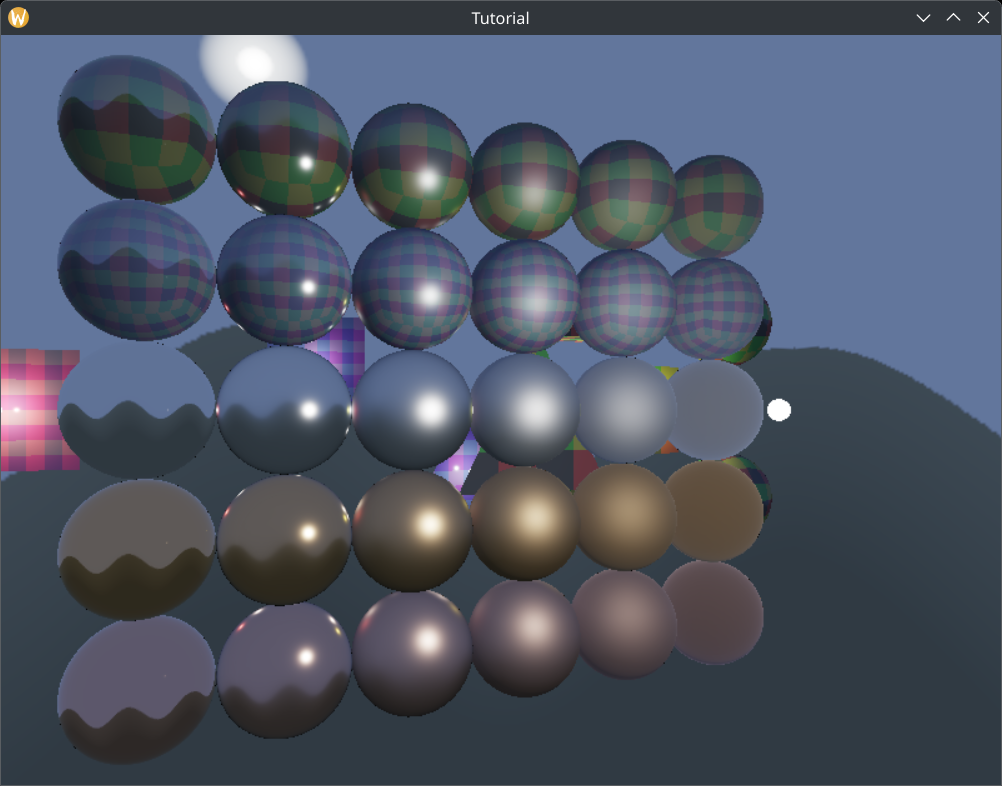
Now we have some kind of indirect illumination, and the application is finally not ugly!
An artifact of using the skydome for indirect illumination is that neighboring spheres don't have a mirror image.
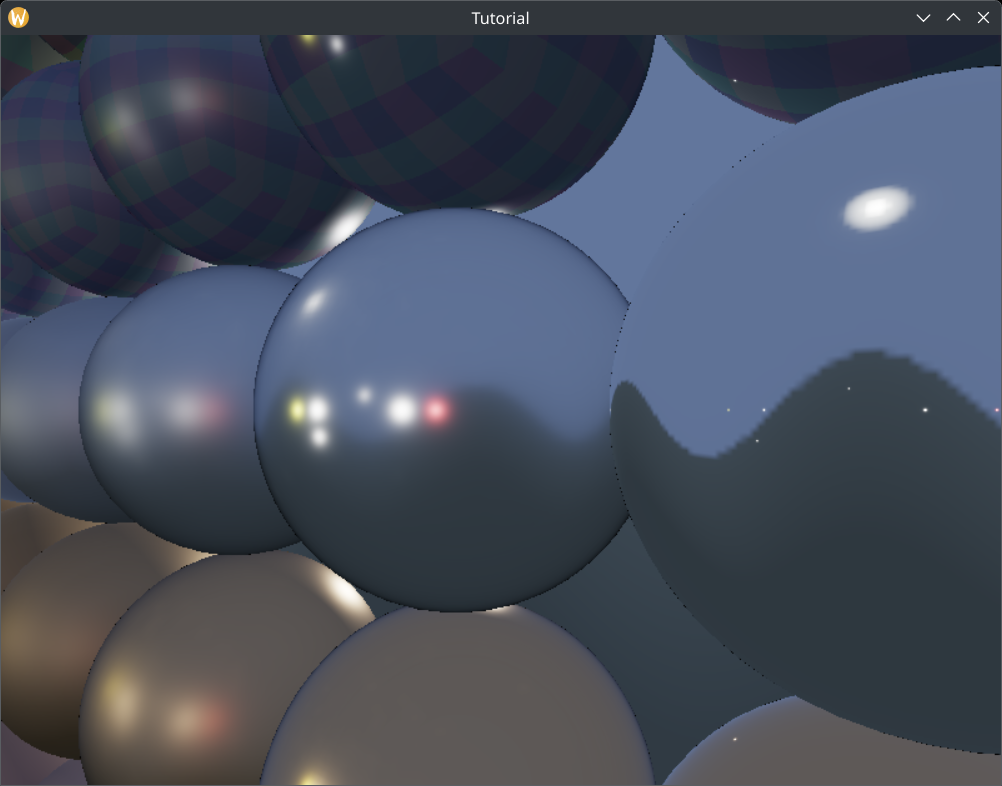
You have other options than just using the skydome as a light source. You can fill environment cubemaps by rendering to them from a point to every cube face, then integrating the results. How they work better or worse is scene dependent.
Wrapping up
Finally we have taken care of the elephant in the room: physically based rendering is no longer ugly! Gold and silver balls are no longer black, but golden and silver. Finally our physically based renderer is viable.
However viable is not great. It's the bare minimum. In the remaining PBR chapters we will add extra functionality that will push it from the bare minimum to good. For instance maybe metal balls are no longer ugly, but the specular highlight on surfaces with low roughness is tiny. Sometimes you want larger highlight on a non-rough surface, and the non-hacky solution for that are area lights.
In the next chapter we will turn our point lights into sphere lights.
The sample code for this tutorial can be found here.
The tutorial continues here.