
Clearing the screen
In the previous chapter we have created a window and the surface that represents that window in Vulkan. We also created a swapchain and have handles to its swapchain images. Now it's time to render to them, and we are going to do the most basic way of rendering. No, it's not our first triangle just yet! We are going to clear the screen!
First we will familiarize ourselves with render passes. Then we will create image views and framebuffers for our swapchain images, so we can render to them using our new render pass. Then we will create our first command pool and command buffer that we can record our rendering commands into. Then we will create synchronization primitives to synchronize the GPU with the CPU and the presentation engine. Finally we are going to acquire a swapchain image, record our rendering commands, and submit them.
This tutorial is in open beta. There may be bugs in the code and misinformation and inaccuracies in the text. If you find any, feel free to open a ticket on the repo of the code samples.
Setup
Render pass
In traditional Vulkan API usage rendering to a set of images is done using a render pass.
A render pass is a data structure that wraps a set of images that we will render to, a set of subpasses that render to subsets of these images, and an ordering between subpasses. This data structure will supply the driver global information about our rendering work.
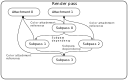
The images that we render to during the full render pass are called attachments.
The whole execution of a render pass is broken up into smaller units of execution called subpasses. A subpass is a unit of rendering work that renders to or reads from a fixed subset of the attachments.
The subset of attachments a subpass uses are identified using attachment references. An attachment reference is an attachment index identifying an attachment and its layout. Attachment references can be input attachments, which are read from, or color attachments that can be written.
An ordering between subpasses can be expressed with subpass dependencies. A subpass dependency defines a "happens before" and "happens after" relationship between a source and a destination subpass, and makes sure that the source subpass' writes to attachments are made visible to the destination subpass.
This is a quick summary, not an exhaustive description. In this tutorial we will not do any multipass rendering, so we don't need to go into more details here. We will discuss the minimal information we need as we code. If you are interested, or when you start doing multipass rendering techniques, feel free to read the spec and look for resources online!
For the sake of this tutorial we will use the simplest render pass: a single attachment, which will be the swapchain image, and a single subpass that will render to it.
First let's create a few shortcut variables for things we will use frequently.
    let width = swapchain_create_info.imageExtent.width;
    let height = swapchain_create_info.imageExtent.height;
    let format = chosen_surface_format.format;
Those are pretty long and we'll use them frequently. Now it's time to start creating our render pass. The first thing we need is to list the attachments used by our render pass and a small amount of extra info about them. In our case it will be a single attachment.
    //
    // RenderPass creation
    //

    let mut attachment_descs = Vec::new();

    let attachment_description = VkAttachmentDescription {
        flags: 0x0,
        format: format,
        samples: VK_SAMPLE_COUNT_1_BIT,
        loadOp: VK_ATTACHMENT_LOAD_OP_CLEAR,
        storeOp: VK_ATTACHMENT_STORE_OP_STORE,
        stencilLoadOp: VK_ATTACHMENT_LOAD_OP_DONT_CARE,
        stencilStoreOp: VK_ATTACHMENT_STORE_OP_DONT_CARE,
        initialLayout: VK_IMAGE_LAYOUT_UNDEFINED,
        finalLayout: VK_IMAGE_LAYOUT_PRESENT_SRC_KHR
    };

    attachment_descs.push(attachment_description);
The field format contains the pixel format of the image we render to. We set this to the swapchain
image's pixel format. The field samples is related to multisampling, which we won't do, and won't
talk about, so let's just set it to VK_SAMPLE_COUNT_1_BIT.
Normally images may contain preexisting data that we could read. The field loadOp could be used to
read it, but we just discard it, and render new data. Discarding happens using the
VK_ATTACHMENT_LOAD_OP_CLEAR value. Its pair, storeOp describes how data will be written
to it. We do need to store data in the swapchain image, so we assign VK_ATTACHMENT_STORE_OP_STORE.
We do not have a stencil buffer, and we will not talk about it, so we set the ops for
stencilLoadOp and stencilStoreOp to don't care. Then comes the layout.
Images may have an expected layout before executing the render pass, and one that it will be transitioned to
after. The former is initialLayout, and since we discard and overwrite the image's initial content
during rendering, we assign VK_IMAGE_LAYOUT_UNDEFINED. We don't care what the prevoius layout was,
it will be overwritten. We do care however about what the layout will be once rendering finishes. The field for
it is finalLayout, and it is required that images we present are transitioned to
VK_IMAGE_LAYOUT_PRESENT_SRC_KHR, so we set it here. This way after rendering the driver will
emit the right commands and the image will be in the right layout, so we can present it.
We will need to pass the attachments as a pointer to an array and a length, so we add it to a vector.
Next we create our subpass, which will render to the previously mentioned attachment.
    //
    // RenderPass creation
    //

    // ...

    let mut color_attachment_refs = Vec::new();

    let new_attachment_ref = VkAttachmentReference {
        attachment: 0,
        layout: VK_IMAGE_LAYOUT_COLOR_ATTACHMENT_OPTIMAL
    };

    color_attachment_refs.push(new_attachment_ref);

    let mut subpass_descs = Vec::new();

    let subpass_description = VkSubpassDescription {
        flags: 0x0,
        pipelineBindPoint: VK_PIPELINE_BIND_POINT_GRAPHICS,
        inputAttachmentCount: 0,
        pInputAttachments: core::ptr::null(),
        colorAttachmentCount: color_attachment_refs.len() as u32,
        pColorAttachments: color_attachment_refs.as_ptr(),
        pResolveAttachments: core::ptr::null(),
        pDepthStencilAttachment: core::ptr::null(),
        preserveAttachmentCount: 0,
        pPreserveAttachments: core::ptr::null()
    };

    subpass_descs.push(subpass_description);
First we fill the attachment reference to our single attachment using a VkAttachmentReference struct.
Its attachment field is an array index of the attachment we want to refer to. Since we have a single
attachment, its array index is 0. The layout field defines what the expected layout
will be during rendering. For rendering the ideal one will be VK_IMAGE_LAYOUT_COLOR_ATTACHMENT_OPTIMAL,
and during execution the image will be transitioned to this layout before rendering.
We put this one into a vector as well, because we will need to pass it in a pointer to an array.
Then we define the subpass with a VkSubpassDescription struct. We won't use most of its fields, and
I won't describe the ones we don't care about right now. Just set them to 0 and
core::ptr::null(). We care about pipelineBindPoint, which will be
VK_PIPELINE_BIND_POINT_GRAPHICS, because we will write to it using the graphics pipeline.
The other two are pColorAttachments and colorAttachmentCount, one is a pointer to
an array of the attachment references, and the other one is the array length. We set it to the length and
begin pointer of color_attachment_refs.
We add it to an array as well.
The last element will be the list of subpass dependencies.
    //
    // RenderPass creation
    //

    // ...

    let mut subpass_deps = Vec::new();

    let external_dependency = VkSubpassDependency {
        srcSubpass: VK_SUBPASS_EXTERNAL as u32,
        dstSubpass: 0,
        srcStageMask: VK_PIPELINE_STAGE_COLOR_ATTACHMENT_OUTPUT_BIT as VkPipelineStageFlags,
        dstStageMask: VK_PIPELINE_STAGE_COLOR_ATTACHMENT_OUTPUT_BIT as VkPipelineStageFlags,
        srcAccessMask: 0x0,
        dstAccessMask: VK_ACCESS_COLOR_ATTACHMENT_WRITE_BIT as VkAccessFlags,
        dependencyFlags: 0x0
    };

    subpass_deps.push(external_dependency);
Although we only have a single subpass, we will need a subpass dependency.
We already talked briefly about image acquisition in the previous chapter. Before rendering to an image, we need to ask for one from the presentation engine. Later we will see that this image acquisition does not happen immediately, and a synchronization primitive will be signalled when it happens.
We will synchronize the VK_PIPELINE_STAGE_COLOR_ATTACHMENT_OUTPUT_BIT stage with the image
acquisition, but according to ARM's Vulkan FAQ's
Transitioning the swapchain image on acquisition section, the render pass' image layout transition to
VK_IMAGE_LAYOUT_COLOR_ATTACHMENT_OPTIMAL may happen earlier. ARM's recommendation is adding a
subpass dependency to VK_SUBPASS_EXTERNAL.
The srcSubpass must be VK_SUBPASS_EXTERNAL, the dstSubpass must be our
single subpass, whose array index is 0, the srcStageMask and the
dstStageMask must be VK_PIPELINE_STAGE_COLOR_ATTACHMENT_OUTPUT_BIT (we will see this
pipeline stage during command submission as well), and we set dstAccessMask to
VK_ACCESS_COLOR_ATTACHMENT_WRITE_BIT.
Now that the graph is pretty much constructed, it's time to create the render pass itself.
    //
    // RenderPass creation
    //

    // ...

    let render_pass_create_info = VkRenderPassCreateInfo {
        sType: VK_STRUCTURE_TYPE_RENDER_PASS_CREATE_INFO,
        pNext: core::ptr::null(),
        flags: 0x0,
        attachmentCount: attachment_descs.len() as u32,
        pAttachments: attachment_descs.as_ptr(),
        subpassCount: subpass_descs.len() as u32,
        pSubpasses: subpass_descs.as_ptr(),
        dependencyCount: subpass_deps.len() as u32,
        pDependencies: subpass_deps.as_ptr()
    };

    println!("Creating render pass.");
    let mut render_pass = core::ptr::null_mut();
    let result = unsafe
    {
        vkCreateRenderPass(
            device,
            &render_pass_create_info,
            core::ptr::null_mut(),
            &mut render_pass
        )
    };

    if result != VK_SUCCESS
    {
        panic!("Failed to create render pass. Error: {:?}.", result);
    }
Like during other Vulkan object creations, we need a create info structure. For render passes this is
VkRenderPassCreateInfo We pass the attachment array in pAttachments and
attachmentCount, the subpasses in pSubpasses and subpassCount,
and the subpass dependencies in pDependencies and dependencyCount.
Then the call to vkCreateRenderPass creates our render pass. We are one step closer to clearing
the screen.
Let's not forget to clean up!
    //
    // Cleanup
    //

    println!("Deleting render pass.");
    unsafe
    {
        vkDestroyRenderPass(
            device,
            render_pass,
            core::ptr::null_mut()
        );
    }

    // ...
Framebuffers and image views
Next we need to create framebuffers and image views. Render passes had a general layout of what kind of attachments we render to.
Framebuffers are vulkan objects that pair up specific images with the attachments of a render pass. An execution of a render pass will receive this framebuffer, and through this framebuffer will identify what images it draws to, when it draws to one of its attachment.
Framebuffers do not take images directly. Instead they take image views.
Image views are vulkan objects that wrap subresources of images and supply extra information about how to interpret them.
The chain of dependencies looks like this: The swapchain has images. We need to create image views that refer to these images, and then we can create framebuffers that refer to these image views during rendering.
Let's create these framebuffers and image views, one for each swapchain image!
First we create the image views right after we queried the swapchain images. One image view needs to be created for every swapchain image.
    //
    // Image view creation
    //

    let mut swapchain_img_views = Vec::with_capacity(swapchain_image_count as usize);
    for (i, swapchain_img) in swapchain_imgs.iter().enumerate()
    {
        let img_view_create_info = VkImageViewCreateInfo {
            sType: VK_STRUCTURE_TYPE_IMAGE_VIEW_CREATE_INFO,
            pNext: core::ptr::null(),
            flags: 0x0,
            image: *swapchain_img,
            viewType: VK_IMAGE_VIEW_TYPE_2D,
            format: format,
            components: VkComponentMapping {
                r: VK_COMPONENT_SWIZZLE_IDENTITY,
                g: VK_COMPONENT_SWIZZLE_IDENTITY,
                b: VK_COMPONENT_SWIZZLE_IDENTITY,
                a: VK_COMPONENT_SWIZZLE_IDENTITY
            },
            subresourceRange: VkImageSubresourceRange {
                aspectMask: VK_IMAGE_ASPECT_COLOR_BIT as VkImageAspectFlags,
                baseMipLevel: 0,
                levelCount: 1,
                baseArrayLayer: 0,
                layerCount: 1
            }
        };

        println!("Creating framebuffer image view.");
        let mut image_view = core::ptr::null_mut();
        let result = unsafe
        {
            vkCreateImageView(
                device,
                &img_view_create_info,
                core::ptr::null_mut(),
                &mut image_view
            )
        };

        if result != VK_SUCCESS
        {
            panic!("Failed to create framebuffer image view {:?}. Error: {:?}.", i, result);
        }

        swapchain_img_views.push(image_view);
    }
Some of this is self explanatory. The image is set to the *swapchain_img,
because we want to render to the swapchain image. The format is set to the swapchain's pixel
format. The viewType is VK_IMAGE_VIEW_TYPE_2D because it's a simple 2D window.
Others are less self explanatory. For instance the components field, which could reinterpret
the green channel as the blue channel, etc. We do not want to do any of that, so we set component swizzle
to VK_COMPONENT_SWIZZLE_IDENTITY for every color channel. The subresourceRange
field is also like that. Understanding what we see here is hard without going into texture arrays and
mipmapping. For now let's just accept that baseMipLevel and baseArrayLayer
must be 0, levelCount and layerCount must be 1,
and aspectMask must be VK_IMAGE_ASPECT_COLOR_BIT. You can read about
image subresources in the spec if you are interested, and we will have to get into them
in the texturing chapter.
Now we have an array of image views that we can clean up at the end of our program.
    //
    // Cleanup
    //

    for swapchain_img_view in swapchain_img_views.iter()
    {
        println!("Deleting swapchain image views.");
        unsafe
        {
            vkDestroyImageView(
                device,
                *swapchain_img_view,
                core::ptr::null_mut()
            );
        }
    }

    // ...
Then comes the framebuffer, one per swapchain image.
    //
    // Framebuffer creation
    //

    let mut framebuffers = Vec::with_capacity(swapchain_image_count as usize);
    for (i, swapchain_img_view) in swapchain_img_views.iter().enumerate()
    {
        let attachments: [VkImageView; 1] = [*swapchain_img_view];

        let create_info = VkFramebufferCreateInfo {
            sType: VK_STRUCTURE_TYPE_FRAMEBUFFER_CREATE_INFO,
            pNext: core::ptr::null(),
            flags: 0x0,
            renderPass: render_pass,
            attachmentCount: attachments.len() as u32,
            pAttachments: attachments.as_ptr(),
            width: width,
            height: height,
            layers: 1
        };

        println!("Creating framebuffer.");
        let mut new_framebuffer = core::ptr::null_mut();
        let result = unsafe
        {
            vkCreateFramebuffer(
                device,
                &create_info,
                core::ptr::null_mut(),
                &mut new_framebuffer
            )
        };

        if result != VK_SUCCESS
        {
            panic!("Failed to create framebuffer {:?}. Error: {:?}.", i, result);
        }

        framebuffers.push(new_framebuffer);
    }
This is a bit simpler. The struct VkFramebufferCreateInfo expects our render pass in the
field renderPass, for every attachment of the render pass it expects an image view,
we must supply it as an array, and it must be passed in pAttachments and
attachmentCount. The width and height of the images must be supplied in
width and height. Again, for simplicity, let's just accept that
the fiels layers must be 1, and you can read about it in the spec if
you are interested.
We are cleaning these up as well at the end of the program.
    //
    // Cleanup
    //

    for swapchain_framebuffer in framebuffers.iter()
    {
        println!("Deleting framebuffer.");
        unsafe
        {
            vkDestroyFramebuffer(
                device,
                *swapchain_framebuffer,
                core::ptr::null_mut()
            );
        }
    }

    // ...
Now let's talk about supplying the GPU with our rendering commands, and GPU commands in general!
Command pools and command buffers
Now that we have a render pass and framebuffers, we need to create the actual rendering commands that we can hand over to the GPU for execution.
In Vulkan a command buffer is a non-threadsafe Vulkan object we can record GPU commands into. Once recorded, they can be submitted for execution to a device queue.
For command buffer creation we need command pools. A command pool is a non-threadsafe Vulkan object that you can use to create command buffers, and when you record commands to a command buffer, they supply memory as needed.
Command buffers contain a reference to the command pool they are allocated from, and use it under the hood during command recording, so they must move together between threads!
Command buffers that have GPU commands recorded to them can be handed over to the GPU for execution. After they finished execution, we can reset their command pool and all of its command buffers will be ready to record new GPU commands.
When a command pool is destroyed, every command buffer allocated from it will be destroyed as well.
So the way we render a single frame looks like this: we create a single command pool for our frame, allocate a command buffer from it, and grant a CPU thread exclusive ownership over the command pool and all of its command buffers for the time of command buffer recording. Once the command buffer is recorded we will send these commands to the GPU, and once it is finished, we can reset the command pool and reuse its command buffer for a future frame.
Let's talk about rendering multiple frames. We could wait for the previous frame to finish, reset its command pool, record the rendering commands for the current frame, submit, rinse and repeat, but that would be slower than it needs to be. Instead you should create a separate command pool and command buffer for some N frames, and you should record the (n+1)th frame while the GPU executes the nth frame. If the command buffers for different frames come from different command pools, they can be reset and rerecorded independently.
What should our N be? How many command pools and buffers do we need? Your mileage may vary, I choose N to be the swapchain image count.
Let's create a little convenience shortcut for ourselves again!
let frame_count = swapchain_imgs.len();
Now let's create our command pools, one for each frame!
    //
    // Command pool & command buffer
    //

    let mut cmd_pools = Vec::with_capacity(frame_count);
    for _i in 0..frame_count
    {
        let cmd_pool_create_info = VkCommandPoolCreateInfo {
            sType: VK_STRUCTURE_TYPE_COMMAND_POOL_CREATE_INFO,
            pNext: core::ptr::null(),
            flags: 0x0,
            queueFamilyIndex: chosen_graphics_queue_family
        };

        println!("Creating command pool.");
        let mut cmd_pool = core::ptr::null_mut();
        let result = unsafe
        {
            vkCreateCommandPool(
                device,
                &cmd_pool_create_info,
                core::ptr::null_mut(),
                &mut cmd_pool
            )
        };

        if result != VK_SUCCESS
        {
            panic!("Failed to create command pool. Error: {:?}.", result);
        }

        cmd_pools.push(cmd_pool);
    }
That was simple. No need for too much explanation. There is only one important field in the create info,
queueFamilyIndex. It determines the queue family that device queues consuming your command
buffers must belong to. Now that our command pools are created, we can allocate command buffers from them,
one for each frame.
    //
    // Command pool & command buffer
    //

    // ...

    let mut cmd_buffers = Vec::with_capacity(frame_count);
    for cmd_pool in cmd_pools.iter()
    {
        let cmd_buffer_alloc_info = VkCommandBufferAllocateInfo {
            sType: VK_STRUCTURE_TYPE_COMMAND_BUFFER_ALLOCATE_INFO,
            pNext: core::ptr::null(),
            commandPool: *cmd_pool,
            level: VK_COMMAND_BUFFER_LEVEL_PRIMARY,
            commandBufferCount: 1
        };

        println!("Allocating command buffers.");
        let mut cmd_buffer = core::ptr::null_mut();
        let result = unsafe
        {
            vkAllocateCommandBuffers(
                device,
                &cmd_buffer_alloc_info,
                &mut cmd_buffer
            )
        };

        if result != VK_SUCCESS
        {
            panic!("Failed to create command buffers. Error: {:?}.", result);
        }

        cmd_buffers.push(cmd_buffer);
    }
Simple again. At the end of our program, we can clean up the command pool, and it will free the command buffers allocated from it as well.
    //
    // Cleanup
    //

    for cmd_pool in cmd_pools.iter()
    {
        println!("Deleting command pool.");
        unsafe
        {
            vkDestroyCommandPool(
                device,
                *cmd_pool,
                core::ptr::null_mut()
            );
        }
    }

    // ...
Fences and Semaphores
A GPU runs in parallel with the CPU, and it's necessary to learn about whether it completed a set of commands for instance because we want to know whether we can reset and reuse a command pool.
A fence is a synchronization primitive that allows our application to get notified when submitted GPU commands finish, and even lets it blockingly wait for completion.
Also we have learned in the previous tutorials that GPUs can have multiple queues that can process GPU commands independently from each other. Sometimes a set of GPU commands on one command queue needs to wait for the completion of commands on another command queue.
A semaphore is a synchronization primitive that lets us express GPU -> GPU dependencies. A semaphore can prevent command buffers from getting executed until it is signalled.
For instance you can submit a command buffer to a queue, supply a semaphore for signaling on completion, and you can submit another command buffer on another queue and make it wait for this semaphore. Swapchain image acquisition and presentation also use semaphores for synchronization.
Let's look at our plan for the execution of rendering commands and presentation! This way we can identify what kind of synchronization primitives we need.
We need to request an image we can render to from the swapchain. The swapchain is going to give us an integer id, but the image may still be read from by the presentation engine. The way we can get notified whether the image is ready for rendering is a sync primitive. Either a semaphore or a fence.
Once this is done, we want to record a command buffer for the requested frame, and submit it. First, we don't want to start rendering before the requested image is ready, so we want to make the GPU wait. Secondly, we don't want to reset the command pool while the GPU is still executing the command buffer, so we want to make the CPU wait.
Once rendering completes, we need to issue a present request for the newly rendered frame. We don't want to present the image before rendering finishes, so we want the present queue to wait.
To execute this we need the following sync primitives for a single frame:
- We need a semaphore that blocks rendering until the requested swapchain image is ready.
- We need a semaphore that blocks presentation until the submitted rendering commands finish.
- We need a fence that blocks the CPU from image acquisition and resetting the command pool until rendering finishes.
For multiple overlapping frames we follow the same principle as we did with command pools: for N frames we create N sets of these two semaphores and a fence. In this tutorial N is still the swapchain image count.
Now let's create our synchronization primitives, one triplet for each frame!
    //
    // Synchronization primitives
    //

    let mut frame_submitted = vec![false; frame_count];

    let mut image_acquired_sems = Vec::with_capacity(frame_count);
    let mut rendering_finished_sems = Vec::with_capacity(frame_count);
    let mut rendering_finished_fences = Vec::with_capacity(frame_count);

    for _i in 0..frame_count
    {
        // Image acquired semaphore

        // ...

        // Rendering finished semaphore

        // ...

        // Frame fence

        // ...
    }
We create our arrays of the three sync primitives. image_acquired_sems,
rendering_finished_sems and rendering_finished_fences. We also have the bool array
frame_submitted, to remember during rendering whether the current frame's resources are submitted.
We'll need this later and I will explain it there.
The image acquired semaphore
        // Image acquired semaphore

        let sem_create_info = VkSemaphoreCreateInfo {
            sType: VK_STRUCTURE_TYPE_SEMAPHORE_CREATE_INFO,
            pNext: core::ptr::null(),
            flags: 0x0
        };

        println!("Creating image acquired semaphore.");
        let mut new_image_acquired_sem = core::ptr::null_mut();
        let result = unsafe
        {
            vkCreateSemaphore(
                device,
                &sem_create_info,
                core::ptr::null(),
                &mut new_image_acquired_sem
            )
        };

        if result != VK_SUCCESS
        {
            panic!("Failed to create image acquired semaphore. Error: {:?}.", result);
        }

        image_acquired_sems.push(new_image_acquired_sem);
The rendering finished semaphore
        // Rendering finished semaphore

        let sem_create_info = VkSemaphoreCreateInfo {
            sType: VK_STRUCTURE_TYPE_SEMAPHORE_CREATE_INFO,
            pNext: core::ptr::null(),
            flags: 0x0
        };

        println!("Creating rendering finished semaphore.");
        let mut new_rendering_finished_sem = core::ptr::null_mut();
        let result = unsafe {
            vkCreateSemaphore(
                device,
                &sem_create_info,
                core::ptr::null(),
                &mut new_rendering_finished_sem
            )
        };

        if result != VK_SUCCESS
        {
            panic!("Failed to create rendering finished semaphore. Error: {:?}.", result);
        }

        rendering_finished_sems.push(new_rendering_finished_sem);
...and the frame fence
        // Frame fence

        let fence_create_info = VkFenceCreateInfo {
            sType: VK_STRUCTURE_TYPE_FENCE_CREATE_INFO,
            pNext: core::ptr::null(),
            flags: 0x0
        };

        println!("Creating frame finished fence.");
        let mut new_frame_fence = core::ptr::null_mut();
        let result = unsafe
        {
            vkCreateFence(
                device,
                &fence_create_info,
                core::ptr::null(),
                &mut new_frame_fence
            )
        };

        if result != VK_SUCCESS
        {
            panic!("Failed to create frame fence. Error: {:?}.", result);
        }

        rendering_finished_fences.push(new_frame_fence);
All of them are pretty simple to create, none of them require any info.
Let's also free all of them at the end!
    //
    // Cleanup
    //

    for frame_finished_fence in rendering_finished_fences
    {
        println!("Deleting fence.");
        unsafe
        {
            vkDestroyFence(
                device,
                frame_finished_fence,
                core::ptr::null_mut()
            );
        }
    }

    for rendering_finished_sem in rendering_finished_sems
    {
        println!("Deleting semaphore.");
        unsafe
        {
            vkDestroySemaphore(
                device,
                rendering_finished_sem,
                core::ptr::null_mut()
            );
        }
    }

    for image_acquired_sem in image_acquired_sems
    {
        println!("Deleting semaphore.");
        unsafe
        {
            vkDestroySemaphore(
                device,
                image_acquired_sem,
                core::ptr::null_mut()
            );
        }
    }

    //...
Now that we have our synchronization primitives in place we can start doing the actual rendering.
Our main loop
We have the main loop from the previous tutorial. The plan is to render a new frame in each iteration. We acquire a new image. Once the index of the image is available, we select a command pool, wait in case the command pool is in use, then reset it, record the rendering commands, and submit.
So we have frame_count amount of framebuffers, command pools, command buffers and sync primitives.
How do we select which one we use for the current frame? We create a counter, and we increment it every frame.
If it would go above frame_count, we wrap around. This way we get an index that falls within the
limits of the arrays. We basically reuse our resources after frame_count iterations following a
round robin algorithm.
Let's create this variable and let's increment it every frame!
    //
    // Game loop
    //

    let mut current_frame_index = 0; // This is new

    let mut event_pump = sdl.event_pump().unwrap();
    'main: loop
    {
        for event in event_pump.poll_iter()
        {
            match event
            {
                sdl2::event::Event::Quit { .. } =>
                {
                    break 'main;
                }
                _ =>
                {}
            }
        }

        //
        // Rendering
        //

        // ...

        current_frame_index = (current_frame_index + 1) % frame_count; // This is new
    }
There is current_frame_index, our counter that we increment every frame, and wrap around if
it goes above limit.
Waiting for previous frame
We have a current_frame_index which determines which sync primitives and command buffers to use this
frame. Since it wraps around, we are reusing these vulkan objects following a round robin algorithm. The GPU runs
in parallel with the CPU.
Because of this reuse and the parallelism the GPU may be executing a previous frame's rendering commands or may be using a previous frame's sync primitives. We will soon write code that uses, resets and writes to Vulkan resources, and we want to avoid stomping on resources the GPU is currently using.
The sync primitive that allows the CPU to wait for the GPU is the fence, so in order to wait for the previous
image acquisition and command buffer execution using the current_frame_index resources, we need
to wait on the rendering_finished_fences element that we are using during command submission.
That will be rendering_finished_fences[current_frame_index].
        //
        // Rendering
        //

        //
        // Waiting for previous frame
        //

        if frame_submitted[current_frame_index]
        {
            let fences = [rendering_finished_fences[current_frame_index]];
            let result = unsafe
            {
                vkWaitForFences(
                    device,
                    fences.len() as u32,
                    fences.as_ptr(),
                    VK_TRUE,
                    core::u64::MAX
                )
            };

            if result != VK_SUCCESS
            {
                panic!("Error while waiting for fences. Error: {:?}.", result);
            }

            let result = unsafe
            {
                vkResetFences(
                    device,
                    fences.len() as u32,
                    fences.as_ptr()
                )
            };

            if result != VK_SUCCESS
            {
                panic!("Error while resetting fences. Error: {:?}.", result);
            }

            frame_submitted[current_frame_index] = false;
        }
We have frame_submitted[current_frame_index] to tell us whether we previously submitted the
command buffers. We need this, because during the first few iterations the
rendering_finished_fences[current_frame_index] is not supplied for signalling in a submission,
and waiting on it would wait forever. Here I solve it with a bool variable. In
other tutorials
people come up with alternative solutions.
Now that at least image_acquired_sems[current_frame_index] and
cmd_pools[current_frame_index] can be safely used, it's time to acquire a swapchain image.
Acquiring swapchain image
Before rendering we need to request an image we can render to. We have pointers to VkImage objects
of every swapchain image but that does not mean we can just render to them. First we need to acquire an image.
This is what vkAcquireNextImageKHR is good for. This function will give us the index of an image
we can render to. Just because we have the image it does not mean the presentation engine no longer reads from
it. This event is signalled either using a fence or a semaphore. Since we want to block only the execution of
the rendering commands, we will use a semaphore.
This function can fail for a variety of reasons. Handling some of them will be covered in the next chapter, but for now we treat any failure as fatal error and we just panic.
        //
        // Rendering
        //

        // ...

        //
        // Acquire image
        //

        let mut image_index: u32 = 0;
        let result = unsafe
        {
            vkAcquireNextImageKHR(
                device,
                swapchain,
                core::u64::MAX,
                image_acquired_sems[current_frame_index],
                core::ptr::null_mut(),
                &mut image_index
            )
        };

        if !(result == VK_SUCCESS || result == VK_SUBOPTIMAL_KHR)
        {
            panic!("Error while acquiring image: {:?}", result);
        }
This function gives us back an image_index, which is the index of the swapchain image we acquired.
It also receives our image_acquired_sems[current_frame_index] to be signalled when the image is
ready.
Pay attention that the current_frame_index and the image_index may not move together.
Our current_frame_index increments and wraps around, but the image_index can be anything
the presentation engine throws at us and this will depend on the chosen present mode, implementation details, etc.
You might ask what the point of this current_frame_index is when we just got ourselves an
image_index. The answer is: we need to choose a semaphore before the function call, but the
image_index will only be available after. Therefore we index the sync primitives with an increasing
index and use image_index only for deciding which framebuffer we want to render to.
As for the error handling, this one is slightly different from what we are used to. Generally if some failure
happens, we terminate our application. Image acquisition and present are different. Although the happy path is
VK_SUCCESS, there is another success code called VK_SUBOPTIMAL_KHR, which means that
the image can still be presented, just maybe the window is resized, maybe the image will be stretched, clipped,
etc. This is a kind of success, and the semaphore will be in use afterwards. The safest way to make sure that
the semaphore will be consistently in a valid state, is to just render to the image and use the semaphore as
a wait semaphore during command submission.
Resetting command pool and recording rendering commands
Now that we know which swapchain image we need to render to, it's time to record the commands the GPU needs to execute into a command buffer. We have created several command pools and command buffers, and one of them belongs to the current frame. However because of the round robin resource reuse it's very likely that the command buffer of the current frame already has the commands of a previous frame written to it.
Before we reuse this command buffer we need to reset its command pool. Since at the beginning of rendering we
have waited for rendering_finished_fences[current_frame_index], the previous execution of
cmd_buffers[current_frame_index] is completed and we can safely reset the command pool, which
resets every command buffer allocated from it.
        //
        // Rendering
        //

        // ...

        //
        // Record
        //

        // Reset command pool

        let result = unsafe
        {
            vkResetCommandPool(
                device,
                cmd_pools[current_frame_index],
                0x0
            )
        };

        if result != VK_SUCCESS
        {
            panic!("Error while resetting command pool. Error: {:?}.", result);
        }
Afterwards we can record our command buffer.
Before recording actual rendering commands, we need to call vkBeginCommandBuffer.
        //
        // Record
        //

        // ...

        // Record command buffer

        let cmd_buffer_begin_info = VkCommandBufferBeginInfo {
            sType: VK_STRUCTURE_TYPE_COMMAND_BUFFER_BEGIN_INFO,
            pNext: core::ptr::null(),
            flags: 0x0,
            pInheritanceInfo: core::ptr::null()
        };

        let result = unsafe
        {
            vkBeginCommandBuffer(
                cmd_buffers[current_frame_index],
                &cmd_buffer_begin_info
            )
        };

        if result != VK_SUCCESS
        {
            panic!("Failed to start recording the comand buffer. Error: {:?}.", result);
        }
Then we need to record our rendering commands. Our rendering commands will be nothing more than clearing the screen, and this is done at the beginning of the render pass, so we record an empty render pass, and that's it. We supply the render pass, the framebuffer of the swapchain image acquired and the clear color of our choice.
The resulting code will look like this:
        //
        // Record
        //

        // ...

        //
        // Rendering commands
        //

        let clear_value = [
            VkClearValue {
                color: VkClearColorValue {
                    float32: [0.0, 0.0, 0.0, 1.0]
                }
            }
        ];

        let render_pass_begin_info = VkRenderPassBeginInfo {
            sType: VK_STRUCTURE_TYPE_RENDER_PASS_BEGIN_INFO,
            pNext: core::ptr::null(),
            renderPass: render_pass,
            framebuffer: framebuffers[image_index as usize],
            renderArea: VkRect2D {
                offset: VkOffset2D {
                    x: 0,
                    y: 0
                },
                extent: VkExtent2D {
                    width: width,
                    height: height
                }
            },
            clearValueCount: clear_value.len() as u32,
            pClearValues: clear_value.as_ptr()
        };

        unsafe
        {
            vkCmdBeginRenderPass(
                cmd_buffers[current_frame_index],
                &render_pass_begin_info,
                VK_SUBPASS_CONTENTS_INLINE
            );

            vkCmdEndRenderPass(
                cmd_buffers[current_frame_index]
            );
        }
That wasn't complicated. Basically we called vkCmdBeginRenderPass and
vkCmdEndRenderPass. It is still worth elaborating a little, after all even this empty render pass
takes lots of parameters in a large struct.
First we define our clear color. Generally a render pass can have more than one attachments, so it's a color
array, but since we only have one, it's an array with only one element. That element is a black color (every
component is 0.0) with the alpha component set to 1.0. You may experiment with any
color you would like.
Next we fill a VkRenderPassBeginInfo struct. It receives the render pass object in the field
renderPass, the framebuffer in framebuffer, the array of clear values in
pClearValues and clearValueCount, and the portion of the attachments we render to
in renderArea. This portion in our case is the whole image.
Once we're finished, we need to call vkEndCommandBuffer.
        //
        // Record
        //

        // ...

        //
        // Rendering commands
        //

        // ...

        let result = unsafe
        {
            vkEndCommandBuffer(
                cmd_buffers[current_frame_index]
            )
        };

        if result != VK_SUCCESS
        {
            panic!("Failed to end recording the comand buffer. Error: {:?}.", result);
        }
Done. The rendering commands are recorded. Next we submit them.
Submitting rendering commands and present request
Now that the command buffer is recorded, we need to send it to the GPU for execution. This is done using vulkan
queues. The function for submitting a command buffer is vkQueueSubmit. It takes a pointer to a
VkSubmitInfo structure, and this struct contains all of the parameters of the submission:
- The command buffers to execute
- The semaphores to wait on before executing the command buffer and the pipeline stages that need to wait for these semaphores
- The semaphores and fences to signal after executing the command buffer
We just need to fill these parameters according to the plan we laid out previously. First, filling the swapchain
image with the new color should wait until the presentation engine finishes reading from it, so there will be one
wait semaphore, the image ready semaphore. The pipeline stage for this semaphore will be
VK_PIPELINE_STAGE_COLOR_ATTACHMENT_OUTPUT_BIT. Then we want presentation to wait until the GPU
finishes rendering, so we need one signal semaphore, the rendering finished semaphore. We also need to get
notified about rendering being finished before we reset the command pools and record a new command buffer, so we
need to signal a fence, the rendering finished fence.
The final code for submission looks like this.
        //
        // Rendering
        //

        // ...

        //
        // Submit
        //

        {
            let wait_semaphores = [
                image_acquired_sems[current_frame_index]
            ];
            let rendering_finished_sem = [
                rendering_finished_sems[current_frame_index]
            ];
            let wait_pipeline_stages = [
                VK_PIPELINE_STAGE_COLOR_ATTACHMENT_OUTPUT_BIT as VkPipelineStageFlags
            ];
            let cmd_buffer = [
                cmd_buffers[current_frame_index]
            ];

            let submit_info = VkSubmitInfo {
                sType: VK_STRUCTURE_TYPE_SUBMIT_INFO,
                pNext: core::ptr::null(),
                waitSemaphoreCount: wait_semaphores.len() as u32,
                pWaitSemaphores: wait_semaphores.as_ptr(),
                pWaitDstStageMask: wait_pipeline_stages.as_ptr(),
                commandBufferCount: cmd_buffer.len() as u32,
                pCommandBuffers: cmd_buffer.as_ptr(),
                signalSemaphoreCount: rendering_finished_sem.len() as u32,
                pSignalSemaphores: rendering_finished_sem.as_ptr()
            };

            let result = unsafe
            {
                vkQueueSubmit(
                    graphics_queue,
                    1,
                    &submit_info,
                    rendering_finished_fences[current_frame_index]
                )
            };

            if result != VK_SUCCESS
            {
                panic!("Failed to submit rendering commands: {:?}.", result);
            }
        }
Now that the rendering commands are submitted we need to issue a present request. This is also a queue operation
and the function we need is vkQueuePresentKHR. Actually if we had multiple windows and multiple
swaphcains we could present to all of them with a single function call, but we have only one window and swapchain.
This one takes a pointer to a VkPresentInfoKHR structure, and the parameters contained in it are the
following:
- An array of swapchains whose images we want to present.
- An array of the image indices we want to present, one for each swapchain.
- An array of wait semaphores we need to wait for before presentation.
- An array of results which indicates the success status for the present requests of the individual swapchains.
We have only one swapchain, so the array of swapchains and image indices will contain only a single element, and
for a single swapchain the return value of vkQueuePresentKHR is enough, so the pointer to the results
can be a null pointer. Presentation needs to wait until the rendering commands are executed, so we will supply one
wait semaphore, the rendering finished semaphore.
The final code for the present request looks like this:
        //
        // Submit
        //

        // ...

        {
            let swapchains = [
                swapchain
            ];
            let image_indices = [
                image_index
            ];
            let rendering_finished_sem = [
                rendering_finished_sems[current_frame_index]
            ];

            let present_info = VkPresentInfoKHR {
                sType: VK_STRUCTURE_TYPE_PRESENT_INFO_KHR,
                pNext: core::ptr::null(),
                waitSemaphoreCount: rendering_finished_sem.len() as u32,
                pWaitSemaphores: rendering_finished_sem.as_ptr(),
                swapchainCount: swapchains.len() as u32,
                pSwapchains: swapchains.as_ptr(),
                pImageIndices: image_indices.as_ptr(),
                pResults: core::ptr::null_mut()
            };

            let result = unsafe
            {
                vkQueuePresentKHR(
                    present_queue,
                    &present_info
                )
            };

            if !(result == VK_SUCCESS || result == VK_SUBOPTIMAL_KHR)
            {
                panic!("Error while submitting present: {:?}.", result);
            }
        }

        frame_submitted[current_frame_index] = true;

        // ...
After present we set frame_submitted[current_frame_index] to true, so we remember that the current
frame is submitted and the fence needs to be waited on and reset the next time current_frame_index
takes the same value.
The error handling is the same as the one used during image acquisition. If the result is VK_SUCCESS,
we are happy. If the present is VK_SUBOPTIMAL_KHR, it probably won't look perfect, but it's
still not the end of the world.
That's it. The next thing that comes is the end of the loop, where we increment current_frame_index
and wrap it around if it would go above frame_count, but we have already written that.
Cleaning up
Vulkan mandates that Vulkan objects must not be destroyed while still in use, so before we destroy our Vulkan objects, we will blockingly wait for all of the commands issued to the device to complete.
    //
    // Cleanup
    //

    let result = unsafe
    {
        vkDeviceWaitIdle(device)
    };

    if result != VK_SUCCESS
    {
        panic!("Error while waiting for device before cleanup. Error: {:?}.", result);
    }

    // ...
If you omit this the validation layer will produce errors about freeing resources that are still being used. This is discussed in other tutorials as well. One such message is below.
VUID-vkDestroyFence-fence-01120(ERROR / SPEC): msgNum: 1562993224 - Validation Error: [ VUID-vkDestroyFence-fence-01120 ] Object 0: handle = 0xdcc8fd0000000012, type = VK_OBJECT_TYPE_FENCE; | MessageID = 0x5d296248 | VkFence 0xdcc8fd0000000012[] is in use. The Vulkan spec states: All queue submission commands that refer to fence must have completed execution (https://www.khronos.org/registry/vulkan/specs/1.3-extensions/html/vkspec.html#VUID-vkDestroyFence-fence-01120)
    Objects: 1
        [0] 0xdcc8fd0000000012, type: 7, name: NULL
If we compile our application now, we finally get a black window! Our application works! Also if you were on Linux+Wayland, and your window did not show up, now it does!
Clearing with a different color every frame
The end result of this tutorial is a black (or whatever color you chose) window. Seemingly it doesn't do much. If we want to visually confirm that our application is really redrawing the screen every frame, we can - epilepsy warning - redraw with a different color every frame.
Be careful! The window is going to show a different color every frame! Make sure such a thing does not cause a seizure for you or anyone around you!
        //
        // Record
        //

        // ...

        //
        // Rendering commands
        //

        let clear_value = [
            VkClearValue {
                color: VkClearColorValue {
                    float32: [
                        0.0,
                        if current_frame_index == 1 { 1.0 } else { 0.0 },
                        0.0,
                        1.0
                    ]
                }
            }
        ];

        let render_pass_begin_info = VkRenderPassBeginInfo {
            sType: VK_STRUCTURE_TYPE_RENDER_PASS_BEGIN_INFO,
            pNext: core::ptr::null(),
            renderPass: render_pass,
            framebuffer: framebuffers[image_index as usize],
            renderArea: VkRect2D {
                offset: VkOffset2D {
                    x: 0,
                    y: 0
                },
                extent: VkExtent2D {
                    width: width,
                    height: height
                }
            },
            clearValueCount: clear_value.len() as u32,
            pClearValues: clear_value.as_ptr()
        };
There. If you like to live dangerously, you can confirm that your application is really doing something different every frame.
Wrapping up
Finally Vulkan draws something! We learned about render passes and framebuffers, we learned how GPU commands are recorded into command buffers, how command buffers are allocated from command pools and how they can be reset and rerecorded. We also recorded our first rendering commands, submitted them and learned how to synchronize between the CPU and the GPU, and the GPU and the presentation engine.
In the next chapter we are going to prepare our code for resizable windows.
The sample code for this tutorial can be found here.
The tutorial continues here.