
Skydome
In the previous chapter we have extended our BRDF to not only reflect a view independent diffuse lighting, but also a view dependent specular highlight. We took the Fresnel equations as a basis, which works for perfectly smooth surfaces, and extended it to rough surfaces by adopting a microfacet model. For our initial scene it looked good.
Then we tried to add metallic objects to the scene, and realized that without indirect illumination metals look ugly. In real time PBR the most common way of computing indirect illumination is using environment mapping, which is generally implemented with cubemaps.
In this chapter we will learn how to use cubemaps while implementing a skydome for our application.
This tutorial is in open beta. There may be bugs in the code and misinformation and inaccuracies in the text. If you find any, feel free to open a ticket on the repo of the code samples.
Cube image
Previously we had simple 2D textures. We assigned a 2D coordinate system to our image, and used 2D coordinates to identify texture data. This works well for texturing where we assign texture coordinates to a 3D model and load its details from an image, but as rendering became more advanced, more advanced image concepts were needed. For instance when volumetric data was needed, 3D textures emerged. One of these more creative models to use images is cubemapping.
In Vulkan a cubemap is an image which contains six array layers, each image layer corresponding to a face of a cube. A cubemap is adressed with a 3D vector by determining which cube face the vector points to, and which point within that face the vector points to. There will be a matching image and a matching point within that image, which will be used to retrieve image data.
A cubemap allows us to retrieve image data using a vector from any direction. In this tutorial we will store the radiance arriving from the sky from every direction in a cubemap, and draw the sky based on this data.
Preparing data
First let's start with defining the content of the skydome cube image. We need to define metadata such as dimensions and format, and cube image content. Since the cube image will consist of six array layers, one image layer for each face, we will need six arrays of 2D image data, one for each image layer.
The metadata we define for our cube image consists of the format, the width, the height, and a few extra pieces of data that helps us with indexing, data size calculations and staging buffer region alignment.
    //
    // Cube data
    //

    let cube_image_format = VK_FORMAT_R32G32B32A32_SFLOAT;
    let cube_img_component_count = 4;
    let cube_img_bytes_per_pixel = cube_img_component_count * std::mem::size_of::<f32>();
    let cube_image_texel_block_size = 16;

    let skydome_img_width = 512;
    let skydome_img_height = 512;

    // Pixel data

    let neg_z_slice_id = 5;
    let pos_z_slice_id = 4;
    let neg_y_slice_id = 3;
    let pos_y_slice_id = 2;
    let neg_x_slice_id = 1;
    let pos_x_slice_id = 0;
Since we need to store radiance in this cube image, I chose a float format, VK_FORMAT_R32G32B32A32_SFLOAT
as the cube image format. This one is usable as sampled image on a lot of GPUs. Depending on your target hardware you
may want a different format.
The width and height will be 512 pixels. Then the cube_img_component_count, which is
4 will be a good utility for determining the size of float arrays containing the source image data,
and cube_img_bytes_per_pixel, which is
cube_img_component_count * std::mem::size_of::<f32>() will be useful when we determine how many bytes
we need in the staging buffer.
Let's remember that image transfer operations require the staging buffer offset to be an integer multiple of the so
called texel block size. We will store this value in cube_image_texel_block_size, which for our format
will be 16.
Finally let's set up a few helper variables that will store which array layer corresponds to which cube face. The data is the following:
- The 0th layer corresponds to the positive X face.
- The 1st layer corresponds to the negative X face.
- The 2nd layer corresponds to the positive Y face.
- The 3rd layer corresponds to the negative Y face.
- The 4th layer corresponds to the positive Z face.
- The 5th layer corresponds to the negative Z face.
That's it for the metadata and other helper data.
The next thing we need is to generate data for the skydome. For the sake of simplicity I will not load it from file nor will I write some serious simulation to generate a realistic skydome. Instead I will generate a simple skydome with a circular sun with a halo-like glow effect and a sinusoid mountain in the background. A screenshot of the test sky data can be seen below.
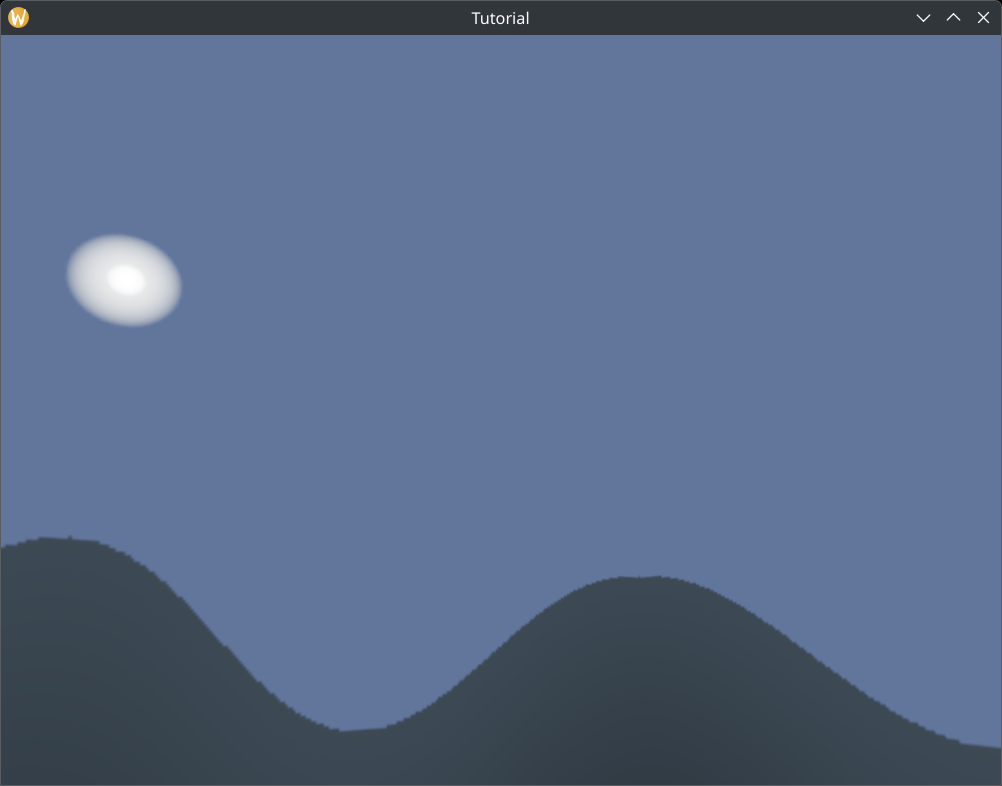
It's ridiculous, but it's simple enough for a tutorial. It does not require complicated simulations, third party dependencies for image decoding, etc., and the color scheme is fine for use in environment mapping. In a real world application you will replace this with something better.
I just insert the code that generates data for this cube image.
fn create_skydome(coord_x: f32, coord_y: f32, coord_z: f32) -> [f32; 3]
{
    let new_coord_x = coord_x * 2.0 - 1.0;
    let new_coord_y = coord_y * 2.0 - 1.0;
    let new_coord_z = coord_z * 2.0 - 1.0;

    let xz_len = (new_coord_x * new_coord_x + new_coord_z * new_coord_z).sqrt();
    let coord_z_xznorm = if xz_len > 1e-2 { new_coord_z / xz_len } else { 0.0 };

    let mut xz_angle = coord_z_xznorm.acos();
    if new_coord_x < 0.0
    {
        xz_angle = -xz_angle;
    }

    let height = 0.0625 * ((xz_angle * 8.0).cos()) + 0.5;

    let inner_sun_mlt = 1.0 / 32.0;
    let inner_sun_color = [
        255.0 * inner_sun_mlt,
        255.0 * inner_sun_mlt,
        255.0 * inner_sun_mlt
    ];

    let outer_sun_mlt = 1.0 / 256.0;
    let outer_sun_color = [
        231.0 * outer_sun_mlt,
        243.0 * outer_sun_mlt,
        255.0 * outer_sun_mlt
    ];

    let sky_mlt = 1.0 / 1280.0;
    let sky_color = [
        112.0 * sky_mlt,
        150.0 * sky_mlt,
        255.0 * sky_mlt
    ];

    let mountain_mlt_top = 1.0 / 1536.0;
    let mountain_color_top = [
        71.0 * mountain_mlt_top,
        90.0 * mountain_mlt_top,
        108.0 * mountain_mlt_top
    ];

    let mountain_mlt_bottom = 1.0 / 2048.0;
    let mountain_color_bottom = [
        71.0 * mountain_mlt_bottom,
        90.0 * mountain_mlt_bottom,
        108.0 * mountain_mlt_bottom
    ];

    if coord_y > height
    {
        let sun_x = 0.0;
        let sun_y = 0.5;
        let sun_to_current_x = sun_x - new_coord_x;
        let sun_to_current_y = sun_y - new_coord_y;
        let sun_radius = 0.025;

        let dist = (sun_to_current_x * sun_to_current_x + sun_to_current_y * sun_to_current_y).sqrt();

        if coord_z < 1e-2
        {
            if dist < sun_radius
            {
                let weight = (dist / sun_radius).min(1.0).max(0.0);
                [
                    inner_sun_color[0] * (1.0 - weight) + outer_sun_color[0] * weight,
                    inner_sun_color[1] * (1.0 - weight) + outer_sun_color[1] * weight,
                    inner_sun_color[2] * (1.0 - weight) + outer_sun_color[2] * weight
                ]
            }
            else
            {
                let weight = ((dist - sun_radius) * 20.0).min(1.0).max(0.0);
                [
                    outer_sun_color[0] * (1.0 - weight) + sky_color[0] * weight,
                    outer_sun_color[1] * (1.0 - weight) + sky_color[1] * weight,
                    outer_sun_color[2] * (1.0 - weight) + sky_color[2] * weight
                ]
            }
        }
        else
        {
            [
                sky_color[0],
                sky_color[1],
                sky_color[2],
            ]
        }
    }
    else
    {
        let weight = ((height - coord_y) * 5.0).min(1.0).max(0.0);
        [
            mountain_color_top[0] * (1.0 - weight) + mountain_color_bottom[0] * weight,
            mountain_color_top[1] * (1.0 - weight) + mountain_color_bottom[1] * weight,
            mountain_color_top[2] * (1.0 - weight) + mountain_color_bottom[2] * weight
        ]
    }
}
Since this is only some dummy test data, there isn't much point in discussing the above code in depth.
Now it's time to create the six float arrays containing the source data of the six cube image layers.
    //
    // Cube data
    //

    // ...

    let skydome_img_slice_float_array_size = skydome_img_width * skydome_img_height * cube_img_component_count;

    // Negative Z
    let mut skydome_image_data_neg_z: Vec<f32> = vec![0.0; skydome_img_slice_float_array_size];
    for i in 0..skydome_img_height
    {
        for j in 0..skydome_img_width
        {
            let skydome_coord_x = (skydome_img_height - j) as f32 / skydome_img_height as f32;
            let skydome_coord_y = (skydome_img_width - i) as f32 / skydome_img_width as f32;
            let skydome_coord_z = 0.0;

            let pixel_data_begin = (i * skydome_img_width + j) * cube_img_component_count;
            let pixel_data_end = (i * skydome_img_width + j + 1) * cube_img_component_count;
            let pixel_data = &mut skydome_image_data_neg_z[pixel_data_begin..pixel_data_end];

            let result = create_skydome(skydome_coord_x, skydome_coord_y, skydome_coord_z);

            pixel_data[0] = result[0];
            pixel_data[1] = result[1];
            pixel_data[2] = result[2];
        }
    }

    // Positive Z
    let mut skydome_image_data_pos_z: Vec<f32> = vec![0.0; skydome_img_slice_float_array_size];
    for i in 0..skydome_img_height
    {
        for j in 0..skydome_img_width
        {
            let skydome_coord_x = (j + 1) as f32 / skydome_img_width as f32;
            let skydome_coord_y = (skydome_img_height - i) as f32 / skydome_img_height as f32;
            let skydome_coord_z = 1.0;

            let pixel_data_begin = (i * skydome_img_width + j) * cube_img_component_count;
            let pixel_data_end = (i * skydome_img_width + j + 1) * cube_img_component_count;
            let pixel_data = &mut skydome_image_data_pos_z[pixel_data_begin..pixel_data_end];

            let result = create_skydome(skydome_coord_x, skydome_coord_y, skydome_coord_z);

            pixel_data[0] = result[0];
            pixel_data[1] = result[1];
            pixel_data[2] = result[2];
        }
    }

    // Negative Y
    let mut skydome_image_data_neg_y: Vec<f32> = vec![0.0; skydome_img_slice_float_array_size];
    for i in 0..skydome_img_height
    {
        for j in 0..skydome_img_width
        {
            let skydome_coord_x = (j + 1) as f32 / skydome_img_width as f32;
            let skydome_coord_y = 0.0;
            let skydome_coord_z = (skydome_img_height - i) as f32 / skydome_img_height as f32;

            let pixel_data_begin = (i * skydome_img_width + j) * cube_img_component_count;
            let pixel_data_end = (i * skydome_img_width + j + 1) * cube_img_component_count;
            let pixel_data = &mut skydome_image_data_neg_y[pixel_data_begin..pixel_data_end];

            let result = create_skydome(skydome_coord_x, skydome_coord_y, skydome_coord_z);

            pixel_data[0] = result[0];
            pixel_data[1] = result[1];
            pixel_data[2] = result[2];
        }
    }

    // Positive Y
    let mut skydome_image_data_pos_y: Vec<f32> = vec![0.0; skydome_img_slice_float_array_size];
    for i in 0..skydome_img_height
    {
        for j in 0..skydome_img_width
        {
            let skydome_coord_x = (j + 1) as f32 / skydome_img_width as f32;
            let skydome_coord_y = 1.0;
            let skydome_coord_z = (i + 1) as f32 / skydome_img_height as f32;

            let pixel_data_begin = (i * skydome_img_width + j) * cube_img_component_count;
            let pixel_data_end = (i * skydome_img_width + j + 1) * cube_img_component_count;
            let pixel_data = &mut skydome_image_data_pos_y[pixel_data_begin..pixel_data_end];

            let result = create_skydome(skydome_coord_x, skydome_coord_y, skydome_coord_z);

            pixel_data[0] = result[0];
            pixel_data[1] = result[1];
            pixel_data[2] = result[2];
        }
    }

    // Negative X
    let mut skydome_image_data_neg_x: Vec<f32> = vec![0.0; skydome_img_slice_float_array_size];
    for i in 0..skydome_img_height
    {
        for j in 0..skydome_img_width
        {
            let skydome_coord_x = 0.0;
            let skydome_coord_y = (skydome_img_height - i) as f32 / skydome_img_height as f32;
            let skydome_coord_z = (j + 1) as f32 / skydome_img_width as f32;

            let pixel_data_begin = (i * skydome_img_width + j) * cube_img_component_count;
            let pixel_data_end = (i * skydome_img_width + j + 1) * cube_img_component_count;
            let pixel_data = &mut skydome_image_data_neg_x[pixel_data_begin..pixel_data_end];

            let result = create_skydome(skydome_coord_x, skydome_coord_y, skydome_coord_z);

            pixel_data[0] = result[0];
            pixel_data[1] = result[1];
            pixel_data[2] = result[2];
        }
    }

    // Positive X
    let mut skydome_image_data_pos_x: Vec<f32> = vec![0.0; skydome_img_slice_float_array_size];
    for i in 0..skydome_img_height
    {
        for j in 0..skydome_img_width
        {
            let skydome_coord_x = 1.0;
            let skydome_coord_y = (skydome_img_height - i) as f32 / skydome_img_height as f32;
            let skydome_coord_z = (skydome_img_width - j) as f32 / skydome_img_width as f32;

            let pixel_data_begin = (i * skydome_img_width + j) * cube_img_component_count;
            let pixel_data_end = (i * skydome_img_width + j + 1) * cube_img_component_count;
            let pixel_data = &mut skydome_image_data_pos_x[pixel_data_begin..pixel_data_end];

            let result = create_skydome(skydome_coord_x, skydome_coord_y, skydome_coord_z);

            pixel_data[0] = result[0];
            pixel_data[1] = result[1];
            pixel_data[2] = result[2];
        }
    }
Now that the data is prepared we need to create the cube image. Textures previously required an image, an image view and a sampler, and their content needed to be uploaded. Cube images will be no different, just a few details will shift.
Image creation
Here we create the cube image. Aside from a few differences the code is almost the same as in the texturing chapter.
    //
    // Skydome texture
    //

    let mut format_properties = VkFormatProperties::default();
    unsafe
    {
        vkGetPhysicalDeviceFormatProperties(
            chosen_phys_device,
            cube_image_format,
            &mut format_properties
        );
    }

    if format_properties.optimalTilingFeatures & VK_FORMAT_FEATURE_SAMPLED_IMAGE_BIT as VkFormatFeatureFlags == 0
    {
        panic!("Image format VK_FORMAT_R32G32B32A32_SFLOAT with VK_IMAGE_TILING_OPTIMAL does not support usage flags VK_FORMAT_FEATURE_SAMPLED_IMAGE_BIT.");
    }

    let image_create_info = VkImageCreateInfo {
        sType: VK_STRUCTURE_TYPE_IMAGE_CREATE_INFO,
        pNext: std::ptr::null(),
        flags: VK_IMAGE_CREATE_CUBE_COMPATIBLE_BIT as VkImageCreateFlags,
        imageType: VK_IMAGE_TYPE_2D,
        format: cube_image_format,
        extent: VkExtent3D {
            width: skydome_img_width as u32,
            height: skydome_img_height as u32,
            depth: 1
        },
        mipLevels: 1,
        arrayLayers: 6,
        samples: VK_SAMPLE_COUNT_1_BIT,
        tiling: VK_IMAGE_TILING_OPTIMAL,
        usage: (VK_IMAGE_USAGE_SAMPLED_BIT |
                VK_IMAGE_USAGE_TRANSFER_DST_BIT) as VkImageUsageFlags,
        sharingMode: VK_SHARING_MODE_EXCLUSIVE,
        queueFamilyIndexCount: 0,
        pQueueFamilyIndices: std::ptr::null(),
        initialLayout: VK_IMAGE_LAYOUT_UNDEFINED
    };

    println!("Creating skydome image.");
    let mut skydome_image = std::ptr::null_mut();
    let result = unsafe
    {
        vkCreateImage(
            device,
            &image_create_info,
            std::ptr::null_mut(),
            &mut skydome_image
        )
    };

    if result != VK_SUCCESS
    {
        panic!("Failed to create skydome image. Error: {}", result);
    }
We prepared the skydome_img_width, skydome_img_height and cube_image_format
variables and here we use them in the appropriate fields.
There are two important details that are different for cube image creation. The first one is the flags
field, which will have the VK_IMAGE_CREATE_CUBE_COMPATIBLE_BIT flag set. The other one is the field
arrayLayers which is set to 6. This is the part that creates six image layers, one for every
cube face.
Let's add the cleanup code at the end of the program!
    //
    // Cleanup
    //

    let result = unsafe
    {
        vkDeviceWaitIdle(device)
    };

    // ...

    println!("Deleting skydome image");
    unsafe
    {
        vkDestroyImage(
            device,
            skydome_image,
            std::ptr::null_mut()
        );
    }
Allocating memory
Then we allocate memory for the image, which is done the same way as previously.
    //
    // Skydome texture
    //

    // ...

    let mut mem_requirements = VkMemoryRequirements::default();
    unsafe
    {
        vkGetImageMemoryRequirements(
            device,
            skydome_image,
            &mut mem_requirements
        );
    }

    let mut chosen_memory_type = phys_device_mem_properties.memoryTypeCount;
    for i in 0..phys_device_mem_properties.memoryTypeCount
    {
        if mem_requirements.memoryTypeBits & (1 << i) != 0 &&
            (phys_device_mem_properties.memoryTypes[i as usize].propertyFlags & image_mem_props) == image_mem_props
        {
            chosen_memory_type = i;
            break;
        }
    }

    if chosen_memory_type == phys_device_mem_properties.memoryTypeCount
    {
        panic!("Could not find memory type.");
    }

    let image_alloc_info = VkMemoryAllocateInfo {
        sType: VK_STRUCTURE_TYPE_MEMORY_ALLOCATE_INFO,
        pNext: std::ptr::null(),
        allocationSize: mem_requirements.size,
        memoryTypeIndex: chosen_memory_type
    };

    println!("Skydome image size: {}", mem_requirements.size);
    println!("Skydome image align: {}", mem_requirements.alignment);

    println!("Allocating skydome image memory");
    let mut skydome_image_memory = std::ptr::null_mut();
    let result = unsafe
    {
        vkAllocateMemory(
            device,
            &image_alloc_info,
            std::ptr::null(),
            &mut skydome_image_memory
        )
    };

    if result != VK_SUCCESS
    {
        panic!("Could not allocate memory. Error: {}", result);
    }

    let result = unsafe
    {
        vkBindImageMemory(
            device,
            skydome_image,
            skydome_image_memory,
            0
        )
    };

    if result != VK_SUCCESS
    {
        panic!("Failed to bind memory to skydome image. Error: {}", result);
    }
Let's clean up the allocation as well!
    //
    // Cleanup
    //

    let result = unsafe
    {
        vkDeviceWaitIdle(device)
    };

    // ...

    println!("Deleting skydome image device memory");
    unsafe
    {
        vkFreeMemory(
            device,
            skydome_image_memory,
            std::ptr::null_mut()
        );
    }
ImageView creation
Now we create the image view. Just as normal images, cube images will require image views for interpretation, just a few minor details will be different.
    //
    // Skydome image view
    //

    let image_view_create_info = VkImageViewCreateInfo {
        sType: VK_STRUCTURE_TYPE_IMAGE_VIEW_CREATE_INFO,
        pNext: std::ptr::null(),
        flags: 0x0,
        image: skydome_image,
        viewType: VK_IMAGE_VIEW_TYPE_CUBE,
        format: cube_image_format,
        components: VkComponentMapping {
            r: VK_COMPONENT_SWIZZLE_IDENTITY,
            g: VK_COMPONENT_SWIZZLE_IDENTITY,
            b: VK_COMPONENT_SWIZZLE_IDENTITY,
            a: VK_COMPONENT_SWIZZLE_IDENTITY
        },
        subresourceRange: VkImageSubresourceRange {
            aspectMask: VK_IMAGE_ASPECT_COLOR_BIT as VkImageAspectFlags,
            baseMipLevel: 0,
            levelCount: 1,
            baseArrayLayer: 0,
            layerCount: 6
        }
    };

    println!("Creating skydome image view.");
    let mut skydome_image_view = std::ptr::null_mut();
    let result = unsafe
    {
        vkCreateImageView(
            device,
            &image_view_create_info,
            std::ptr::null_mut(),
            &mut skydome_image_view
        )
    };

    if result != VK_SUCCESS
    {
        panic!("Failed to create skydome image view. Error: {}", result);
    }
The two things to pay attention to are the fields viewType and layerCount. The first one must
be set to VK_IMAGE_VIEW_TYPE_CUBE, and the second one must be set to 6
We need to clean up the cube image view as well.
    //
    // Cleanup
    //

    let result = unsafe
    {
        vkDeviceWaitIdle(device)
    };

    // ...

    println!("Deleting skydome image view");
    unsafe
    {
        vkDestroyImageView(
            device,
            skydome_image_view,
            std::ptr::null_mut()
        );
    }
Data upload
Now it's time to upload the image data to the cube image.
First we need to resize the staging buffer to make room for the cube image content.
    //
    // Staging buffer size
    //

    let geometry_data_end = vertex_data_size + index_data_size;

    // Padding image offset to image texel block size

    let image_align_remainder = geometry_data_end % image_texel_block_size;
    let image_padding = if image_align_remainder == 0 {0} else {image_texel_block_size - image_align_remainder};

    let image_data_offset = geometry_data_end + image_padding;
    let image_data_total_size = image_data_array.iter().fold(0, |sum, image| {sum + image.get_data_size()});

    let image_data_end = image_data_offset + image_data_total_size;

    // Padding image offset to image texel block size

    let skydome_image_align_remainder = image_data_end % cube_image_texel_block_size;
    let skydome_image_padding = if skydome_image_align_remainder == 0 {0} else {cube_image_texel_block_size - skydome_image_align_remainder};

    let skydome_image_data_offset = image_data_end + skydome_image_padding;
    let skydome_single_image_data_size = skydome_img_width * skydome_img_height * cube_img_bytes_per_pixel;
    let skydome_image_data_size = 6 * skydome_single_image_data_size;

    let staging_buffer_size = skydome_image_data_offset + skydome_image_data_size;

    let staging_buf_mem_props = (VK_MEMORY_PROPERTY_HOST_VISIBLE_BIT | VK_MEMORY_PROPERTY_HOST_COHERENT_BIT) as VkMemoryPropertyFlags;
Fundamentally the process is analogous to what we did for textures. We need to align the offset of the cube image data
to the cube_image_texel_block_size, then calculate the size of the source data in bytes for a single layer,
and reserve space for six of these.
Then we need to upload the cube image data into the staging buffer.
    //
    // Uploading to Staging buffer
    //

    let vertex_data_offset = 0;
    let index_data_offset = vertex_data_size as u64;

    unsafe
    {
        let mut data = core::ptr::null_mut();
        let result = vkMapMemory(
            device,
            staging_buffer_memory,
            0,
            staging_buffer_size as VkDeviceSize,
            0,
            &mut data
        );

        // ...

        //
        // Copy skydome image data to staging buffer
        //

        let skydome_offset = skydome_image_data_offset as isize;
        let skydome_image_data_neg_z_dest: *mut f32 = std::mem::transmute(data.offset(skydome_offset + neg_z_slice_id * skydome_single_image_data_size as isize));
        std::ptr::copy_nonoverlapping::<f32>(
            skydome_image_data_neg_z.as_ptr(),
            skydome_image_data_neg_z_dest,
            skydome_image_data_neg_z.len()
        );

        let skydome_image_data_pos_z_dest: *mut f32 = std::mem::transmute(data.offset(skydome_offset + pos_z_slice_id * skydome_single_image_data_size as isize));
        std::ptr::copy_nonoverlapping::<f32>(
            skydome_image_data_pos_z.as_ptr(),
            skydome_image_data_pos_z_dest,
            skydome_image_data_pos_z.len()
        );

        let skydome_image_data_neg_y_dest: *mut f32 = std::mem::transmute(data.offset(skydome_offset + neg_y_slice_id * skydome_single_image_data_size as isize));
        std::ptr::copy_nonoverlapping::<f32>(
            skydome_image_data_neg_y.as_ptr(),
            skydome_image_data_neg_y_dest,
            skydome_image_data_neg_y.len()
        );

        let skydome_image_data_pos_y_dest: *mut f32 = std::mem::transmute(data.offset(skydome_offset + pos_y_slice_id * skydome_single_image_data_size as isize));
        std::ptr::copy_nonoverlapping::<f32>(
            skydome_image_data_pos_y.as_ptr(),
            skydome_image_data_pos_y_dest,
            skydome_image_data_pos_y.len()
        );

        let skydome_image_data_neg_x_dest: *mut f32 = std::mem::transmute(data.offset(skydome_offset + neg_x_slice_id * skydome_single_image_data_size as isize));
        std::ptr::copy_nonoverlapping::<f32>(
            skydome_image_data_neg_x.as_ptr(),
            skydome_image_data_neg_x_dest,
            skydome_image_data_neg_x.len()
        );

        let skydome_image_data_pos_x_dest: *mut f32 = std::mem::transmute(data.offset(skydome_offset + pos_x_slice_id * skydome_single_image_data_size as isize));
        std::ptr::copy_nonoverlapping::<f32>(
            skydome_image_data_pos_x.as_ptr(),
            skydome_image_data_pos_x_dest,
            skydome_image_data_pos_x.len()
        );

        vkUnmapMemory(
            device,
            staging_buffer_memory
        );
    }
Then we need to record the transfer commands.
First let's add a layout transition to VK_IMAGE_LAYOUT_TRANSFER_DST_OPTIMAL.
    //
    // Memory transfer
    //

    {
        // ...

        //
        // Copy image data from staging buffer to image
        //

        let mut transfer_dst_barriers = Vec::with_capacity(images.len() + 1); // We have increased this by one
        for image in images.iter()
        {
            transfer_dst_barriers.push(
                VkImageMemoryBarrier {
                    sType: VK_STRUCTURE_TYPE_IMAGE_MEMORY_BARRIER,
                    pNext: core::ptr::null(),
                    srcAccessMask: VK_ACCESS_HOST_WRITE_BIT as VkAccessFlags,
                    dstAccessMask: VK_ACCESS_TRANSFER_WRITE_BIT as VkAccessFlags,
                    oldLayout: VK_IMAGE_LAYOUT_UNDEFINED,
                    newLayout: VK_IMAGE_LAYOUT_TRANSFER_DST_OPTIMAL,
                    srcQueueFamilyIndex: VK_QUEUE_FAMILY_IGNORED as u32,
                    dstQueueFamilyIndex: VK_QUEUE_FAMILY_IGNORED as u32,
                    image: *image,
                    subresourceRange: VkImageSubresourceRange {
                        aspectMask: VK_IMAGE_ASPECT_COLOR_BIT as VkImageAspectFlags,
                        baseMipLevel: 0,
                        levelCount: 1,
                        baseArrayLayer: 0,
                        layerCount: 1
                    }
                }
            );
        }

        // This is new
        transfer_dst_barriers.push(
            VkImageMemoryBarrier {
                sType: VK_STRUCTURE_TYPE_IMAGE_MEMORY_BARRIER,
                pNext: std::ptr::null(),
                srcAccessMask: VK_ACCESS_HOST_WRITE_BIT as VkAccessFlags,
                dstAccessMask: VK_ACCESS_TRANSFER_WRITE_BIT as VkAccessFlags,
                oldLayout: VK_IMAGE_LAYOUT_UNDEFINED,
                newLayout: VK_IMAGE_LAYOUT_TRANSFER_DST_OPTIMAL,
                srcQueueFamilyIndex: VK_QUEUE_FAMILY_IGNORED as u32,
                dstQueueFamilyIndex: VK_QUEUE_FAMILY_IGNORED as u32,
                image: skydome_image,
                subresourceRange: VkImageSubresourceRange {
                    aspectMask: VK_IMAGE_ASPECT_COLOR_BIT as VkImageAspectFlags,
                    baseMipLevel: 0,
                    levelCount: 1,
                    baseArrayLayer: 0,
                    layerCount: 6
                }
            }
        );

        unsafe
        {
            vkCmdPipelineBarrier(
                transfer_cmd_buffer,
                VK_PIPELINE_STAGE_HOST_BIT as VkPipelineStageFlags,
                VK_PIPELINE_STAGE_TRANSFER_BIT as VkPipelineStageFlags,
                0,
                0,
                core::ptr::null(),
                0,
                core::ptr::null(),
                transfer_dst_barriers.len() as u32,
                transfer_dst_barriers.as_ptr()
            );
        }

        // ...
    }
Then let's record the copy commands!
    //
    // Memory transfer
    //

    {
        // ...

        //
        // Copy image data from staging buffer to image
        //

        // ...

        let copy_region = [
            VkBufferImageCopy {
                bufferOffset: skydome_image_data_offset as VkDeviceSize,
                bufferRowLength: 0,
                bufferImageHeight: 0,
                imageSubresource: VkImageSubresourceLayers {
                    aspectMask: VK_IMAGE_ASPECT_COLOR_BIT as VkImageAspectFlags,
                    mipLevel: 0,
                    baseArrayLayer: 0,
                    layerCount: 6
                },
                imageOffset: VkOffset3D {
                    x: 0,
                    y: 0,
                    z: 0
                },
                imageExtent: VkExtent3D {
                    width: skydome_img_width as u32,
                    height: skydome_img_height as u32,
                    depth: 1
                }
            }
        ];

        unsafe
        {
            vkCmdCopyBufferToImage(
                transfer_cmd_buffer,
                staging_buffer,
                skydome_image,
                VK_IMAGE_LAYOUT_TRANSFER_DST_OPTIMAL,
                copy_region.len() as u32,
                copy_region.as_ptr()
            );
        }

        // ...
    }
This is also almost the same as the one for textures, but this time the layerCount is 6.
If you use array images, you can upload consecutive array layers like this in general.
Finally let's add layout transition to VK_IMAGE_LAYOUT_SHADER_READ_ONLY_OPTIMAL.
    //
    // Memory transfer
    //

    {
        // ...

        //
        // Copy image data from staging buffer to image
        //

        // ...

        let mut sampler_src_barriers = Vec::with_capacity(images.len() + 1); // We have increased this by one
        for image in images.iter()
        {
            sampler_src_barriers.push(
                VkImageMemoryBarrier {
                    sType: VK_STRUCTURE_TYPE_IMAGE_MEMORY_BARRIER,
                    pNext: core::ptr::null(),
                    srcAccessMask: VK_ACCESS_TRANSFER_WRITE_BIT as VkAccessFlags,
                    dstAccessMask: VK_ACCESS_SHADER_READ_BIT as VkAccessFlags,
                    oldLayout: VK_IMAGE_LAYOUT_TRANSFER_DST_OPTIMAL,
                    newLayout: VK_IMAGE_LAYOUT_SHADER_READ_ONLY_OPTIMAL,
                    srcQueueFamilyIndex: VK_QUEUE_FAMILY_IGNORED as u32,
                    dstQueueFamilyIndex: VK_QUEUE_FAMILY_IGNORED as u32,
                    image: *image,
                    subresourceRange: VkImageSubresourceRange {
                        aspectMask: VK_IMAGE_ASPECT_COLOR_BIT as VkImageAspectFlags,
                        baseMipLevel: 0,
                        levelCount: 1,
                        baseArrayLayer: 0,
                        layerCount: 1
                    }
                }
            );
        }

        // This is new
        sampler_src_barriers.push(
            VkImageMemoryBarrier {
                sType: VK_STRUCTURE_TYPE_IMAGE_MEMORY_BARRIER,
                pNext: std::ptr::null(),
                srcAccessMask: VK_ACCESS_TRANSFER_WRITE_BIT as VkAccessFlags,
                dstAccessMask: VK_ACCESS_SHADER_READ_BIT as VkAccessFlags,
                oldLayout: VK_IMAGE_LAYOUT_TRANSFER_DST_OPTIMAL,
                newLayout: VK_IMAGE_LAYOUT_SHADER_READ_ONLY_OPTIMAL,
                srcQueueFamilyIndex: VK_QUEUE_FAMILY_IGNORED as u32,
                dstQueueFamilyIndex: VK_QUEUE_FAMILY_IGNORED as u32,
                image: skydome_image,
                subresourceRange: VkImageSubresourceRange {
                    aspectMask: VK_IMAGE_ASPECT_COLOR_BIT as VkImageAspectFlags,
                    baseMipLevel: 0,
                    levelCount: 1,
                    baseArrayLayer: 0,
                    layerCount: 6
                }
            }
        );

        unsafe
        {
            vkCmdPipelineBarrier(
                transfer_cmd_buffer,
                VK_PIPELINE_STAGE_TRANSFER_BIT as VkPipelineStageFlags,
                VK_PIPELINE_STAGE_FRAGMENT_SHADER_BIT as VkPipelineStageFlags,
                0,
                0,
                core::ptr::null(),
                0,
                core::ptr::null(),
                sampler_src_barriers.len() as u32,
                sampler_src_barriers.as_ptr()
            );
        }

        let result = unsafe
        {
            vkEndCommandBuffer(
                transfer_cmd_buffer
            )
        };

        // ...
    }
That will take care of data upload.
Sampler creation
The skydome's cube texture will be a sampled image in the shader, and it will require a sampler. In the
texturing chapter we configured the texture sampler for
VK_FILTER_NEAREST filtering, which will look ugly on our skydome, so let's create a new one!
    //
    // Cube sampler
    //

    let sampler_create_info = VkSamplerCreateInfo {
        sType: VK_STRUCTURE_TYPE_SAMPLER_CREATE_INFO,
        pNext: std::ptr::null(),
        flags: 0x0,
        magFilter: VK_FILTER_LINEAR,
        minFilter: VK_FILTER_LINEAR,
        mipmapMode: VK_SAMPLER_MIPMAP_MODE_NEAREST,
        addressModeU: VK_SAMPLER_ADDRESS_MODE_CLAMP_TO_EDGE,
        addressModeV: VK_SAMPLER_ADDRESS_MODE_CLAMP_TO_EDGE,
        addressModeW: VK_SAMPLER_ADDRESS_MODE_CLAMP_TO_EDGE,
        mipLodBias: 0.0,
        anisotropyEnable: VK_FALSE,
        maxAnisotropy: 0.0,
        compareEnable: VK_FALSE,
        compareOp: VK_COMPARE_OP_NEVER,
        minLod: 0.0,
        maxLod: 0.0,
        borderColor: VK_BORDER_COLOR_INT_OPAQUE_BLACK,
        unnormalizedCoordinates: VK_FALSE
    };

    println!("Creating cube sampler.");
    let mut cube_sampler = std::ptr::null_mut();
    let result = unsafe
    {
        vkCreateSampler(
            device,
            &sampler_create_info,
            std::ptr::null_mut(),
            &mut cube_sampler
        )
    };

    if result != VK_SUCCESS
    {
        panic!("Failed to create cube sampler. Error: {}", result);
    }
The main difference between the texture sampler and this one is the VK_FILTER_LINEAR filtering. This will
make the skydome texture look much less pixelated.
In the next chapter we will modify this sampler even further.
Let's destroy it at the end of the program!
    //
    // Cleanup
    //

    let result = unsafe
    {
        vkDeviceWaitIdle(device)
    };

    // ...

    println!("Deleting cube sampler");
    unsafe
    {
        vkDestroySampler(
            device,
            cube_sampler,
            std::ptr::null_mut()
        );
    }
Now that we have the resource created, it's time to set up the descriptors.
Descriptor set layout
We need to access our newly created cube image from shaders and for that we need descriptors. That starts with adjusting the descriptor set layout, so let's do that!
    //
    // Descriptor set layout
    //

    let max_ubo_descriptor_count = 8;
    let max_tex2d_descriptor_count = 2;
    let max_texcube_descriptor_count = 1;

    let layout_bindings = [
        VkDescriptorSetLayoutBinding {
            binding: 0,
            descriptorType: VK_DESCRIPTOR_TYPE_UNIFORM_BUFFER,
            descriptorCount: max_ubo_descriptor_count,
            stageFlags: VK_SHADER_STAGE_VERTEX_BIT as VkShaderStageFlags,
            pImmutableSamplers: core::ptr::null()
        },
        VkDescriptorSetLayoutBinding {
            binding: 1,
            descriptorType: VK_DESCRIPTOR_TYPE_COMBINED_IMAGE_SAMPLER,
            descriptorCount: max_tex2d_descriptor_count,
            stageFlags: VK_SHADER_STAGE_FRAGMENT_BIT as VkShaderStageFlags,
            pImmutableSamplers: core::ptr::null()
        },
        VkDescriptorSetLayoutBinding {
            binding: 2,
            descriptorType: VK_DESCRIPTOR_TYPE_UNIFORM_BUFFER,
            descriptorCount: max_ubo_descriptor_count,
            stageFlags: VK_SHADER_STAGE_FRAGMENT_BIT as VkShaderStageFlags,
            pImmutableSamplers: core::ptr::null()
        },
        VkDescriptorSetLayoutBinding {
            binding: 3,
            descriptorType: VK_DESCRIPTOR_TYPE_UNIFORM_BUFFER,
            descriptorCount: max_ubo_descriptor_count,
            stageFlags: VK_SHADER_STAGE_FRAGMENT_BIT as VkShaderStageFlags,
            pImmutableSamplers: core::ptr::null()
        },
        VkDescriptorSetLayoutBinding {
            binding: 4,
            descriptorType: VK_DESCRIPTOR_TYPE_COMBINED_IMAGE_SAMPLER,
            descriptorCount: max_texcube_descriptor_count,
            stageFlags: VK_SHADER_STAGE_FRAGMENT_BIT as VkShaderStageFlags,
            pImmutableSamplers: core::ptr::null()
        }
    ];

    let descriptor_set_layout_create_info = VkDescriptorSetLayoutCreateInfo {
        sType: VK_STRUCTURE_TYPE_DESCRIPTOR_SET_LAYOUT_CREATE_INFO,
        pNext: core::ptr::null(),
        flags: 0x0,
        bindingCount: layout_bindings.len() as u32,
        pBindings: layout_bindings.as_ptr()
    };
We append a new combined image sampler descriptor binding and create a variable to control its array size.
Now let's allocate and write descriptors!
Descriptor set
We need to resize the descriptor pool to make sure there is room for the new cube image descriptors.
    //
    // Descriptor pool & descriptor set
    //

    let pool_sizes = [
        VkDescriptorPoolSize {
            type_: VK_DESCRIPTOR_TYPE_UNIFORM_BUFFER,
            descriptorCount: max_ubo_descriptor_count * 3
        },
        VkDescriptorPoolSize {
            type_: VK_DESCRIPTOR_TYPE_COMBINED_IMAGE_SAMPLER,
            descriptorCount: max_tex2d_descriptor_count + max_texcube_descriptor_count
        }
    ];

    // ...
Since the descriptor set layout was extended, the allocated descriptor set will have the new cube image descriptor allocated for it. We just need to fill it with the right kind of data.
That means adding new descriptor writes.
    //
    // Descriptor pool & descriptor set
    //

    // ...

    // Writing descriptor set

    // ...

    // Writing cube texture descriptors

    let texcube_descriptor_writes = [
        VkDescriptorImageInfo {
            sampler: cube_sampler,
            imageView: skydome_image_view,
            imageLayout: VK_IMAGE_LAYOUT_SHADER_READ_ONLY_OPTIMAL
        }
    ];

    let descriptor_set_writes = [
        VkWriteDescriptorSet {
            sType: VK_STRUCTURE_TYPE_WRITE_DESCRIPTOR_SET,
            pNext: core::ptr::null(),
            dstSet: descriptor_set,
            dstBinding: 0,
            dstArrayElement: 0,
            descriptorCount: transform_ubo_descriptor_writes.len() as u32,
            descriptorType: VK_DESCRIPTOR_TYPE_UNIFORM_BUFFER,
            pImageInfo: core::ptr::null(),
            pBufferInfo: transform_ubo_descriptor_writes.as_ptr(),
            pTexelBufferView: core::ptr::null()
        },
        VkWriteDescriptorSet {
            sType: VK_STRUCTURE_TYPE_WRITE_DESCRIPTOR_SET,
            pNext: core::ptr::null(),
            dstSet: descriptor_set,
            dstBinding: 1,
            dstArrayElement: 0,
            descriptorCount: tex2d_descriptor_writes.len() as u32,
            descriptorType: VK_DESCRIPTOR_TYPE_COMBINED_IMAGE_SAMPLER,
            pImageInfo: tex2d_descriptor_writes.as_ptr(),
            pBufferInfo: core::ptr::null(),
            pTexelBufferView: core::ptr::null()
        },
        VkWriteDescriptorSet {
            sType: VK_STRUCTURE_TYPE_WRITE_DESCRIPTOR_SET,
            pNext: core::ptr::null(),
            dstSet: descriptor_set,
            dstBinding: 2,
            dstArrayElement: 0,
            descriptorCount: material_ubo_descriptor_writes.len() as u32,
            descriptorType: VK_DESCRIPTOR_TYPE_UNIFORM_BUFFER,
            pImageInfo: core::ptr::null(),
            pBufferInfo: material_ubo_descriptor_writes.as_ptr(),
            pTexelBufferView: core::ptr::null()
        },
        VkWriteDescriptorSet {
            sType: VK_STRUCTURE_TYPE_WRITE_DESCRIPTOR_SET,
            pNext: core::ptr::null(),
            dstSet: descriptor_set,
            dstBinding: 3,
            dstArrayElement: 0,
            descriptorCount: light_ubo_descriptor_writes.len() as u32,
            descriptorType: VK_DESCRIPTOR_TYPE_UNIFORM_BUFFER,
            pImageInfo: core::ptr::null(),
            pBufferInfo: light_ubo_descriptor_writes.as_ptr(),
            pTexelBufferView: core::ptr::null()
        },
        VkWriteDescriptorSet {
            sType: VK_STRUCTURE_TYPE_WRITE_DESCRIPTOR_SET,
            pNext: core::ptr::null(),
            dstSet: descriptor_set,
            dstBinding: 4,
            dstArrayElement: 0,
            descriptorCount: texcube_descriptor_writes.len() as u32,
            descriptorType: VK_DESCRIPTOR_TYPE_COMBINED_IMAGE_SAMPLER,
            pImageInfo: texcube_descriptor_writes.as_ptr(),
            pBufferInfo: core::ptr::null(),
            pTexelBufferView: core::ptr::null()
        }
    ];
We fill it with the new cube image and the new sampler, and append it to the descriptor set writes array.
Shader programming
Before we draw our models, we are going to draw the skydome with a separate pipeline and separate shaders. Here we write the skydome vertex and fragment shaders.
We will load our new shaders into new shader objects.
    //
    // Shader modules
    //

    // Vertex shader

    // Here we load our old vertex shader

    // Fragment shader

    // Here we load our old fragment shader

    // Skydome vertex shader

    // Here we load our new vertex shader

    // Skydome fragment shader

    // Here we load our new fragment shader
Vertex shader
First let's write the vertex shader.
#version 460

const uint MAX_UBO_DESCRIPTOR_COUNT = 8;

struct CameraData
{
    mat4 projection_matrix;
    mat4 view_matrix;
};

layout(std140, set=0, binding = 0) uniform UniformData {
    CameraData cam_data;
} uniform_data[MAX_UBO_DESCRIPTOR_COUNT];

layout(push_constant) uniform ResourceIndices {
    layout(offset=4) uint ubo_desc_index;
} resource_indices;

layout(location = 0) in vec3 position;

layout(location = 0) out vec3 frag_position;

void main()
{
    uint ubo_desc_index = resource_indices.ubo_desc_index;

    mat4 view_matrix = uniform_data[ubo_desc_index].cam_data.view_matrix;
    mat4 projection_matrix = uniform_data[ubo_desc_index].cam_data.projection_matrix;

    frag_position = position;

    vec4 non_translated_pos = view_matrix * vec4(position, 0.0);
    gl_Position = projection_matrix * vec4(non_translated_pos.xyz, 1.0);
}
This one is simpler than the vertex shader of our scene objects. The skydome will be rendered with a unit sphere and this shader will keep that in mind.
We will not have a model matrix for the skydome. Wherever we are, we want the unit sphere to be at the center. The assumption is that the sky is so far that any movement will be negligible, the sky does not get visibly closer. However some of the view transform needs to be taken into consideration. As we look at different parts of the sky, we want to see those parts of the sky.
Fundamentally we want to apply the rotation part of the view transformation, but not the translation. The approach I take is creating homogeneous coordinates whose fourth component is set to zero, apply the view transformation, and this results in the view rotation being applied, and the view translation being ignored.
When we do the projection however, the fourth component will be important, so we create homogeneous coordinates where the fourth coordinate will be 1. This makes sure that the projection is done correctly.
I saved this file as 07_skydome.vert.
./build_tools/bin/glslangValidator -V -o ./shaders/07_skydome.vert.spv ./shader_src/vertex_shaders/07_skydome.vert
Once our binary is ready, we need to load it. We load it into a new shader object.
    //
    // Shader modules
    //

    // ...

    // Skydome vertex shader

    let mut file = std::fs::File::open(
        "./shaders/07_skydome.vert.spv"
    ).expect("Could not open shader source");

    let mut bytecode = Vec::new();
    file.read_to_end(&mut bytecode).expect("Failed to read shader source");

    let shader_module_create_info = VkShaderModuleCreateInfo {
        sType: VK_STRUCTURE_TYPE_SHADER_MODULE_CREATE_INFO,
        pNext: std::ptr::null(),
        flags: 0x0,
        codeSize: bytecode.len(),
        pCode: bytecode.as_ptr() as *const u32
    };

    println!("Creating skydome vertex shader module.");
    let mut skydome_vertex_shader_module = std::ptr::null_mut();
    let result = unsafe
    {
        vkCreateShaderModule(
            device,
            &shader_module_create_info,
            std::ptr::null_mut(),
            &mut skydome_vertex_shader_module
        )
    };

    if result != VK_SUCCESS
    {
        panic!("Failed to create skydome vertex shader. Error: {}.", result);
    }
We need to clean this up at the end of the program.
    //
    // Cleanup
    //

    let result = unsafe
    {
        vkDeviceWaitIdle(device)
    };

    // ...

    println!("Deleting skydome vertex shader module");
    unsafe
    {
        vkDestroyShaderModule(
            device,
            skydome_vertex_shader_module,
            std::ptr::null_mut()
        );
    }

    // ...
Now its time for our fragment shader!
Fragment shader
The skydome will require a new fragment shader as well.
#version 460

const uint MAX_UBO_DESCRIPTOR_COUNT = 8;

layout(set = 0, binding = 4) uniform samplerCube skydome_sampler;

layout(std140, set=0, binding = 2) uniform UniformData {
    float exposure_value;
} uniform_data[MAX_UBO_DESCRIPTOR_COUNT];

layout(push_constant) uniform ResourceIndices {
    layout(offset=4) uint ubo_desc_index;
} resource_indices;

layout(location = 0) in vec3 position;

layout(location = 0) out vec4 fragment_color;

void main()
{
    uint ubo_desc_index = resource_indices.ubo_desc_index;

    // Sampling skydome cubemap

    vec3 radiance = texture(skydome_sampler, position).rgb;

    // Exposure

    float exposure_value = uniform_data[ubo_desc_index].exposure_value;
    float ISO_speed = 100.0;
    float lens_vignetting_attenuation = 0.65;
    float max_luminance = (78.0 / (ISO_speed * lens_vignetting_attenuation)) * exp2(exposure_value);

    float max_spectral_lum_efficacy = 683.0;
    float max_radiance = max_luminance / max_spectral_lum_efficacy;
    float exposure = 1.0 / max_radiance;

    vec3 exp_radiance = radiance * exposure;

    // Tone mapping

    float a = 2.51f;
    float b = 0.03f;
    float c = 2.43f;
    float d = 0.59f;
    float e = 0.14f;
    vec3 tonemapped_color = clamp((exp_radiance*(a*exp_radiance+b))/(exp_radiance*(c*exp_radiance+d)+e), 0.0, 1.0);

    // Linear to sRGB

    vec3 srgb_lo = 12.92 * tonemapped_color;
    vec3 srgb_hi = 1.055 * pow(tonemapped_color, vec3(1.0/2.4)) - 0.055;
    vec3 srgb_color = vec3(
        tonemapped_color.r <= 0.0031308 ? srgb_lo.r : srgb_hi.r,
        tonemapped_color.g <= 0.0031308 ? srgb_lo.g : srgb_hi.g,
        tonemapped_color.b <= 0.0031308 ? srgb_lo.b : srgb_hi.b
    );

    fragment_color = vec4(srgb_color, 1.0);
}
The skydome fragment shader will be relatively straightforward. The radiance value stored in the cube image for a given direction is the radiance value arriving at the camera.
The skydome cubemap is stored in the variable
layout(set = 0, binding = 4) uniform samplerCube skydome_sampler which has the type
samplerCube. With a sampled image of this type the function texture will take a 3D vector and
returns the image data present at that direction. Let's remember the addressing scheme! The six array layers of a cube
image are assigned to the six faces of the cube. The texture function will select the matching face and
fetch the image data at the point the 3D vector points to.
Once we have the cube image data, we have the radiance arriving at the camera. We apply the standard postprocessing steps
that we used on the result of the rendering equation. We will need the exposure value, so we add the uniform variable
uniform_data with the layout qualifier layout(std140, set=0, binding = 2), which is where we
store the exposure value in the uniform buffers. We do not need anything else in that uniform buffer region, so we do not
include them here.
I saved this file as 04_skydome.frag.
./build_tools/bin/glslangValidator -V -o ./shaders/04_skydome.frag.spv ./shader_src/fragment_shaders/04_skydome.frag
Once our binary is ready, we need to load it.
    //
    // Shader modules
    //

    // ...

    // Skydome fragment shader

    let mut file = std::fs::File::open(
        "./shaders/04_skydome.frag.spv"
    ).expect("Could not open shader source");

    let mut bytecode = Vec::new();
    file.read_to_end(&mut bytecode).expect("Failed to read shader source");

    let shader_module_create_info = VkShaderModuleCreateInfo {
        sType: VK_STRUCTURE_TYPE_SHADER_MODULE_CREATE_INFO,
        pNext: std::ptr::null(),
        flags: 0x0,
        codeSize: bytecode.len(),
        pCode: bytecode.as_ptr() as *const u32
    };

    println!("Creating skydome fragment shader module.");
    let mut skydome_fragment_shader_module = std::ptr::null_mut();
    let result = unsafe
    {
        vkCreateShaderModule(
            device,
            &shader_module_create_info,
            std::ptr::null_mut(),
            &mut skydome_fragment_shader_module
        )
    };

    if result != VK_SUCCESS
    {
        panic!("Failed to create skydome fragment shader. Error: {}.", result);
    }
We need to clean this shader up as well.
    //
    // Cleanup
    //

    let result = unsafe
    {
        vkDeviceWaitIdle(device)
    };

    // ...

    println!("Deleting skydome fragment shader module");
    unsafe
    {
        vkDestroyShaderModule(
            device,
            skydome_fragment_shader_module,
            std::ptr::null_mut()
        );
    }

    // ...
Now it's time to create a pipeline for our skydome.
Creating skydome pipeline
Now we create a new pipeline to render the skydome with. We will keep the old pipeline around for the scene elements and create a new one for the skydome. Some of the pipeline state will be the same, so we will reuse them. Others will be different, we will create separate ones for them. Finally we will issue the call to create the pipelines. Let's remember that a single call can create multiple pipelines, and we will take advantage of that.
Renaming our old shaders
Some elements of the pipeline will be the same for skydome and scene element rendering, and some will be different. The vertex and fragment shaders will definitely be different. So far we only had one pipeline, and one vertex and fragment shader. Now we have two, and it helps code readability if we give them more specific names.
The skydome vertex and fragment shaders already have names that communicate what those shaders are good for, but the
shaders for the scene elements is still generic. Let's rename them! Naming things is tricky, I will just prepend the
word model_* to variable names.
Let's do that with the vertex and fragment shader.
    //
    // Shader modules
    //

    // Vertex shader

    // ...

    println!("Creating model vertex shader module.");
    let mut model_vertex_shader_module = core::ptr::null_mut();
    let result = unsafe
    {
        vkCreateShaderModule(
            device,
            &shader_module_create_info,
            core::ptr::null_mut(),
            &mut model_vertex_shader_module
        )
    };

    // ...

    // Fragment shader

    // ...

    println!("Creating model fragment shader module.");
    let mut model_fragment_shader_module = core::ptr::null_mut();
    let result = unsafe
    {
        vkCreateShaderModule(
            device,
            &shader_module_create_info,
            core::ptr::null_mut(),
            &mut model_fragment_shader_module
        )
    };

    // ...
Now their names are model_vertex_shader_module and model_fragment_shader_module.
The cleanup code must be adjusted too.
    //
    // Cleanup
    //

    let result = unsafe
    {
        vkDeviceWaitIdle(device)
    };

    // ...

    println!("Deleting model fragment shader module");
    unsafe
    {
        vkDestroyShaderModule(
            device,
            model_fragment_shader_module,
            core::ptr::null_mut()
        );
    }

    println!("Deleting model vertex shader module");
    unsafe
    {
        vkDestroyShaderModule(
            device,
            model_vertex_shader_module,
            core::ptr::null_mut()
        );
    }

    // ...
Now let's create the pipelines!
Creating the pipeline
Most of the create infos for the two pipeline will be the same, and we won't touch them. There are only two create infos that need adjustment: the shader stages and the depth stencil state.
The shader stages are evident, because we use different shaders. As for the depth stencil, in the approach presented in this tutorial we draw the skydome first, and we do not want it to cover anything, so we turn off depth write. Then we draw the scene elements. It's not the most efficient, because the parts of the skydome that are occluded will have fragment shader invocations running for them and then their result will be overwritten, but the resulting image will be correct regardless, so for now I call it good enough.
Now let's get started with adjusting and renaming create infos of the old pipeline!
Let's rename the shader stage create info variable of the old pipeline!
    //
    // Pipeline state
    //

    // Model pipeline state

    let model_shader_stage_info = [
        VkPipelineShaderStageCreateInfo {
            sType: VK_STRUCTURE_TYPE_PIPELINE_SHADER_STAGE_CREATE_INFO,
            pNext: core::ptr::null(),
            flags: 0x0,
            pSpecializationInfo: core::ptr::null(),
            stage: VK_SHADER_STAGE_VERTEX_BIT,
            module: model_vertex_shader_module,
            pName: b"main\0".as_ptr() as *const i8
        },
        VkPipelineShaderStageCreateInfo {
            sType: VK_STRUCTURE_TYPE_PIPELINE_SHADER_STAGE_CREATE_INFO,
            pNext: core::ptr::null(),
            flags: 0x0,
            pSpecializationInfo: core::ptr::null(),
            stage: VK_SHADER_STAGE_FRAGMENT_BIT,
            module: model_fragment_shader_module,
            pName: b"main\0".as_ptr() as *const i8
        }
    ];
Since the name of the variables holding the shader objects changed, it must be reflected here as well.
Let's also rename the depth stencil state create info!
    //
    // Pipeline state
    //

    // ...

    let model_depth_stencil_state = VkPipelineDepthStencilStateCreateInfo {
        // ...
    };
Here the content does not need to change.
Now let's add the shader stages and depth stencil state for the skydome pipeline!
    //
    // Pipeline state
    //

    // ...

    // Skydome pipeline state

    let skydome_shader_stage_info = [
        VkPipelineShaderStageCreateInfo {
            sType: VK_STRUCTURE_TYPE_PIPELINE_SHADER_STAGE_CREATE_INFO,
            pNext: core::ptr::null(),
            flags: 0x0,
            pSpecializationInfo: core::ptr::null(),
            stage: VK_SHADER_STAGE_VERTEX_BIT,
            module: skydome_vertex_shader_module,
            pName: b"main\0".as_ptr() as *const i8
        },
        VkPipelineShaderStageCreateInfo {
            sType: VK_STRUCTURE_TYPE_PIPELINE_SHADER_STAGE_CREATE_INFO,
            pNext: core::ptr::null(),
            flags: 0x0,
            pSpecializationInfo: core::ptr::null(),
            stage: VK_SHADER_STAGE_FRAGMENT_BIT,
            module: skydome_fragment_shader_module,
            pName: b"main\0".as_ptr() as *const i8
        }
    ];

    let skydome_depth_stencil_state = VkPipelineDepthStencilStateCreateInfo {
        sType: VK_STRUCTURE_TYPE_PIPELINE_DEPTH_STENCIL_STATE_CREATE_INFO,
        pNext: core::ptr::null(),
        flags: 0x0,
        depthTestEnable: VK_FALSE,
        depthWriteEnable: VK_FALSE,
        depthCompareOp: VK_COMPARE_OP_LESS,
        depthBoundsTestEnable: VK_FALSE,
        stencilTestEnable: VK_FALSE,
        front: VkStencilOpState {
            failOp: VK_STENCIL_OP_KEEP,
            passOp: VK_STENCIL_OP_KEEP,
            depthFailOp: VK_STENCIL_OP_KEEP,
            compareOp: VK_COMPARE_OP_NEVER,
            compareMask: 0,
            writeMask: 0,
            reference: 0
        },
        back: VkStencilOpState {
            failOp: VK_STENCIL_OP_KEEP,
            passOp: VK_STENCIL_OP_KEEP,
            depthFailOp: VK_STENCIL_OP_KEEP,
            compareOp: VK_COMPARE_OP_NEVER,
            compareMask: 0,
            writeMask: 0,
            reference: 0
        },
        minDepthBounds: 0.0,
        maxDepthBounds: 1.0
    };
The shader stage info contains the new shaders, and the depth stencil create info has the depth testing and depth write disabled.
The rest will be the same. If you remember the
hardcoded triangle tutorial, I said that you can and
should create multiple pipelines with a single vkCreateGraphicsPipelines call whenever it's possible. Here
we will create both our model and skydome pipeline with a single call.
    //
    // Pipeline state
    //

    // ...

    // Creation

    let pipeline_create_infos = [
        VkGraphicsPipelineCreateInfo {
            sType: VK_STRUCTURE_TYPE_GRAPHICS_PIPELINE_CREATE_INFO,
            pNext: core::ptr::null(),
            flags: 0x0,
            stageCount: model_shader_stage_info.len() as u32,
            pStages: model_shader_stage_info.as_ptr(),
            pVertexInputState: &vertex_input_state,
            pInputAssemblyState: &input_assembly_state,
            pTessellationState: core::ptr::null(),
            pViewportState: &viewport_state,
            pRasterizationState: &rasterization_state,
            pMultisampleState: &multisample_state,
            pDepthStencilState: &model_depth_stencil_state,
            pColorBlendState: &color_blend_state,
            pDynamicState: &dynamic_state,
            layout: pipeline_layout,
            renderPass: render_pass,
            subpass: 0,
            basePipelineHandle: core::ptr::null_mut(),
            basePipelineIndex: -1
        },
        VkGraphicsPipelineCreateInfo {
            sType: VK_STRUCTURE_TYPE_GRAPHICS_PIPELINE_CREATE_INFO,
            pNext: core::ptr::null(),
            flags: 0x0,
            stageCount: skydome_shader_stage_info.len() as u32,
            pStages: skydome_shader_stage_info.as_ptr(),
            pVertexInputState: &vertex_input_state,
            pInputAssemblyState: &input_assembly_state,
            pTessellationState: core::ptr::null(),
            pViewportState: &viewport_state,
            pRasterizationState: &rasterization_state,
            pMultisampleState: &multisample_state,
            pDepthStencilState: &skydome_depth_stencil_state,
            pColorBlendState: &color_blend_state,
            pDynamicState: &dynamic_state,
            layout: pipeline_layout,
            renderPass: render_pass,
            subpass: 0,
            basePipelineHandle: core::ptr::null_mut(),
            basePipelineIndex: -1
        }
    ];

    println!("Creating pipelines.");
    let mut pipelines = [std::ptr::null_mut(); 2];
    let result = unsafe
    {
        vkCreateGraphicsPipelines(
            device,
            core::ptr::null_mut(),
            pipeline_create_infos.len() as u32,
            pipeline_create_infos.as_ptr(),
            core::ptr::null_mut(),
            pipelines.as_mut_ptr()
        )
    };

    if result != VK_SUCCESS
    {
        panic!("Failed to create pipelines. Error: {}", result);
    }

    let model_pipeline = pipelines[0];
    let skydome_pipeline = pipelines[1];
Let's adjust the cleanup code! We renamed a pipeline and created a new one, the cleanup code must reflect this.
    //
    // Cleanup
    //

    let result = unsafe
    {
        vkDeviceWaitIdle(device)
    };

    // ...

    println!("Deleting skydome pipeline");
    unsafe
    {
        vkDestroyPipeline(
            device,
            skydome_pipeline,
            core::ptr::null_mut()
        );
    }

    println!("Deleting model pipeline");
    unsafe
    {
        vkDestroyPipeline(
            device,
            model_pipeline,
            core::ptr::null_mut()
        );
    }

    // ...
Now that the cube image and the rendering pipeline is ready, it's time to record the rendering commands.
Rendering the skydome
Let's start with rearranging a few things. Now we have a single vertex and index buffer, and two pipelines. Previously we started everything with binding the graphics pipeline, but this time, we will make a little adjustment. Now we change graphics pipelines more often, so we move the graphics pipeline binding for code organization reasons.
        //
        // Rendering commands
        //

        // ...

        unsafe
        {
            vkCmdBeginRenderPass(
                cmd_buffers[current_frame_index],
                &render_pass_begin_info,
                VK_SUBPASS_CONTENTS_INLINE
            );

            // We remove the model pipeline binding command from here

            let viewports = [
                VkViewport {
                    x: 0.0,
                    y: 0.0,
                    width: width as f32,
                    height: height as f32,
                    minDepth: 0.0,
                    maxDepth: 1.0
                }
            ];
            vkCmdSetViewport(
                cmd_buffers[current_frame_index],
                0,
                viewports.len() as u32,
                viewports.as_ptr()
            );

            let scissors = [
                VkRect2D {
                    offset: VkOffset2D {
                        x: 0,
                        y: 0
                    },
                    extent: VkExtent2D {
                        width: width,
                        height: height
                    }
                }
            ];
            vkCmdSetScissor(
                cmd_buffers[current_frame_index],
                0,
                scissors.len() as u32,
                scissors.as_ptr()
            );

            let descriptor_sets = [
                descriptor_set
            ];

            vkCmdBindDescriptorSets(
                cmd_buffers[current_frame_index],
                VK_PIPELINE_BIND_POINT_GRAPHICS,
                pipeline_layout,
                0,
                descriptor_sets.len() as u32,
                descriptor_sets.as_ptr(),
                0,
                core::ptr::null()
            );

            let vertex_buffers = [vertex_buffer];
            let offsets = [0];
            vkCmdBindVertexBuffers(
                cmd_buffers[current_frame_index],
                0,
                vertex_buffers.len() as u32,
                vertex_buffers.as_ptr(),
                offsets.as_ptr()
            );

            vkCmdBindIndexBuffer(
                cmd_buffers[current_frame_index],
                index_buffer,
                0,
                VK_INDEX_TYPE_UINT32
            );

            // Setting per frame descriptor array index
            let ubo_desc_index: u32 = current_frame_index as u32;

            vkCmdPushConstants(
                cmd_buffers[current_frame_index],
                pipeline_layout,
                VK_SHADER_STAGE_VERTEX_BIT | VK_SHADER_STAGE_FRAGMENT_BIT,
                core::mem::size_of::<u32>() as u32,
                core::mem::size_of::<u32>() as u32,
                &ubo_desc_index as *const u32 as *const core::ffi::c_void
            );

            // We moved the model pipeline binding here
            vkCmdBindPipeline(
                cmd_buffers[current_frame_index],
                VK_PIPELINE_BIND_POINT_GRAPHICS,
                model_pipeline
            );

            // Here we draw our models...

            vkCmdEndRenderPass(
                cmd_buffers[current_frame_index]
            );
        }
We move the graphics pipeline binding after the scene global data is set.
Then we bind the skydome pipeline before the scene object rendering and issue a draw call for the skydome.
        //
        // Rendering commands
        //

        // ...

        unsafe
        {
            vkCmdBeginRenderPass(
                cmd_buffers[current_frame_index],
                &render_pass_begin_info,
                VK_SUBPASS_CONTENTS_INLINE
            );

            // ...

            // Setting per frame descriptor array index

            // ...

            vkCmdBindPipeline(
                cmd_buffers[current_frame_index],
                VK_PIPELINE_BIND_POINT_GRAPHICS,
                skydome_pipeline
            );

            vkCmdDrawIndexed(
                cmd_buffers[current_frame_index],
                models[sphere_index].index_count,
                1,
                models[sphere_index].first_index,
                models[sphere_index].vertex_offset,
                0
            );

            vkCmdBindPipeline(
                cmd_buffers[current_frame_index],
                VK_PIPELINE_BIND_POINT_GRAPHICS,
                model_pipeline
            );

            // Here we draw our models...

            vkCmdEndRenderPass(
                cmd_buffers[current_frame_index]
            );
        }
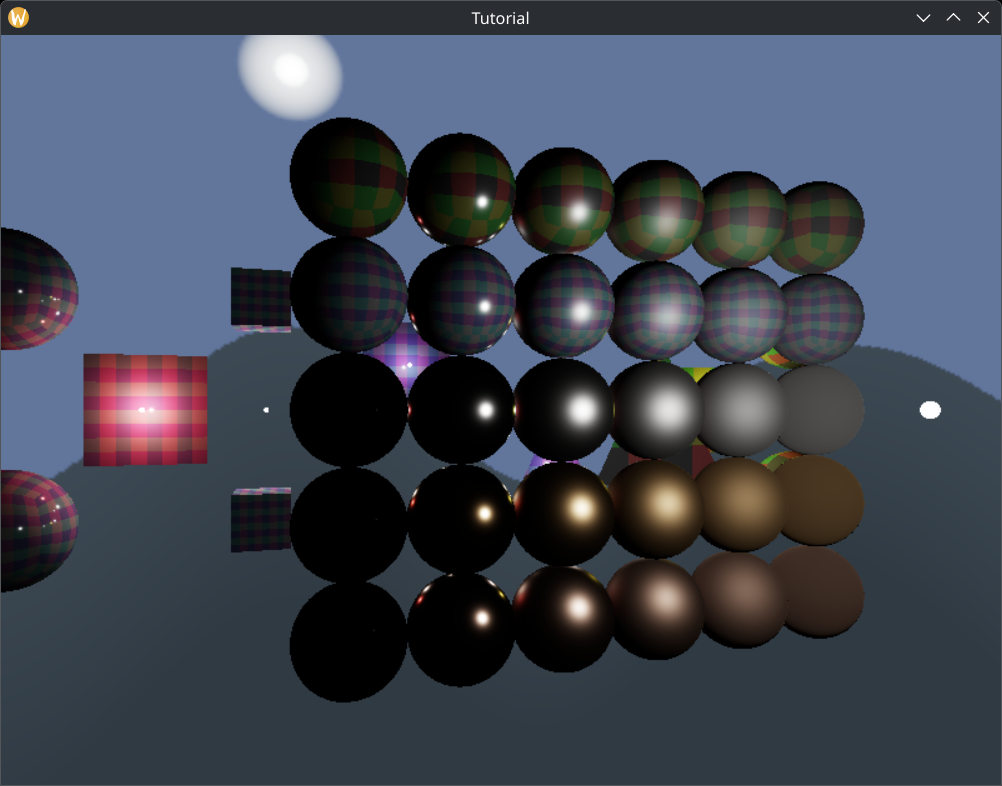
...and that's it!
Wrapping up
In this chapter we have learned what cube images are, how they work, and applied this construct to render a skydome.
In the next chapter we will use cubemaps to incorporate indirect illumination into our application. We will take the radiance coming from the newly rendered skydome into account. That way our metal balls finally won't be black.
The sample code for this tutorial can be found here.
The tutorial continues here.